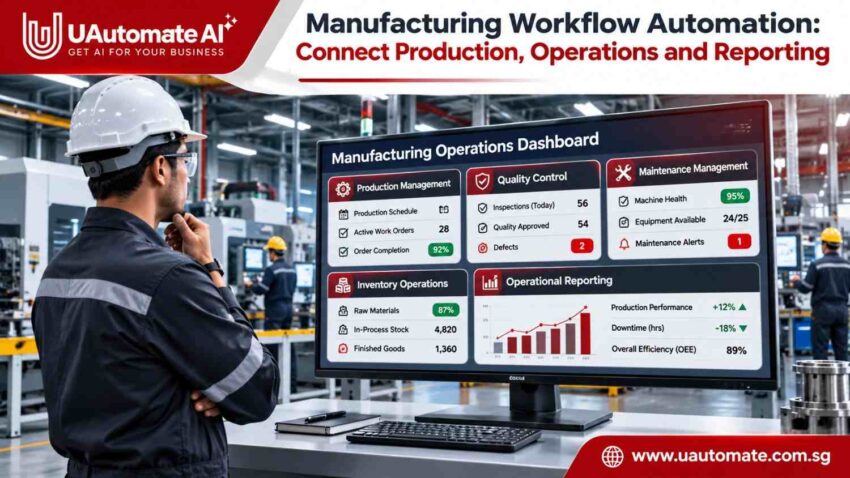
Manufacturing processes are not just about running machines and finishing production orders. Each order is a team effort between production planners, machine operators, quality inspectors, maintenance staff, inventory managers and business leaders. When each department uses separate applications, spreadsheets and is updated manually the simple tasks become very difficult to handle.
Manufacturing workflow automation is a tool which connects these processes via digital structures. Instead of running production, operations and reporting in silos, companies may put in place workflows which pass info between functions, delegate tasks, monitor progress and alert the relevant parties when there is an issue which requires attention.
In Singapore’s manufacturing sector which is dealing with greater production demands, this solution may improve coordination without the need to replace present software systems.
The goal is not to just automate repetitive processes. It is to link different stages of manufacturing which in turn gets the right info to the right people.
Why Manufacturing Operations Need Connected Workflows
A manufacturing facility may have very modern machinery, an ERP platform and also very experienced employees. Still, operational issues may present themselves in that the systems which different departments use do not integrate.
In a setting where a manufacturer is running many customer orders at the same time the planning team puts together production schedules, inventory staff determine material availability, operators report on production status, and quality inspectors document results.
In each department we see that which is within their charge is performed well, but info is also very much siloed in different applications. Employees may have to email, call out or update spreadsheets in order to get a full picture of an order’s current status.
This creates several challenges:
- Disconnected information: Departments keep their own records which in turn make it hard to get a unified production picture.
- Delayed handovers: Employees have to report to the next department when a production stage is completed.
- Unclear responsibilities: Supervisors may have a hard time determining which team member is in charge of pending approvals or unresolved issues.
- Repeated data entry: The same production information may need to be entered into multiple applications.
- Limited reporting visibility: Managers receive updates only after employees collect and consolidate information.
- Slow problem resolution: Material shortages, machine breakdowns and quality issues may remain unresolved because the relevant people are not notified promptly.
These issues are related. Delayed report of production issues affects material planning, machine allocation, delivery schedules and also customer commitments.
For instance if a machine does not report on a finished job the quality team may not know that an inspection is to take place. Also the next production run may sit unscheduled as the supervisor thinks the machine is still in use.
Manufacturers must look at the flow of info throughout their entire operation which goes beyond the individual applications.
Businesses evaluating broader digital improvements can also read our guide to manufacturing software development in Singapore, covering production monitoring, operational dashboards and system integration.
From Individual Tasks to an Integrated Manufacturing Workflow
In the past traditional automation has been used to speed up single tasks. But in manufacturing we have many linked responsibilities which means that improving one function may not better the whole process.
For instance we see that production output is captured automatically. But should the updated info not make it to the planning team or management dashboard we may still have to put in manual reports.
A present state solution to this issue is a connected workflow which we put in place by which each step is defined after an activity is completed. We put forward the next action, identify the responsible party, make available the relevant info and report out the results.
Understanding the difference
| Traditional approach | Connected workflow approach |
| Employees manually share production updates | Relevant teams receive notifications when statuses change |
| Separate spreadsheets track production stages | Shared records provide consistent operational visibility |
| Supervisors manually follow up on pending tasks | Automated reminders support follow-up |
| Reports are prepared using multiple spreadsheets | Operational information feeds reporting dashboards |
| Problems are communicated through individual messages | Exceptions are assigned to responsible employees |
Manufacturers with specialised production requirements may need applications designed around their existing processes. Read more about custom software development for manufacturing companies and when tailored applications are worth considering.
The difference is not just about reducing manual work. It is about making daily operations more predictable and easier to manage.
Employees still make important decisions, approve exceptions and handle situations requiring experience. Software helps them spend less time chasing information and more time addressing production requirements.
Five Operational Connections That Make a Difference
A practical automation approach should start with the relationships between different manufacturing functions.
Instead of looking at each department as a separate entity, manufacturers may look at which areas of the business information should flow between teams and how one process’ output is an input for another.
1. Production planning connected to execution
Production planning is what determines which products to make, when they will be finished and what resources are required.
Also a production schedule is of no use when the shop floor does not have access to relevant info and report progress.
A connected production workflow can bring together:
- Confirmed production orders.
- Job priorities and planned completion dates.
- Machine and resource availability.
- Production instructions and work-order details.
- Actual production status.
- Delays and schedule changes.
Upon release of a production order the system will present the work instructions to the assigned team. As operators report progress supervisors will see the status of which jobs are still to be done, are in progress, or are completed.
If we have a delay in production we will update the plan and review the impact on other products.
This makes it easier to see differences between what is planned and what is actually produced instead of finding out about delays only as a deadline approaches.
2. Production execution connected to quality control
Quality checks must be included in the production process at the same time as manufacturing and not to be a separate activity which comes into play only after the products are made.
Inspection criteria may differ based on the product, materials, manufacturing stage and customer specifications.
A workflow which is connected can assign inspection at specific production points.
For example a manufacturing order may have an initial inspection post machining, another during assembly and a final one before dispatch.
The system can maintain records of:
- Inspection requirements and checklists.
- Work-order and batch references.
- Inspection results.
- Responsible quality personnel.
- Non-conformance records.
- Corrective-action assignments.
Upon failure of an inspection the workflow will inform the quality supervisor and put the related order in review.
Further production will remain at present levels until the required decision is recorded which the process rules have determined to be necessary.
We have put in place a framework for production and quality teams which which they have a common base of which orders are ready for the next stage and which are still requiring action. Also we have put in place a more traceable record of inspection decisions and corrective actions.
3. Machine activity connected to maintenance
Machine availability is a key factor in production schedules. When there are issues with communication of equipment problems manufacturers see unexpected interruptions and difficulty in coordinating maintenance.
Industrial workflow systems which tie in equipment events with maintenance responsibilities.
For instance a machine issue may put out a maintenance request which includes the equipment identifier, event time, problem category and associated production order.
The issue is to be assigned to the proper technician. The maintenance team reports the work done, at the same time the production supervisor looks at the issue’s impact on the schedule.
Where appropriate machine interfaces present, also equipment signals may trigger notifications based on predefined operating conditions.
Also automated alerts should support technical investigation which in no way replaces equipment inspection or safety procedures.
Connecting these activities also allows manufacturers to improve the accuracy of their equipment records and to recognize repeat operational issues.
Manufacturers looking to go beyond basic equipment monitoring can also explore industrial AI solutions for analysing operational data, retrieving technical knowledge and supporting maintenance decisions.
4. Inventory information connected to production requirements
Production teams require accurate material info to meet schedule.
If inventory data is not updated accurately, production may plan for the use of materials which are out of stock, already set aside for other use or reported in wrong quantities.
A connected system which ties in material requirements with production orders and inventory records.
When a production order is placed the system will check the inventory of required parts. If we find out that we are short on any item the responsible inventory or procurement staff will be notified.
Once the shortage has been looked at and material availability confirmed, we will share the updated info with production planning.
This has departments using the same info which in turn reduces the need to maintain separate records and report on material availability.
Also supervisors are made aware of production issues which may be a result of material constraints.
5. Production activity connected to management reporting
The last link is between operational performance and business visibility.
Managers require more than just a report of completed orders. They need information which also includes production performance, outstanding issues, interruptions and unresolved problems.
A connected workflow can provide structured information for reporting dashboards, including:
- Production output against planned targets.
- Work orders completed and pending.
- Production delays by stage.
- Quality inspection outcomes.
- Machine downtime records.
- Outstanding maintenance tasks.
- Workflow approval status.
- Department-level operational performance.
When reporting is integrated into operational records managers spend less time collecting updates from different departments.
They can put more into getting to the bottom of what is going on and determining which actions are required.
Beyond production activities, manufacturers can improve administrative coordination through business process automation for manufacturers, particularly across quotations, procurement approvals and reporting.
How an Operational Event Becomes an Action
One of the most useful aspects of connected manufacturing systems is their ability to turn operational information into a defined responsibility.
A machine breakdown, for example, should not simply appear as a notification on a dashboard. It should create a process that helps the relevant people investigate and respond.
Consider how responsibilities can be organised when a machine stops during an active production order.
| Operational stage | What happens | Responsible team |
| Event identification | A breakdown is reported or detected | Machine operator or monitoring system |
| Information validation | Equipment details and affected work order are recorded | Production team |
| Impact assessment | The affected production activity is reviewed | Production supervisor |
| Maintenance assignment | A service request is allocated | Maintenance team |
| Operational response | Production is rescheduled or another resource is considered | Production planning |
| Resolution recording | Repair details and inspection outcomes are documented | Maintenance team |
| Performance reporting | Equipment and production records are updated | Operations management |
This structure makes it easier to understand who needs to act at each stage. It also prevents an important operational problem from becoming another message that employees might overlook.
The same approach can be applied to material shortages, quality failures, delayed approvals and incomplete production tasks.
What Should an Effective Workflow Architecture Include?
Manufacturers do not necessarily need one large application to manage every operational activity. A more practical approach can be to connect existing systems through an integration and workflow layer.
1. Enterprise systems
ERP platforms generally manage business-level information such as customer orders, inventory, purchasing and financial records.
A connected workflow should identify which information needs to move between the ERP and production applications.
2. Manufacturing execution systems
MES platforms support production execution activities, including work-order tracking, scheduling, resource coordination and shop-floor information.
They provide important operational information to connected workflows, helping bridge the gap between business-level planning and actual production activity.
3. Equipment and machine data
PLCs, SCADA systems, sensors and industrial gateways may provide machine status, operating information and equipment events.
The availability of this information depends on equipment interfaces, supported communication protocols, network access and integration requirements.
4. Workflow and integration layer
This layer coordinates information between applications and determines what happens when a particular event occurs.
It can manage:
- Workflow triggers and business rules.
- Task assignments and approvals.
- Notifications and escalations.
- Data validation.
- Integration with existing applications.
- Status tracking and audit records.
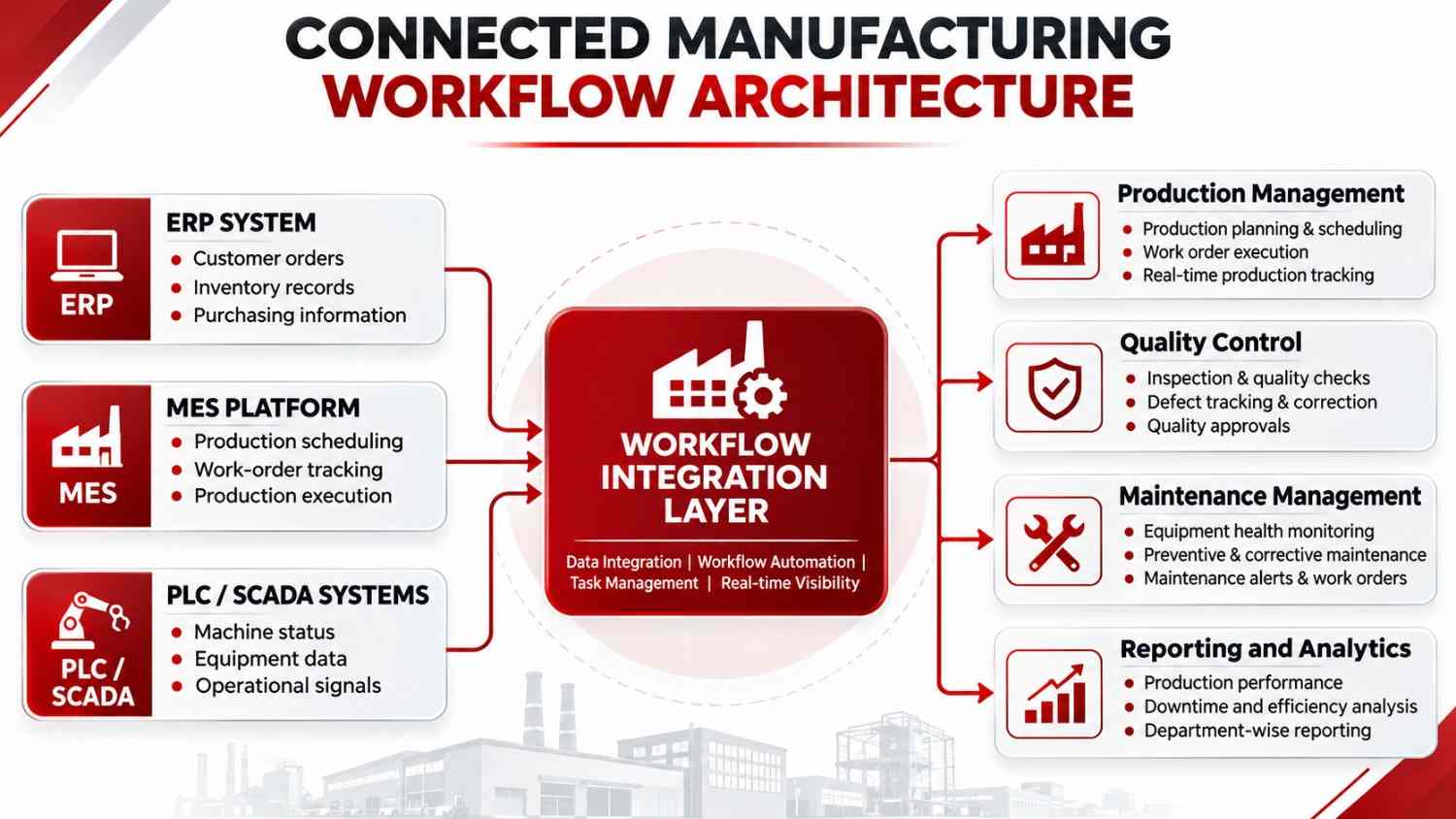
Connecting existing applications requires suitable APIs, data structures and integration methods. Software integration and automation can help manufacturers exchange information between enterprise applications and operational systems.
5. Reporting and analytics
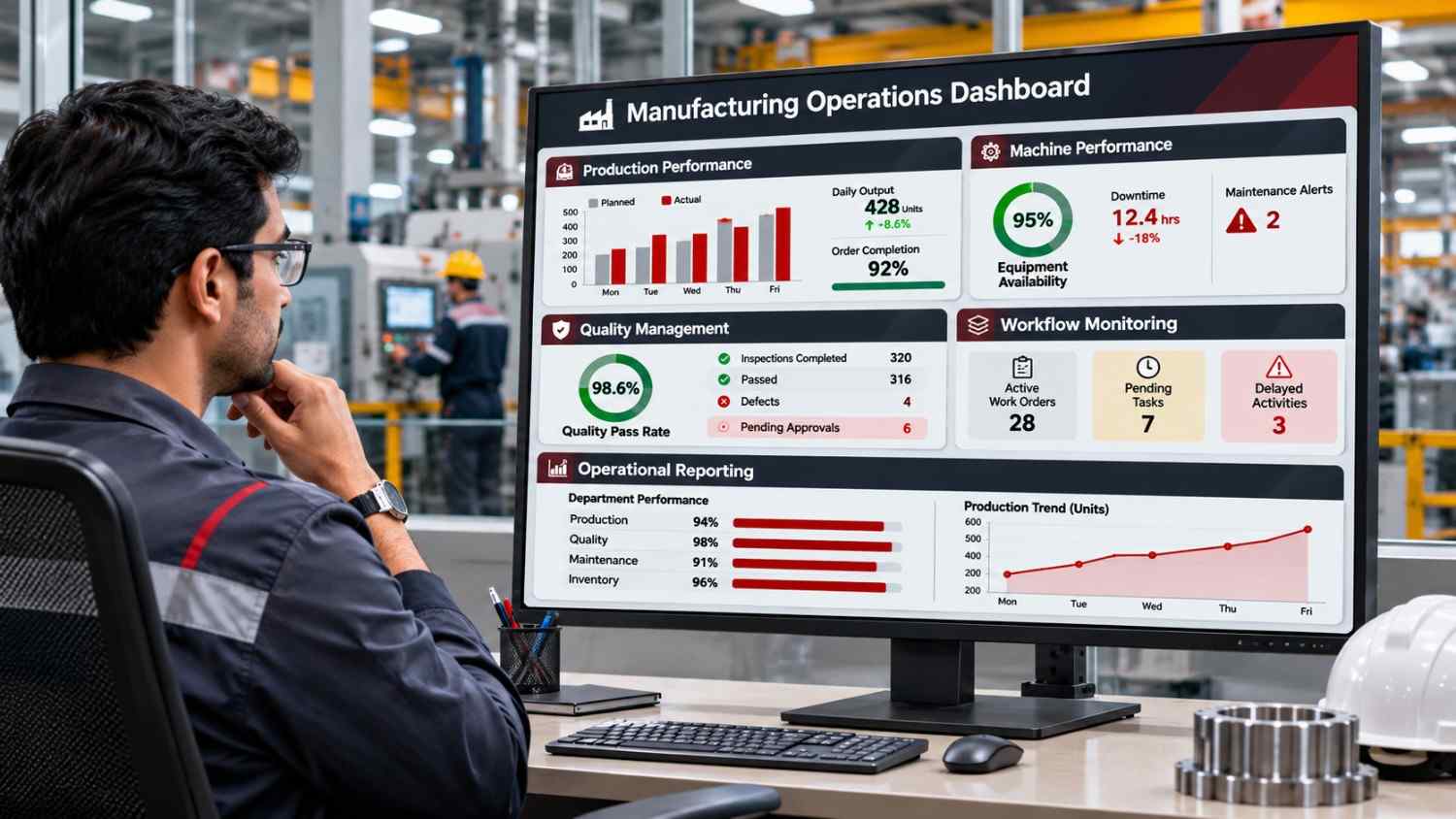
Operational dashboards bring information from connected applications into a useful management view.
Managers can review production progress, outstanding issues, equipment interruptions and department-level performance without relying entirely on manually prepared reports.
The ISA-95 enterprise-control system integration standard provides a useful reference for understanding the relationship between enterprise systems and manufacturing control systems.
The US National Institute of Standards and Technology also discusses manufacturing data collection and interoperability in its recommendations for collecting and reusing manufacturing data.
The Reporting Layer: Turning Operational Records into Decisions
A reporting dashboard should help management understand what needs attention rather than simply display large amounts of information.
The most useful reporting structure connects operational indicators with the decisions they support.
| Reporting area | Information to monitor | Management decision |
| Production progress | Planned versus completed work | Review schedule performance |
| Work-order status | Pending, active and completed orders | Reallocate resources |
| Equipment performance | Downtime events and maintenance status | Investigate interruptions |
| Quality | Inspection results and non-conformances | Review corrective actions |
| Inventory | Material availability and shortages | Coordinate material allocation |
| Workflow performance | Pending approvals and overdue tasks | Resolve operational bottlenecks |
Why reporting needs reliable source data
A dashboard cannot provide dependable information if departments use inconsistent definitions or update records at different times.
For example, one department may consider a work order complete when production finishes, while another considers it complete only after quality approval.
Manufacturers should establish consistent definitions for production start and completion, work-order status, planned and actual quantities, downtime categories, quality approval and material consumption.
Data validation, timestamps, access permissions and audit records should also be considered during implementation.
NIST’s work on the Digital Thread for Smart Manufacturing highlights the importance of integrating manufacturing information and making it usable across different systems.
Singapore Manufacturing: A Practical Example of Connected Operations
Singapore’s manufacturing sector provides a useful example of why connected production workflows matter.
The Infocomm Media Development Authority (IMDA) has documented the digital transformation of Singapore-based printing and fulfilment company Markono through its Markono 4.0 initiative.
The initiative demonstrates how technologies such as IoT sensors, cloud systems, analytics and connected production information can support manufacturing operations.
Its reported capabilities include production scheduling, work-order assignment based on capacity and priority, shop-floor monitoring and maintenance-related intelligence.
IMDA has reported improvements in delivery times, production capacity and operational efficiency following the company’s transformation. These outcomes belong to Markono’s specific implementation and should not be treated as guaranteed results for other manufacturers.
The broader lesson is that operational improvements can come from connecting information, scheduling, execution and decision-making rather than investing only in additional machinery.
Where UAutomate AI Fits into Manufacturing Workflow Automation
Manufacturers often already have ERP platforms, production applications, databases and equipment systems. The challenge is making these technologies work together in a way that supports actual operational requirements.
UAutomate AI approaches manufacturing software as an engineering and integration challenge rather than assuming every manufacturer needs to replace its entire technology environment.
Production workflow management
UAutomate AI can develop digital workflows for production tasks, work-status tracking, shift handovers and operational coordination.
These applications can help teams follow structured processes and access relevant production information more easily.
Operational dashboards and reporting
Manufacturing teams need visibility into production activity, equipment interruptions and unresolved operational issues.
Custom dashboards can bring relevant information into a centralised interface, helping supervisors and management review operational performance.
Industrial system integration
Existing applications and industrial systems may need to exchange information to support connected workflows.
Depending on available interfaces and technical requirements, UAutomate AI can engineer integrations involving ERP, MES, SCADA, PLC-connected environments, databases and other supported applications.
Maintenance and equipment intelligence
Equipment records, service histories and maintenance workflows can be organised into connected applications.
Where suitable machine data is available, integrations can bring equipment events into maintenance and operational reporting processes.
Custom software engineering
Every manufacturing facility has different production requirements, approval structures and operational constraints.
UAutomate AI can assess these requirements and develop software components around processes that standard applications do not adequately support.
Explore UAutomate AI’s manufacturing software solutions to understand its approach to production workflows, operational visibility and industrial system integration.
How to Introduce Connected Workflows Without Disrupting Production
A successful implementation should improve operations progressively rather than introduce unnecessary complexity.
Start with one operational problem
Identify a process that regularly creates delays or requires excessive manual coordination. Production-to-quality handovers may be a suitable starting point if employees frequently struggle to identify which orders are awaiting inspection.
Map the complete workflow
Document each stage, including the information required, responsible employee, decision rules and expected outcome. Include common exceptions and situations where human intervention is necessary.
Review existing technology
Identify which systems already hold the required information. This assessment helps determine whether the solution requires an API integration, database connection, custom application or another supported interface.
Establish workflow rules
Define task ownership, approval permissions, notification conditions and escalation timelines. A quality failure, for instance, should have a different response from a routine production status update.
Develop a focused pilot
Implement the workflow within one department, production line or selected process. Test it using realistic operating conditions and involve the employees who will use the system.
Measure the outcome
Compare performance against the original operational problem. Useful measures include:
- Time required to complete workflow handovers.
- Number of overdue production tasks.
- Time taken to identify unresolved issues.
- Frequency of duplicate data entry.
- Reporting preparation time.
- Accuracy of operational records.
Expand in planned stages
Once the initial workflow is stable, connect additional departments and processes. This staged approach makes it easier to identify integration problems, improve user adoption and maintain production continuity.
What to Evaluate Before Investing in Manufacturing Process Software
Choosing a solution should begin with operational requirements rather than a long list of software features.
Manufacturers should evaluate several important considerations:
Integration compatibility: Can the proposed solution exchange information with existing ERP, MES, databases and equipment systems?
Workflow flexibility: Can approval conditions, task assignments and production stages reflect the actual business process?
Data reliability: Are timestamps, production identifiers, machine records and status definitions consistent?
Access control: Can employees access only the information and actions relevant to their responsibilities?
Exception handling: What happens when a machine stops, a material shortage occurs or a required approval is delayed?
Scalability: Can the solution support additional production lines, departments or locations as requirements evolve?
System security: Are appropriate authentication, network controls, access permissions and data protection measures included?
Operational support: Can the solution be maintained, monitored and updated as the manufacturing environment changes?
A good solution should support the way a manufacturing business operates without forcing employees to work around another disconnected application.
For manufacturers considering tailored applications, custom software development can also be explored as an option when standard platforms do not adequately support specific operational requirements.
Frequently Asked Questions
1. What is manufacturing workflow automation?
Manufacturing workflow automation uses software to coordinate production activities, task assignments, approvals, information exchange and operational reporting. It connects departments and helps ensure that information and responsibilities move between workflow stages consistently.
2. How does production workflow automation improve manufacturing operations?
It helps production teams access updated work-order information, communicate progress, coordinate handovers and identify delays. It can also reduce repeated data entry and make outstanding tasks easier for supervisors to monitor.
3. What is the difference between manufacturing workflow automation and manufacturing process automation?
Manufacturing process automation generally focuses on automating specific production or operational activities. Workflow automation focuses on coordinating the sequence of tasks, information and decisions between people, departments and systems. Both approaches can work together.
4. Can manufacturing workflows be automated without replacing an existing ERP system?
Yes. Depending on the ERP’s available interfaces, data structure and integration permissions, additional applications and workflow layers can connect existing systems. A technical assessment is necessary to determine the most appropriate integration approach.
5. Which manufacturing processes should businesses automate first?
Manufacturers should prioritise processes with frequent manual handovers, repeated data entry, delayed approvals or poor operational visibility. Production-to-quality handovers, work-order status updates, maintenance requests and exception notifications can be useful starting points.
6. How does industrial workflow management support production reporting?
It creates structured records of production events, task completion, approvals and operational exceptions. These records can feed reporting dashboards, helping managers review production progress, outstanding work and operational performance.
7. How long does it take to implement manufacturing workflow automation?
Implementation time depends on workflow complexity, existing system compatibility, data availability, security requirements and the number of departments involved. A focused pilot may be simpler than a facility-wide integration project. The timeline should be established after technical discovery and scope definition.
8. Can UAutomate AI develop custom manufacturing workflow solutions?
UAutomate AI offers manufacturing software engineering and integration capabilities for businesses seeking production workflow management, operational dashboards, maintenance applications and connected industrial systems. The appropriate solution depends on the manufacturer’s requirements and existing technology environment.
Connect Your Manufacturing Operations with UAutomate AI
Manufacturing efficiency depends on how well production, operations and reporting work together. When information moves between departments through disconnected applications and manual communication, even routine activities can create unnecessary delays.
A connected approach can help manufacturers establish clearer responsibilities, improve operational visibility and make information more useful for everyday decisions.
UAutomate AI helps businesses explore custom manufacturing software, production workflow management and industrial system integration based on their operational requirements.
If your manufacturing operation is struggling with disconnected production records, manual handovers or fragmented reporting, it may be time to adopt a more connected approach. Contact UAutomate AI to discuss your manufacturing requirements and explore how customised software solutions can connect your production, operations and reporting processes.