
Manufacturing companies require more than machines and skilled personnel to run efficient operations. Also they require reliable systems to manage production schedules, inventory, equipment, quality checks and business workflows. But when present applications do not support these requirements’ daily operations become complex. Custom manufacturing software is a solution to develop apps around specific production needs, connect separate systems and reduce manual processes. For manufacturers which have specialized workflows or are dealing with growth in operational complexity the right software can make running factory operations much easier.
This is a typical issue for companies which have outgrown their base software. We see that while ERP may do a good job in purchase and inventory they may have issues with very specific production processes. Also machine operators may still have to report equipment performance by hand as their machines do not interface with business systems. At the same time managers report to spend hours in collection of info which by the time they have it is out of date.
For manufacturers, machine builders and industrial businesses in Singapore the focus is on the connection of equipment, employees and business systems which in turn improves production visibility and operational efficiency.
Explore UAutomate AI’s manufacturing software solutions to understand how tailored software can address industrial challenges.
Why Standard Manufacturing Software Cannot Support Every Production Environment
Off the shelf manufacturing platforms are for businesses with common operational needs. They usually include features for inventory management, purchasing, production planning, order processing and reporting.
For manufacturers that have simple workflows these platforms do the job. But we see issues arise when production processes become more specialized or when multiple systems have to exchange info.
In a precision engineering firm that produces components to customer order we see that their production team may have to manage machine allocation, material batches, inspection results and engineering changes per order. Presently a standard application may support some of these processes but may not cover the full workflow.
Where standard systems start creating limitations
| Manufacturing requirement | Common software limitation | Potential solution |
| Production scheduling | Limited support for specialised scheduling rules | Custom scheduling application |
| Machine connectivity | Restricted equipment integration | Industrial data integration |
| Quality management | Inspection workflows do not match production needs | Custom quality module |
| Equipment maintenance | Separate maintenance records | Connected maintenance application |
| Operational reporting | Information scattered across platforms | Unified reporting dashboard |
| Customer-specific production | Rigid standard workflows | Bespoke workflow management |
Another problem is the cost of continuous workarounds. Businesses may purchase additional modules, transfer information manually or maintain separate applications to fill software gaps.
However, this does not mean every manufacturer needs an entirely new platform. Sometimes configuration or integration is enough. Custom development becomes worth considering when important operational requirements remain unsupported and existing solutions cannot address them efficiently.
Seven Operational Problems That Indicate Your Factory May Need Custom Software
In many cases we see the need for better software which presents itself in the form of day to day production issues. A factory may hit its marks but still see its staff spend time on manual information management.
Here are seven situations manufacturers should examine.
1. Production scheduling still depends on spreadsheets
Production planning issues include the issue of variable order priorities, machine availability, material shortages and delivery deadlines.
In the case of scheduling which is done via spreadsheets any change requires manual update and communication between departments. This in turn increases the chance of having out of date info and scheduling conflicts.
A custom scheduling application brings together work orders, machine capacity, production priorities and job status.
2. Machines and business systems operate independently
Manufacturing plants may have equipment from many different suppliers and generations in them. That includes various controllers, communication interfaces and software environments.
When systems break down and don’t report to the business applications, staff report production output and downtime of equipment.
A proper integration solution can collect available machine data and present relevant info through operational dashboards and reporting applications.
3. Inventory records do not reflect actual production consumption
A production team may find out that a required component is out of stock even when the inventory reports enough.
This can be the result of inconsistent recording of material issues, returns, scrap and actual consumption.
An integrated inventory system which ties in material movement with production transactions and in turn enables purchasing and production teams to work with more reliable information.
4. Quality inspection information is scattered
Inspection results are in paper forms, spreadsheets and separate quality applications.
When defects present, we see that which batch info, inspection history or corrective action to take can take up a great deal of time.
Customized quality applications can put together digital inspection checklists, defect reporting, approval processes and traceability records.
5. Maintenance teams struggle to identify recurring equipment problems
When there is a separation between maintenance records and production information teams may see issues of repeated equipment failure to output.
A maintenance software which is connected can manage asset registers, service schedules, maintenance requests and equipment histories. We also see that past data is a tool to identify repeat issues.
6. Management receives outdated production reports
Managers require accurate info to gauge production performance and identify bottlenecks.
When employees put in long hours to integrate information from various applications reports may go to management already out of date.
A core dashboard which puts together production output, downtime records, work-order status and quality information.
7. Customer-specific workflows require too much manual coordination
Machine manufacturers and speciality producers often deal with customer specs, engineering changes, approval processes and testing requirements.
Standard practices do not include all variations.
Custom applications support configuration management, document approvals, testing records and customer communication as per the company’s actual delivery process.
In these situations what we see is not that there is a lack of software. It is that we have trouble getting existing systems, information and people to work as a team.
What Should Custom Manufacturing Software Actually Solve?
Developing a new application without first identifying the issue at hand can add to the complexity.
Manufacturers first to identify what processes are in need of improvement and what info employees require to do their job.
Production workflow and work-order management
Production workflow applications organise activities from order release to production completion.
Depending on requirements, they can include:
- Digital work orders and production status tracking.
- Job allocation and task assignments.
- Production progress monitoring.
- Shift handover records.
- Workflow approvals and exception alerts.
For instance when a production job transitions from the machining stage to assembly the relevant team is notified of the update which in turn is sent to them instead of the present practice of manual and repeated communication.
Connecting these processes through manufacturing workflow automation can reduce repetitive coordination and help information move more consistently between departments.
Inventory and material coordination
Manufacturers require accurate information on material availability, consumption and stock movements.
Applications can present material issue reports, stock tracking, replenishment alerts, supplier info and consumption reporting. We see that activities are integrated with production records which in turn helps to reduce information gaps between departments.
Quality inspection and product traceability
A digital quality system which includes inspection checkpoints, batch info, test results, defect categories and corrective actions.
This is also true for when manufacturers require access to production and inspection records of certain orders or batches.
Equipment monitoring and maintenance management
Equipment related applications which bring together asset info, maintenance schedules, work orders and service histories.
In the case of available machine data, event monitoring and downtime categorization which in turn helps maintenance teams study recurring issues.
Operational dashboards and management reporting
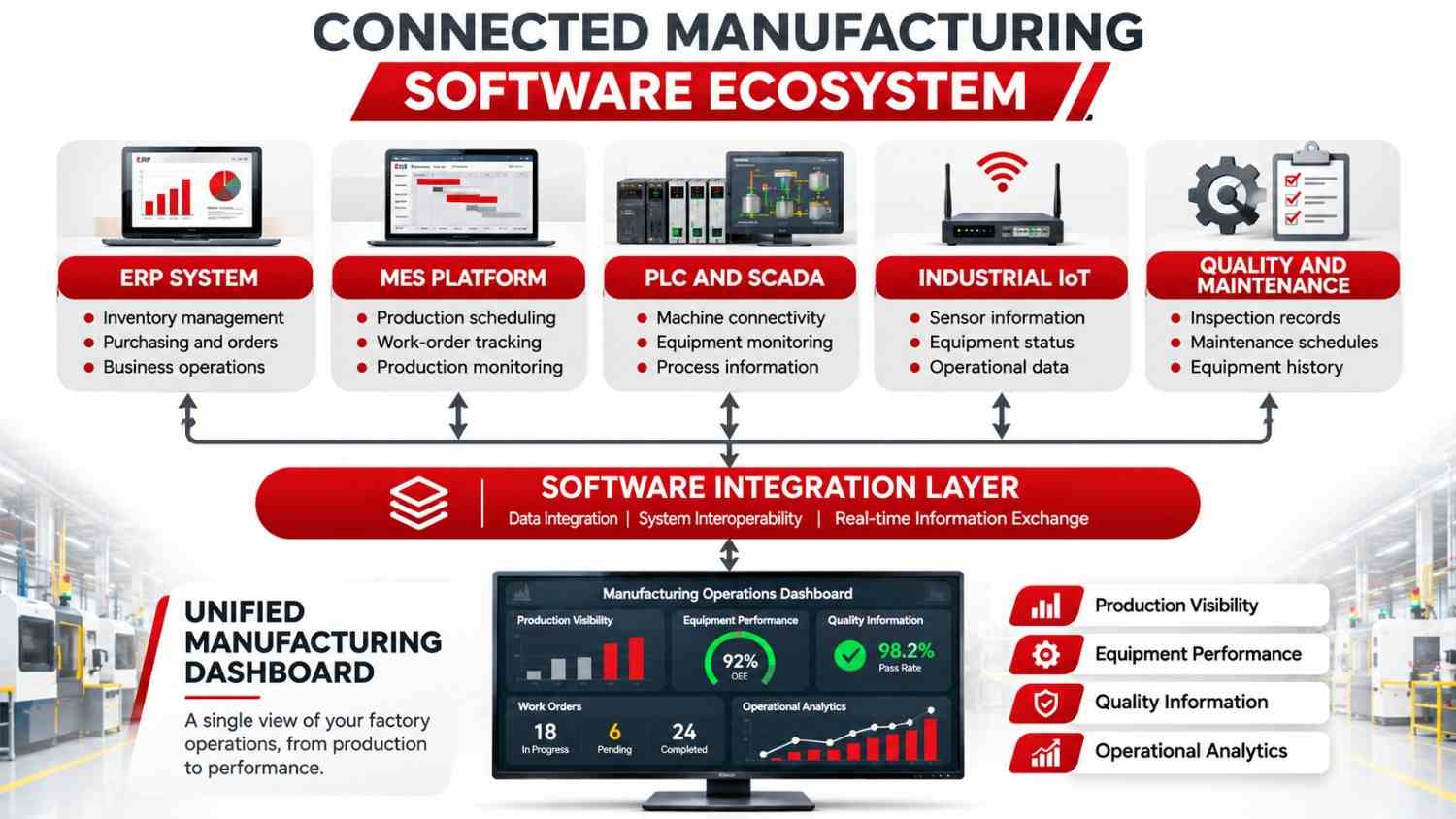
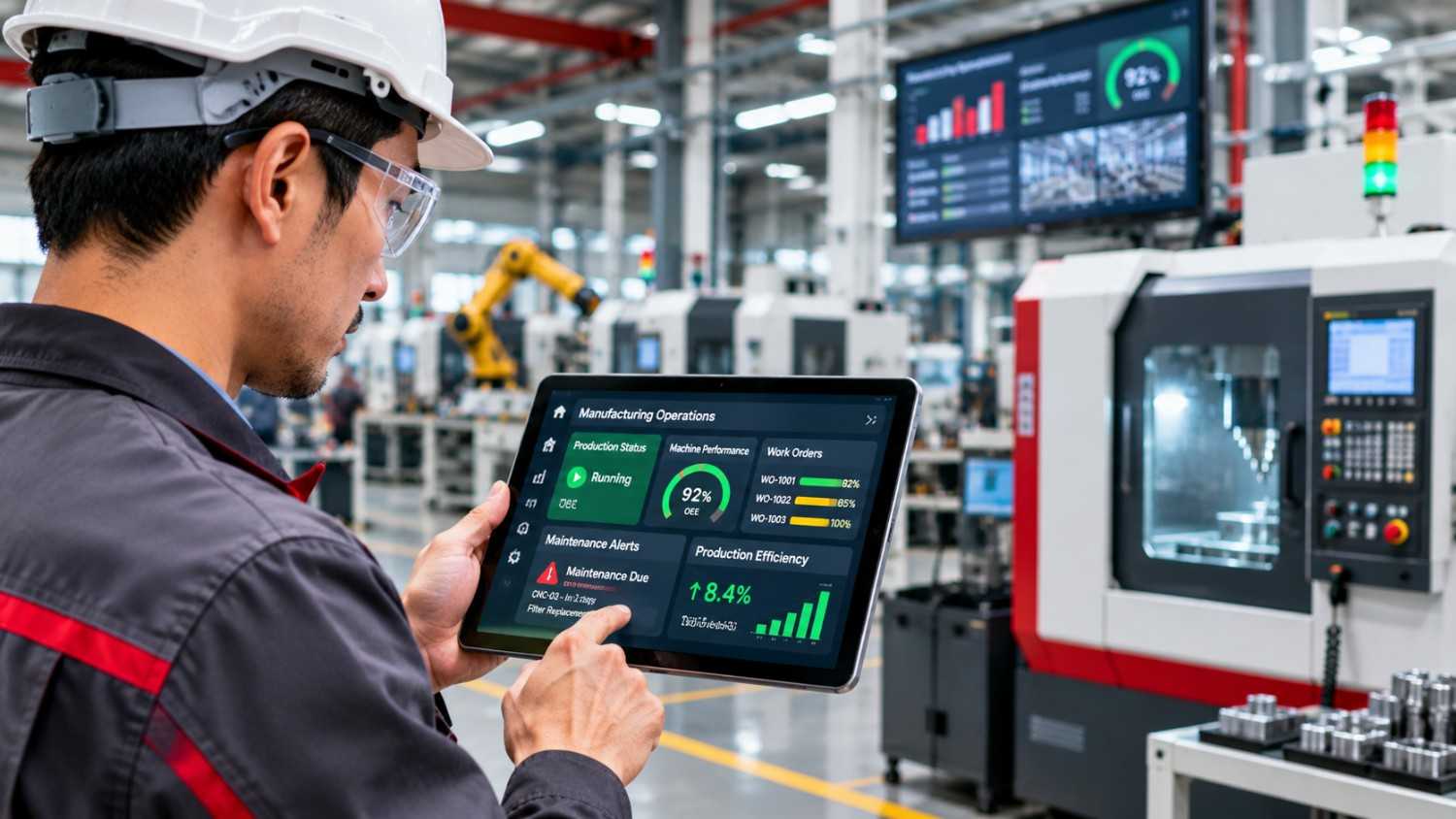
Instead of checking multiple applications, managers can access important operational information through a shared dashboard.
| Dashboard component | Information displayed | Operational use |
| Production performance | Planned versus actual output | Review production progress |
| Equipment monitoring | Machine status and downtime | Investigate interruptions |
| Work orders | Open and completed jobs | Track pending work |
| Quality management | Inspection and defect records | Identify quality issues |
| Maintenance | Service schedules and requests | Coordinate maintenance |
| Inventory | Stock movements and availability | Support production planning |
A useful dashboard is not necessarily the one displaying the most information. It is the one that helps employees recognise problems and decide what needs attention.
Where Custom Industrial Software Creates the Greatest Operational Value
The strongest opportunities often appear where manufacturing processes, industrial equipment and business applications need to exchange information.
Connecting PLC, SCADA and industrial IoT information
Programmable Logic Controllers (PLCs) manage machine and process control functions, while Supervisory Control and Data Acquisition (SCADA) systems support industrial monitoring and supervisory operations.
Custom software can provide an application layer that makes selected operational information available for reporting, maintenance and business workflows.
For example, a machine event can be recorded and displayed on a production dashboard. Maintenance teams can then review the event and create an associated service request.
Integration should consider equipment compatibility, communication protocols, network architecture and operational safety.
Automating production reporting and shift handovers
Production teams regularly record completed jobs, machine interruptions, pending tasks and operational issues.
A digital reporting application can standardise these records and make relevant information available to the next shift. This reduces dependence on handwritten notes and informal communication.
Building machine monitoring and downtime analysis applications
A machine monitoring application can collect available equipment events, record downtime reasons and organise historical information.
Manufacturers can investigate which machines experience repeated interruptions, which downtime categories occur most frequently and where maintenance delays affect production.
These records help managers identify areas that deserve attention.
Developing predictive maintenance and AI-assisted inspection
Artificial intelligence can extend manufacturing applications when sufficient relevant data and appropriate validation processes are available.
Possible applications include analysing equipment sensor patterns, identifying unusual inspection results, extracting information from technical documents and classifying maintenance reports.
AI predictions should not automatically control safety-critical equipment. Engineering validation and operator oversight remain essential.
AI can also support wider operational improvements through AI-powered business automation, particularly when repetitive information-handling tasks and disconnected workflows need attention.
Creating software for machine builders and automation companies
Machine builders may require more than internal production software. Their customers may also benefit from equipment monitoring portals, service request applications, maintenance history interfaces and digital manuals.
Industrial automation companies can extend their project capabilities through custom dashboards, data applications and AI-enabled integrations.
These applications connect engineering projects with the digital services customers may need after equipment installation.
Manufacturers looking to go beyond traditional automation can also explore industrial AI solutions for manufacturers to understand how AI can support technical knowledge retrieval, troubleshooting and operational decision-making.
Custom Development, ERP Customisation or System Integration: Which Should You Choose?
Not every software limitation requires a completely new platform. Manufacturers should compare three approaches before committing to development.
| Evaluation factor | Off-the-shelf software | Customisation or integration | Custom development |
| Initial investment | Generally lower | Depends on complexity | Generally higher |
| Implementation | Faster for standard processes | Moderate | Depends on scope |
| Flexibility | Limited by product | Moderate to high | Designed around requirements |
| Machine connectivity | Depends on supported interfaces | Extends existing connectivity | Engineered for specific environments |
| Long-term control | Vendor-dependent | Shared across systems | Defined by ownership agreement |
| Best suited for | Standard processes | Existing systems with manageable gaps | Unique operational requirements |
When should manufacturers buy standard software?
A ready-made solution is appropriate when business processes are standard, available features meet operational needs and the platform provides suitable integration options.
There is little reason to develop a new inventory or accounting application if an established product already meets the requirement.
When is ERP customisation or integration enough?
If an existing ERP manages purchasing, finance and inventory effectively, a manufacturer may only need an additional application to connect production information or automate a specific workflow.
Integration can solve these problems without replacing the existing system.
When should you consider bespoke manufacturing systems?
Custom development becomes more relevant when critical workflows cannot be supported through existing products, machine connectivity requires specialised integration or several operational applications need to work together.
For many industrial businesses, a hybrid approach is practical: retain reliable standard systems and introduce custom applications where specific requirements justify the investment.
How to Develop Manufacturing Applications Without Disrupting Production
Introducing new software into an active manufacturing environment requires careful planning. Replacing established systems in one step can create unnecessary risks, particularly when multiple departments and machines depend on them.
A phased approach allows businesses to introduce new capabilities, test them under controlled conditions and improve the application before expanding its use.
A practical manufacturing software development roadmap
Step 1: Understand the existing production environment
Examine how production, inventory, quality, maintenance and reporting currently operate. Identify the systems being used and where employees rely on manual intervention.
Step 2: Identify and prioritise operational bottlenecks
Prioritise issues based on frequency, operational impact, implementation complexity and potential business value.
Step 3: Map workflows, machines and existing systems
Document how information moves between departments and applications. Identify relevant PLCs, SCADA systems, ERP platforms, databases and sensors.
Step 4: Define requirements and software architecture
Establish user roles, data structures, application interfaces, integration methods, hosting requirements and security controls.
Step 5: Develop and test a focused pilot
Start with a limited workflow, production line or department. Test the application using realistic scenarios and involve operators, supervisors and technical personnel.
Step 6: Deploy, monitor and improve progressively
Introduce additional workflows or production areas in planned stages. Collect user feedback, monitor performance and address issues before expanding.
How the implementation process works
| Stage | Main activity | Expected output |
| 1. Discovery | Identify operational problems | Requirements document |
| 2. Assessment | Review existing systems | Technical assessment |
| 3. Planning | Design software architecture | Development roadmap |
| 4. Development | Build software components | Working application |
| 5. Testing | Validate workflows and integrations | Tested solution |
| 6. Deployment | Introduce application in phases | Operational software |
| 7. Optimisation | Monitor and improve | Continuous improvements |
This approach keeps development connected to actual factory requirements and reduces the need for disruptive system replacement.
Read our guide to manufacturing software development in Singapore for further insights.
Technical Considerations Manufacturers Should Not Overlook
A manufacturing application must work within a real industrial environment. Its architecture should account for equipment compatibility, security and long-term maintenance.
1. Legacy machine compatibility and industrial protocols
Factories may operate machines from different manufacturers and generations. Before development, engineers should identify communication interfaces, supported protocols, controller configurations and data access permissions.
Technologies such as OPC UA can support structured information exchange between industrial systems. The OPC Foundation provides technical information about its role in industrial interoperability.
2. Data security and operational technology protection
Connecting factory equipment to business applications introduces security considerations that should be addressed during architecture design.
Manufacturers should evaluate network segmentation, user permissions, secure communication, audit logs and backups.
Singapore’s Operational Technology Cybersecurity Masterplan 2024 highlights the importance of strengthening OT security throughout the technology lifecycle.
3. Cloud, edge and on-premise deployment
Not every manufacturing application needs to operate entirely in the cloud.
| Deployment model | Suitable application | Key consideration |
| Cloud | Central reporting and multi-site dashboards | Connectivity and data governance |
| Edge | Local equipment data processing | Local availability |
| On-premise | Applications requiring local infrastructure control | Infrastructure maintenance |
| Hybrid | Connected factory and enterprise applications | Integration and security |
The appropriate model depends on operational latency, connectivity, data sensitivity and infrastructure requirements.
4. Scalability and long-term maintainability
Software should accommodate additional machines, users, production lines and operational requirements without requiring a complete redesign.
Manufacturers should clarify source code ownership, documentation, support arrangements, security updates and future development responsibilities.
Businesses looking beyond manufacturing-specific applications can also explore UAutomate AI’s custom software engineering services.
How UAutomate AI Helps Manufacturers Build Connected Software Systems
Manufacturing software development requires an understanding of both business workflows and industrial technology.
UAutomate AI is a Singapore-based software engineering company focused on manufacturing software, industrial AI, automation and connected digital applications.
Its approach begins with understanding existing operations and identifying the software capabilities needed to address specific problems.
Manufacturing software built around production workflows
UAutomate AI develops software capabilities for production workflow management, downtime analysis, maintenance intelligence and quality-related processes.
These applications can help manufacturers organise work orders, structure production information and improve access to operational records.
Machine, enterprise and operational system integration
Depending on technical feasibility and project requirements, integration opportunities can involve ERP and enterprise applications, MES and SCADA environments, PLC and machine data sources, maintenance databases and operational dashboards.
The objective is to make relevant information more accessible without automatically replacing existing infrastructure.
Industrial AI and operational intelligence
UAutomate AI also develops AI-enabled applications supporting predictive analytics, technical document intelligence, computer vision, workflow automation and decision support.
Potential manufacturing applications include extracting information from maintenance documents, organising technical knowledge and analysing operational data.
AI should be introduced where it provides a clear operational advantage and can be validated against appropriate data.
Supporting manufacturers, machine builders and automation companies
| Target business | Potential software requirements |
| Manufacturers | Production dashboards, workflow applications and downtime analysis |
| Machine builders | Equipment monitoring, service portals and digital product extensions |
| Industrial automation companies | Software integration, dashboards and AI applications |
| Engineering firms | Technical applications and workflow automation |
UAutomate AI focuses on understanding the operational environment, defining practical requirements and developing software that can evolve with business needs.
Learn more about UAutomate AI and explore its manufacturing software capabilities.
Frequently Asked Questions About Custom Manufacturing Software
1. What is custom manufacturing software?
It is software developed around a company’s specific production, equipment, inventory, quality or operational requirements. It can connect existing systems and support workflows that standard platforms cannot adequately accommodate.
2. When should a manufacturing company invest in custom software?
Consider custom development when manual workarounds become excessive, existing systems cannot support critical workflows or operational information remains fragmented across applications.
3. What is the difference between ERP and custom manufacturing software?
ERP manages broader business functions such as finance, purchasing and inventory. Custom manufacturing software addresses specific requirements such as production monitoring, machine connectivity and specialised workflows.
4. Can custom software integrate with existing PLC and SCADA systems?
Yes, where compatible interfaces, protocols and appropriate access are available. Integration must consider equipment capabilities, network architecture and industrial cybersecurity requirements.
5. How much does custom manufacturing software development cost?
Costs depend on application complexity, integrations, infrastructure, security requirements and project scope. A technical assessment is necessary to provide a realistic estimate.
6. How long does it take to develop manufacturing software?
Timelines depend on requirements and integration complexity. A focused application may take a few months, while larger industrial platforms generally require phased development.
7. Can manufacturers build custom software without replacing their existing ERP?
Yes. Custom applications can complement an existing ERP through suitable APIs, integration layers or supported data exchange methods.
8. How do you choose the right manufacturing software development company?
Look for software engineering expertise, industrial integration knowledge, a structured discovery process, transparent project milestones, security practices and ongoing maintenance capabilities.
Turn Your Manufacturing Challenges Into Practical Software Solutions
If disconnected systems, manual reporting and limited machine visibility are affecting your operations, it may be time to consider a better software approach. Investing in custom manufacturing software can help your business connect existing systems, simplify specialised workflows and build a more organised manufacturing environment.
UAutomate AI helps industrial businesses explore custom software, integration and AI solutions around their actual requirements.
Discuss your manufacturing software project with UAutomate AI and identify a practical next step towards connected manufacturing operations.