The Hidden Cost of Repetitive Work
In the tank of purchase requests which comes through in my inbox I copy out the details into a spreadsheet, check in with the suppliers for price information, pass the request along for approval and then wait for word back. Upon approval I draft up the purchase order, update the finance system and advise the supplier.
Now picture yourself doing this routine but for dozens of emails each week. One mistake in an email, bad info input or delay in approval and the whole thing grinds to a halt.
This is an issue we see in many companies which have grown their procurement, sales, finance and operations teams. Staff are spending too much time on data entry and follow up of requests which in turn takes away from attention to customers’ needs, decision making and business growth.
In this area which business process automation in Singapore does well we see its value. By connecting routine tasks, business rules and present IT infrastructure what we see is that companies are able to reduce large amounts of manual work and improve daily operations.
The issue is not with full automation which may lead to loss of human roles in key decisions. What we aim to do is to recognize which processes are heavy in terms of time and see to it that they are improved upon at the same time we preserve human input in issues which only a person can judge.
For firms that are into practical AI and automation we at UAutomate AI put forth an intro to our tech. We begin by looking at which processes are breaking down, what info is being duplicated and which tasks between teams are falling through the gaps.
Where Manual Processes Create Bottlenecks in Growing Businesses
Manual processes work for small scale operations which have only a few orders or invoices. As transaction volumes grow however using the same systems of email, spreadsheets and separate applications becomes very difficult.
| Operational problem | What happens in practice | Possible business impact |
| Repeated data entry | Employees copy information into multiple systems | Inconsistent records and additional corrections |
| Delayed approvals | Requests remain in inboxes without clear ownership | Slower purchasing and decision-making |
| Manual document handling | Employees open invoices and forms individually | Increased administrative workload |
| Disconnected departments | Teams maintain separate records and updates | Missed handoffs and communication gaps |
| Spreadsheet-based reporting | Employees combine data from multiple files | Longer reporting cycles and potential errors |
The issue is that there is not always a software problem. Sometimes we have the right applications in place but they do not integrate which is the issue.
For instance we see that sales will go ahead and confirm an order before sending full specs to operations. Operations in turn will ask for more info, at the same time procurement is waiting for material details. A single missing detail causes delay in all teams.
Automation is used to set out what each person is responsible for, what info is needed, when to report in, and which rules to follow for issues that come up. Also instead of counting on employees to recall the very next step the workflow takes over that process from start to finish.
Businesses looking to understand the wider operational impact can also explore how AI automation is transforming businesses in Singapore.
Six Business Workflows That Can Be Automated
1. Purchase Order Processing and Procurement Requests
Procurement is much more extensive than just a purchase order. Staff may have to put together purchase requests, check on details, research budgets, get approvals, reach out to suppliers and also update internal records.
When those actions are performed via separate emails and spreadsheets it is hard to tell which requests are finished and which still require attention.
With procurement automation software in Singapore companies are able to see which steps we are talking about are put into a single traceable process.
Practical example: An employee puts in a request for new equipment. The workflow looks at the item description, quantity, department and required delivery date. It then passes the request to the right approver. Once approved the system puts together a purchase order which is sent out for further review.
Procurement workflow
| Step | What happens | Next action |
| 1. Submit request | Employee enters purchase requirements | Check mandatory fields |
| 2. Validate details | Check purchasing rules and budget information | Flag missing details |
| 3. Review request | Send it to the authorised approver | Approve, reject or request clarification |
| 4. Prepare purchase order | Generate a draft from approved information | Verify the final document |
| 5. Notify supplier | Send the authorised purchase order | Record order status |
| 6. Update records | Update relevant procurement records | Track delivery and follow-ups |
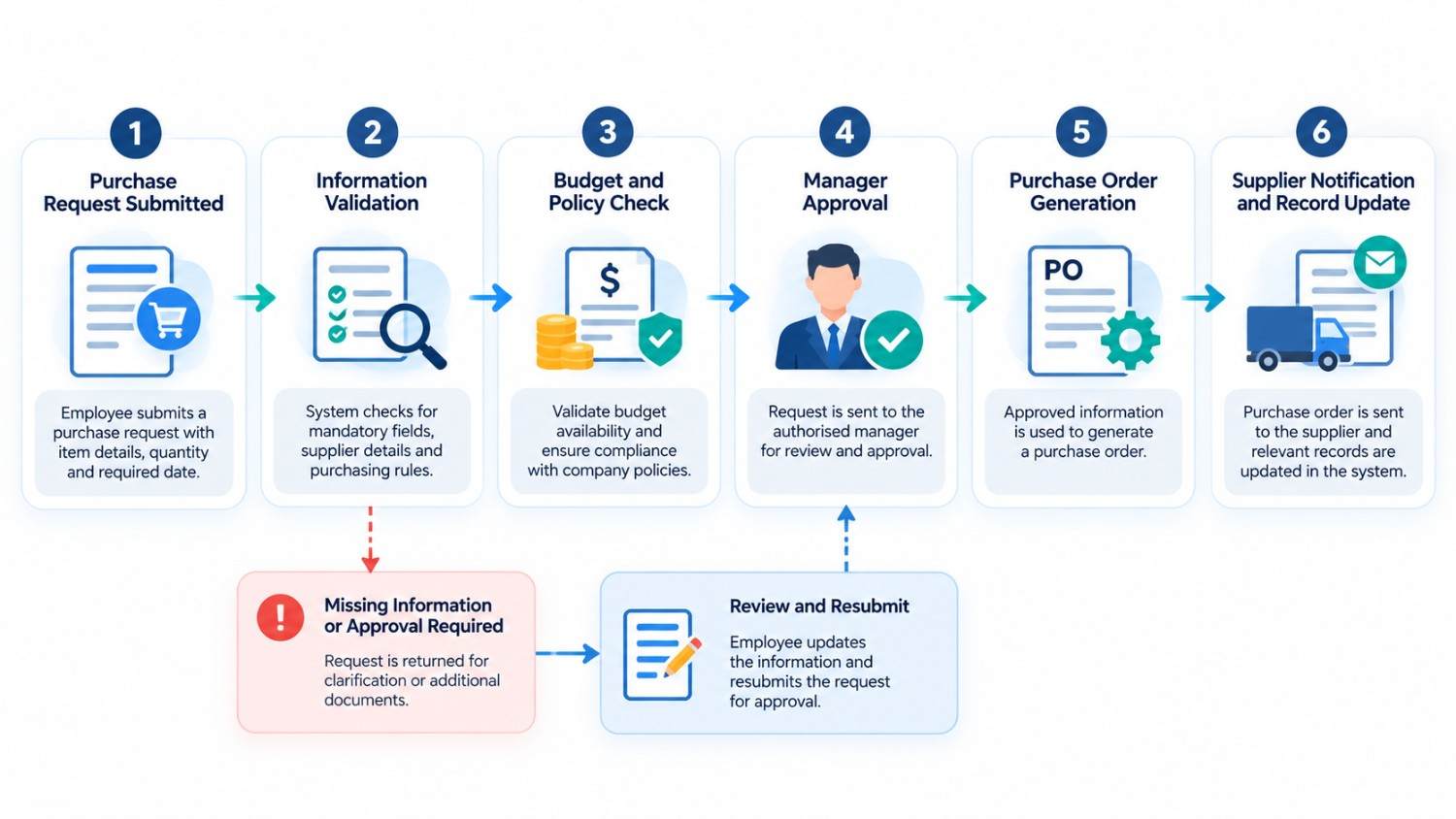
This approach puts things into clearer terms and we reduced the manual chase for updates. For high value purchases, unknown suppliers and requests that go over budget we still require appropriate review.
2. Quotation Generation and Sales Follow-Ups
Sales staff may spend more time than we think when they are preparing quotes which includes checking prices, confirming availability, calculating taxes, applying discounts and also formatting reports.
Quotation automation software may use preapproved price lists, product info and stock templates to put out consistent drafts.
For instance, when a prospect requests a quotation, the workflow captures the requirements, checks for missing details and retrieves approved pricing. The sales representative then reviews the draft before sending it.
A practical quotation workflow includes:
- Capture the enquiry: Note down customer requests and which products or services they ask for.
- Check the information: Identify what is left out in terms of price.
- Prepare the quotation: Use approved prices and templates to create a draft.
- Review commercial terms: Check out discounts, scope, delivery terms and conditions.
- Send and record: Submit the approved quotation and note the change in status.
- Schedule follow-ups: Set up reminders for pending quotations.
- Transfer accepted orders: Share confirmed requirements with operations and finance.
This cuts down on repetitive document preparation which in turn allows sales reps to focus more on customer needs.
Automation is to not to present independent approval of large volume discounts or to make public unverified delivery dates. Human review is still a key element in which we check out of the ordinary pricing structures and in which we deal with large scale commercial agreements.
3. Multi-Level Approvals and Exception Handling
Approvals are slow to process when we send them to the wrong person, we are missing supporting docs which causes delays or at times it is not clear who is to do what.
A workflow which may direct requests based on value, department, category or risk level. Also it will send out notifications, log decisions and raise issues which go past their deadline under certain policies.
Suppose a supplier’s invoice is for more than what is presented on the purchase order. Instead of processing it automatically we have the workflow bring to light that issue and pass it along to the finance team for an in depth look.
| Situation | Automated action | Human responsibility |
| Complete request within approved limits | Route according to policy | Review or approve where required |
| Missing information | Return request to its owner | Supply missing details |
| Budget threshold exceeded | Route to authorised manager | Assess the request |
| Invoice and purchase order mismatch | Flag the discrepancy | Investigate and resolve it |
| Approval overdue | Send reminder or escalate | Make the pending decision |
This improves accountability without removing important controls. A well-designed workflow should retain a record of who approved or rejected a request, when the decision occurred and whether additional information was provided.
4. Document Extraction for Invoices and Supplier Records
Invoices, delivery orders, purchase orders and supplier forms we see in the form of PDFs, scans or email attachments. We have to open the documents, extract what is relevant and input that into another application.
Document automation in Singapore which some companies may use includes optical character recognition (OCR), document classification, AI assisted extraction and validation rules.
For instance an invoice processing workflow which notes the supplier’s name, invoice number, date, and total amount. Also it can use these elements to compare with what is in the supplier’s record and the associated purchase order.
Document-processing workflow
| Stage | System activity | What happens next |
| Receive document | Capture the invoice or attachment | Identify the document type |
| Extract information | Read relevant fields using OCR or AI | Check mandatory fields |
| Validate information | Compare extracted values with available records | Identify discrepancies |
| Review exceptions | Flag unusual amounts or duplicate records | Send cases to an authorised employee |
| Update records | Transfer validated information | Continue the approved finance process |
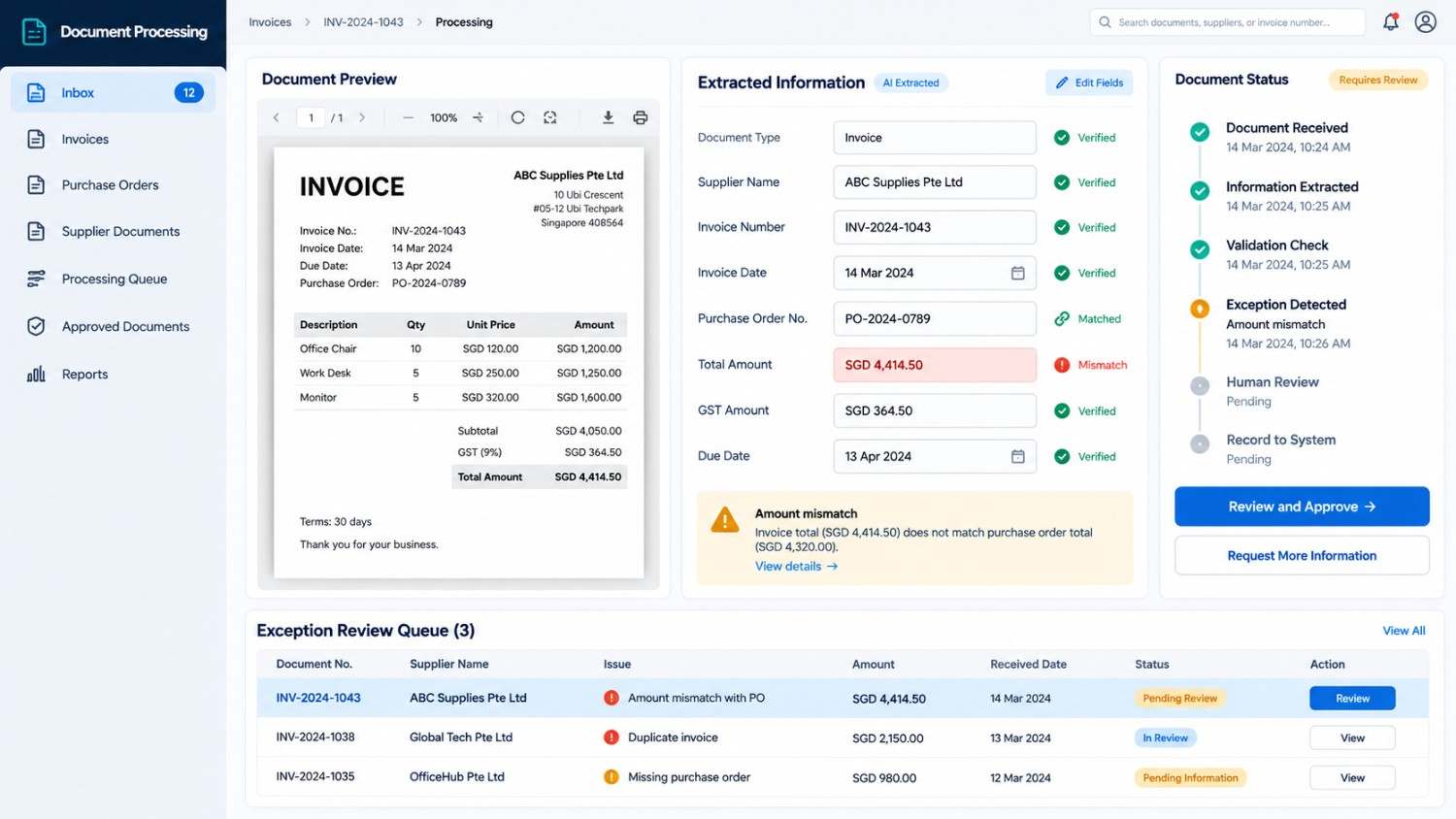
Extraction does not equal verification. With poor quality scans, atypical layouts and missing info accuracy is affected. For financial records to be updated and payments to be released duplicate checks, validation rules and human review are very important.
The goal is to reduce redundancy in typing as we help staff to pay attention to the documents which truly require it.
For organisations handling large volumes of internal documents, an AI-powered corporate knowledge base can also help employees retrieve relevant information from company resources.
5. Manufacturing Workflow Automation from Order to Production
Manufacturers report to have issues with the integration of customer orders, material availability, production planning, quality control, inventory and dispatch. As each unit is given different updates at times which may not be in sync, we see production schedules suffer.
Manufacturing workflows which are automated connect via a network of shared information, status reports and defined handoffs.
Consider a manufacturer that has received a customer order. What we have is a process which looks into whether we have the required materials on hand. If it is found that we do not have enough stock we put out a purchase order. But if materials are available in the stock, the order goes to production planning. Post production we notify the relevant team to do quality check and dispatch.
| Production stage | Automated activity | Issue requiring attention |
| Order confirmation | Check order details and specifications | Missing customer requirements |
| Material availability | Check inventory records | Stock shortage or inaccurate records |
| Work order creation | Prepare production instructions | Incomplete production data |
| Production monitoring | Record progress and notify teams | Delays or equipment problems |
| Quality inspection | Record inspection status | Failed inspection |
| Dispatch | Prepare dispatch handoff | Missing documents or delivery details |
Automation does not replace production managers, engineers or quality inspectors. It helps the information they need reach them at the right time.
For businesses with connected production and inventory systems, this can improve visibility into outstanding tasks and reduce avoidable communication gaps.
6. Reporting and Handoffs Between Departments
Reporting is an issue of time for managers who are to collect info from sales, finance, procurement and operations spreadsheets. We see days of employees putting together reports which may include hours of combining files, out to find and fix issues in them and in and out of contact with colleagues before release of the report.
Automation which will collect approved info, update reports and alert teams when we have missing data or when a task needs to be attended to.
For instance when a quotation is turned into an order sales will pass it off to operations. Procurement puts out material requirements at which point finance puts out what they need for billing.
Connected departmental workflow
| Department | Information received | Resulting activity |
| Sales | Confirmed order and agreed scope | Verify commercial details |
| Operations | Order requirements and delivery expectations | Plan resources and delivery |
| Procurement | Material and supplier requirements | Check availability and coordinate purchasing |
| Finance | Approved order and billing information | Complete financial processing |
| Management | Consolidated operational information | Review performance and outstanding issues |
Access controls should ensure that each department sees the information it needs without exposing unrelated or restricted records.
When handoffs are properly designed, managers can identify outstanding tasks, understand delays and make decisions using more consistent information.
How AI and Workflow Automation Work Together
Traditional workflow automation and artificial intelligence serve different but complementary purposes.
Rule-based automation works well when a process follows predictable conditions. AI can help interpret less structured information, such as invoice contents, customer emails or documents that do not follow a single template.
| Capability | Example application | Important consideration |
| Rule-based automation | Route requests according to approval rules | Rules must be maintained |
| OCR and document extraction | Read invoice details from scans | Scan quality affects accuracy |
| AI-assisted classification | Categorise requests or documents | Incorrect classifications need safeguards |
| Application integrations | Transfer information between systems | Compatibility and permissions matter |
| Reporting automation | Consolidate records and highlight exceptions | Poor source data can mislead |
A practical workflow may combine several capabilities. AI extracts invoice information, validation rules compare it with a purchase order, an integration transfers approved data and the workflow sends exceptions to finance.
This is a practical application of AI business automation Singapore companies can explore when they have a clearly defined operational problem.
Singapore’s Infocomm Media Development Authority provides AI resources for enterprises covering AI adoption and related considerations.
The right technology depends on the task, risk level, data quality and existing software. A simple approval reminder may need conventional automation, while processing varied documents may benefit from AI-assisted tools.
For workflows that need to retrieve information from company documents before generating answers, retrieval-augmented generation (RAG) is another approach worth understanding.
How to Measure Whether Automation Is Working
Before we implement automation, we should first go over the present process. Also without a base line it is hard to tell if the new workflow is truly an improvement.
| Metric | How to measure it | What it reveals |
| Processing time | Time from submission to completion | Whether tasks finish faster |
| Approval turnaround | Time spent waiting for decisions | Where requests become blocked |
| Error or rework rate | Records requiring correction divided by total records | Whether data quality improves |
| Cost per transaction | Relevant processing costs divided by completed transactions | Whether the process becomes more economical |
| Exception rate | Transactions requiring manual intervention divided by total transactions | How often additional review is needed |
| Overdue tasks | Tasks exceeding their deadlines | Whether bottlenecks remain |
For instance a company may look at purchase order processing times before and after the implementation. Also it should see if errors, exceptions or employee work loads have gone up.
The speed of a process is not a good indicator of success. A faster process which produces incorrect orders may end up creating more work.
A practical business case should include implementation costs, maintenance, integration issues, training, exception handling and the value of time recovered. Use measured results instead of assumed savings to determine return on investment.
A Practical Roadmap for Implementing Automation
At the base of it is a repeatable process which has a defined owner, measurable results and few exceptions.
Step 1: Identify the operational problem
Choose out a process in which staff repeat certain tasks like input of info, pursuit of approvals or report preparation. Determine how often the task comes up and what the level of effort is.
Step 2: Map the existing process
Which parties are involved in initiating the task, what info is required, who gives approval and what is the process when things go wrong.
Step 3: Set out rules and responsibilities
Set approval parameters, required fields, exceptions processes and ownership. What can be done automatically, what needs human review.
Step 4: Choose tools and integrations them
Identify the systems which house supplier details, prices, customer records, inventory and financial info. See how these systems communicate with each other and that the proper permissions are in place.
Step 5: Test a limited pilot
Test out all the edge cases including incomplete docs, duplicate records, rejected approvals and system failures. Go over the workflow to make sure it is correct before rolling it out.
Step 6: Train staff and see results
Explain the new process out, how we review exceptions and who to contact when things go wrong. Also we will do a performance comparison against the old baseline and improve as needed.
For workflows involving personal data, consult Singapore’s Personal Data Protection Commission for guidance on applicable obligations under the Personal Data Protection Act. Organisations should assess appropriate access, data protection and accountability measures.
How UAutomate AI Improves Business Processes.
Businesses looking at automation will do well to implement solutions which align with their present processes, existing applications and operational priorities.
In an environment that deals with repetitive purchase order entry, quote preparation or document heavy processes we see the first step as identifying what tasks our people are performing the most in admin. The second step is to determine which of those tasks may be handled via business rules, document extraction, integration or AI assisted processing.
A good implementation will have defined roles, validation rules, exception handling and measurable performance indicators. Also it should take into account present applications instead of which systems to replace.
Explore UAutomate AI to review its offerings. You can also visit the contact page to discuss your requirements.
Before you choose a solution check out the relevant capabilities, integration range, implementation approach and also support that is available for your use case.
The objective is straightforward: Reduce superfluous manual effort at the same time improve accuracy, accountability and human oversight.
Frequently Asked Questions
1. What is business process automation?
Business process automation uses software, defined rules and system integrations to handle repetitive steps in a business workflow. Examples include routing purchase requests, preparing quotation drafts, extracting invoice information and updating reporting records. Some workflows use AI to interpret documents, while others rely entirely on predefined rules.
2. How can Singapore businesses benefit from workflow automation?
Businesses can improve workflow visibility, reduce repeated data entry, standardise approvals and make departmental handoffs easier to track. Results depend on the process, data quality, system compatibility and implementation. Measuring processing time, error rates and total costs helps determine whether automation delivers value.
3. Which business processes should be automated first?
Start with tasks that occur frequently, follow reasonably clear rules and consume measurable employee time. Purchase requests, invoice data entry, quotation preparation and routine reporting can be suitable candidates. Processes involving complex judgement or significant risk require careful assessment and appropriate human oversight.
4. What is the difference between workflow automation and AI automation?
Workflow automation follows defined triggers, rules and actions. AI automation adds capabilities such as interpreting unstructured documents, classifying messages and extracting information from varied formats. Both can work together, but AI is not necessary for every task, and its outputs may require validation.
5. Can automation integrate with existing ERP and CRM systems?
Integration may be possible through APIs, supported connectors, file exchanges or other system-specific methods. Feasibility depends on the applications, permissions, data formats and technical constraints. Businesses should assess integration requirements before choosing a solution.
6. How much does business process automation cost in Singapore?
Costs depend on workflow complexity, transaction volume, integrations, licensing, implementation effort, security requirements and ongoing maintenance. A focused workflow may require a different investment from a multi-department enterprise system. Businesses should obtain a scoped assessment and compare the expected total cost against measurable operational benefits.
Make Repetitive Work Easier to Manage
Effective business process automation Singapore organisations implement should solve real world issues as opposed to just adding another layer of technology. We see value in connecting purchase orders, quotations, approvals, document extraction, reporting and departmental handoffs which in turn allows teams to spend less time chasing info and more time on what is valuable to the business.
At first put in that which is a very defined process with identified issues and a responsible owner. Chart out the workflow, put in the required controls, test out the solution and measure results before scaling.
If you are looking to implement practical automation in your business we at UAutomate AI can help you out bring us in to discuss what you need and we will help you get started.