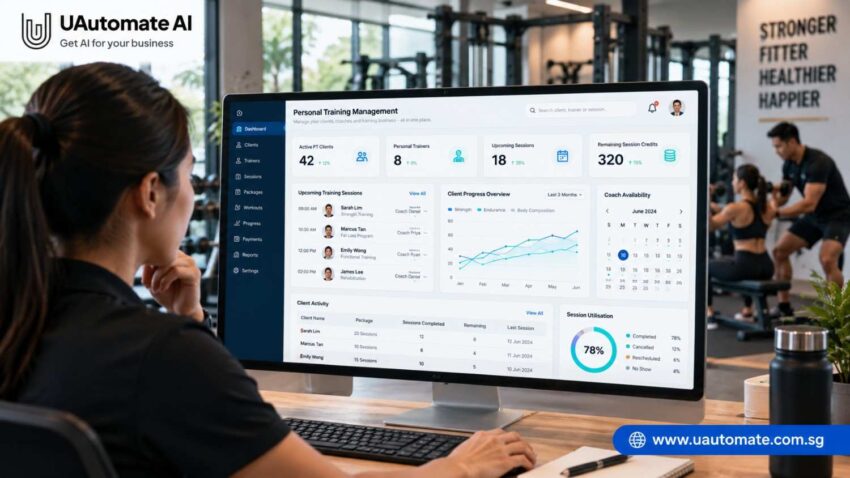
Running a personal training business is about more than just creating workout routines and conducting training sessions. Also in play are issues of appointment management, client information, session packages, payments and progress reports.
When a studio has a small client base then spreadsheets, calendars and messaging apps may suffice. As the business grows however organizing everything becomes more difficult. Missed appointments, incorrect session balances or out of date workout records may in turn affect the client experience and daily operations.
This is the value that personal training management software brings out. It enables fitness businesses to track client info, coordinate between coaches, design training programs and report on progress through a connected platform.
For independent trainers, boutique PT studios and growing fitness businesses in Singapore we present a solution which is to outsource some admin tasks and at the same time we put in place an organized approach.
What Happens Behind the Scenes of a Personal Training Business?
During the hour of the training session there are also a number of activities which take place prior to and post the client’s arrival.
In a studio which has 60 active clients and 5 personal trainers every customer has a different health goal, preferred time slots, training needs and package preferences. The studio is to work out these issues at the same time which also means to see that trainers have sufficient time for their sessions.
| Business activity | What needs to be managed |
| Client onboarding | Contact details, fitness goals and preferences |
| Coach allocation | Trainer profiles, availability and assignments |
| Appointment scheduling | Bookings, timings and rescheduling |
| Package management | Purchased sessions and remaining credits |
| Workout planning | Exercises, routines and modifications |
| Progress monitoring | Performance records and assessments |
| Administration | Payments, renewals and reports |
These go together. Upon a client booking in for a session the studio has to check off trainer availability. Post session the filled in time may be put toward the client’s package and added to their training history.
Managing each task separately creates redundant work. Staff may have to input into multiple reports the same info.
The issue goes beyond just boarding more users. We also see which trainers, admins and owners have access to accurate info.
The Hidden Operational Problems That Affect Personal Training Studios
Many personal training businesses start out with basic management tools. We may see trainers use Google Calendar to book sessions, WhatsApp for interaction, and Excel in which they create their plans.
These tools do well on their own, but we see issues when information is scattered.
A. Scheduling Conflicts Between Clients and Coaches
When many trainers have their own set of clients coordinating appointments is an issue.
For example a client may ask for a 6 PM session which the trainer does not have open at that time because another appointment is already on the calendar.
A core scheduling tool which allows staff to see trainer availability as well as upcoming bookings at the same time which in turn reduces the chance of back to back appointments.
B. Incorrect Session Package Tracking
Personal training facilities often sell packages which include a set number of sessions.
Suppose a customer buys 20 sessions and uses 7. We have 13 sessions left.
When manual updates are performed records may be left out. Cancellations or changes in schedules also cause issues with what is still to go.
A structured tracking system which maintains accurate package records and also makes it easy to answer client questions.
Many of these repetitive activities can be simplified through structured automation. Read our guide on business process automation in Singapore to understand how businesses can reduce manual work and improve operational efficiency.
C. Scattered Client Information
Client information is contained in registration forms, spreadsheets and also in individual trainer notes.
When a client switches to a new coach they may not be familiar with the past workout history or training goals of the client.
Centralized client records which present info in a more accessible way and also which maintain continuity between sessions.
D. Inconsistent Communication Between Coaches
Clients at times use many trainers. If coaches don’t share training records important info may be left out.
Shared out records which detail past sessions, what was modified, and program goals which in turn helps trainers with the present one.
E. Limited Visibility Into Business Performance
Studio owners should look beyond the number of sessions held. Also they may wish to see what packages are almost done, what coaches still have free time, and what clients have stopped coming in as regulars.
Collecting these details manually takes time.
| Operational area | Manual approach | Connected system |
| Client information | Separate files | Centralised profiles |
| Scheduling | Individual calendars | Shared bookings |
| Session credits | Manual calculations | Structured package records |
| Workout history | Personal notes | Digital training records |
| Progress tracking | Scattered measurements | Organised history |
| Reporting | Spreadsheets | Consolidated reports |
The purpose of a connected system is to reduce administrative work, not replace personal interaction between trainers and clients.
What Should Personal Training Management Software Actually Manage?
Not all fitness platforms are the same. Some are focused on bookings and others which are more in depth in what they offer for managing clients, coaches and studio operations.
Before selecting a platform consider this.
1. Centralised Client Profiles
A client profile should provide trainers with the information needed to understand the person they are training.
Depending on the studio’s requirements, it may include:
- Personal and contact details.
- Fitness goals and training preferences.
- Relevant health information provided by the client.
- Assigned personal trainer.
- Purchased packages.
- Appointment history.
- Workout plans and progress records.
For example, when a client returns after a break, the trainer can review previous sessions instead of searching through old conversations.
Access to sensitive information should be restricted according to staff responsibilities.
2. Coach Assignments and Availability
A personal training studio may have a variety of qualified staff.
Coach scheduling software will also see that administrators handle trainer profiles, which include bio and skills, in addition to set work hours, client allocation, and upcoming appointments.
For instance we may pair up a client that is looking for strength training with a coach which has the appropriate experience although this will depend on the coach’s availability and the studio’s assessment.
A shared calendar also allows owners to see which bookings are at the same time and to see how trainers’ hours are filling up.
3. Session Package Tracking and Credit Management
For businesses selling training bundles, accurate session records are essential.
Example: Personal training package
| Package information | Example |
| Package type | 20 training sessions |
| Package status | Active |
| Assigned coach | Coach A |
| Purchased sessions | 20 |
| Completed sessions | 7 |
| Remaining credits | 13 |
| Completion | 35% |
A proper system should track individual session status which includes that of completed, cancelled and rescheduled appointments.
The credit deduction and restoration policies should be very clear. We provide staff and clients with a uniform explanation of how packages are used.
4. Appointment Booking and Rescheduling
A training session is not a simple matter of choosing a date and time. The system also has to take into account client preference, trainer availability, session length and current bookings.
In the case of our business models we also see multiple locations and cancellation policies.
A booking which is integrated helps clients and staff see open slots, confirm appointments and handle changes without checking separate calendars.
5. Workout Plans and Training History
Every client has unique goals and training needs. A workout program should cater to these differences instead of the same routine for all.
Digital workout records can include:
- Exercise names and descriptions.
- Sets and repetitions.
- Training weights or resistance levels.
- Workout frequency.
- Exercise modifications.
- Previous session records.
For example, a trainer working with a beginner can record the exercises introduced during the first few weeks and adjust the programme according to the client’s performance.
The American College of Sports Medicine provides professional resources on exercise programming and resistance training, supporting the importance of individualised training approaches.
6. Client Progress Tracking
Progress tracking helps trainers understand how clients are responding to their programmes.
| Progress indicator | What it monitors |
| Strength performance | Changes in lifting capacity |
| Workout completion | Training consistency |
| Exercise repetitions | Performance across sessions |
| Body measurements | Changes in selected measurements |
| Fitness assessments | Changes in defined fitness indicators |
| Attendance | Training participation |
Not every measurement is suitable for every client. Trainers should select indicators according to individual goals, consent and professional requirements.
Maintaining digital records makes historical information easier to review and compare.
How a Connected PT Management System Works: A Client Journey
Individual features are useful, but their real value comes from working together.
Consider Daniel, a hypothetical client joining a personal training studio in Singapore. His journey involves several stages, from registration to package renewal.
A typical client management workflow
| Stage | Activity | Information updated |
| 1. Registration | Daniel submits his details and fitness goals. | Client profile |
| 2. Coach assignment | The studio selects a suitable trainer. | Coach details |
| 3. Package activation | Daniel purchases 12 sessions. | Package balance |
| 4. Appointment booking | A training slot is confirmed. | Booking details |
| 5. Workout planning | The trainer prepares a programme. | Exercise records |
| 6. Session completion | The trainer records the completed session. | Session status and credits |
| 7. Progress review | The trainer evaluates performance. | Progress history |
| 8. Renewal follow-up | The studio checks package completion. | Renewal records |
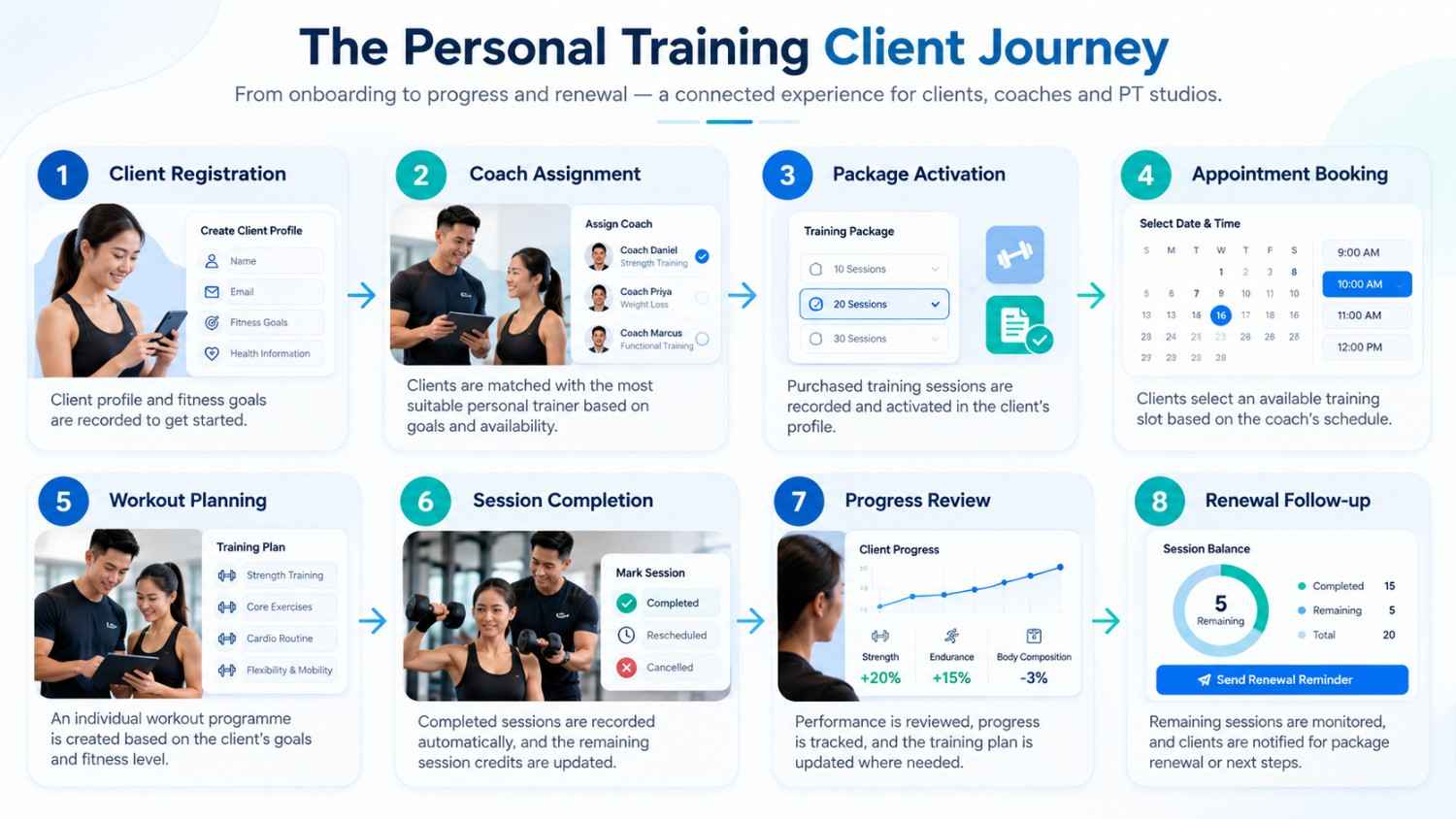
This example shows how one client interaction involves several connected activities.
When a session is completed, the relevant package balance should be updated according to the studio’s rules. The trainer should also be able to maintain the client’s workout history.
If Daniel changes his assigned coach, the new trainer should be able to access the information required to continue the programme, subject to appropriate permissions.
A connected platform makes these activities easier to coordinate and reduces the need for repeated manual updates.
Why Different Personal Training Businesses Need Different Management Capabilities
An independent trainer does not have the same requirements as a studio employing ten coaches.
The choice of software should reflect the business model.
| Business type | Main requirements | Useful capabilities |
| Independent trainer | Individual client management | Profiles, scheduling and workout history |
| Small PT studio | Multiple coach coordination | Assignments, packages and shared calendars |
| Boutique fitness business | Different training programmes | Booking and client management |
| Multi-coach facility | Higher client volume | Centralised operations and reporting |
| Growing business | Expanding operations | Integrations and automation |
Independent Personal Trainers
Independent trainers generally need a simple way to maintain client information, organise appointments and record training sessions.
Advanced staff-management features may not be necessary, but digital records become increasingly useful as the client base grows.
Small and Boutique PT Studios
Studios with several trainers need better coordination between staff members.
Management may need to assign clients, monitor coach schedules, track packages and review appointment activity.
A shared system helps administrators maintain visibility without depending on individual trainers for every update.
Multi-Coach Fitness Facilities
Larger facilities may require multiple staff accounts, role-based access, centralised databases, cross-coach scheduling and operational dashboards.
The ideal platform should meet current requirements while allowing the business to expand.
How to Choose the Right PT Studio Management Software
Choosing software based only on its feature list can be misleading. A platform may offer many capabilities but still fail to match the studio’s actual workflow.
Before investing, evaluate the following areas.
| Selection criteria | Questions to ask |
| Ease of use | Can trainers use it without complicated processes? |
| Client management | Can information be maintained in one profile? |
| Coach scheduling | Does it support multiple trainers? |
| Package tracking | Can it track purchased and remaining sessions? |
| Workout management | Can trainers maintain individual programmes? |
| Progress reporting | Can historical performance be reviewed? |
| Customisation | Can workflows match business requirements? |
| Integrations | Can it connect with existing applications? |
| Data protection | Are security and access permissions clearly defined? |
| Scalability | Can it accommodate business growth? |
If existing platforms cannot accommodate your specific business requirements, custom software development in Singapore can help businesses explore solutions designed around their operational needs.
A Practical Checklist Before Making a Decision
Before selecting a platform, test how it handles everyday activities.
- Create a sample client profile.
- Add a trainer and configure availability.
- Test appointment booking and rescheduling.
- Create a sample training package.
- Check how completed sessions affect remaining credits.
- Review workout management.
- Test progress reporting.
- Understand staff access permissions.
- Ask about data export and migration.
- Review support and operating costs.
Cost is another important factor when selecting a management platform. Subscription fees, setup charges, integrations and ongoing maintenance can affect the overall investment. Before choosing a solution, it is worth understanding the different pricing components. Read our guide on gym software pricing in Singapore to learn what gym owners should consider when budgeting for management software.
Don’t Overlook Client Data Protection
Personal training businesses may collect contact details, fitness information and other personal records.
In Singapore, businesses handling personal data should understand their responsibilities under the Personal Data Protection Act (PDPA).
The Personal Data Protection Commission Singapore provides guidance on consent, notification, purpose limitation, protection, retention and accountability.
When evaluating software, ask how information is stored, who can access it and how long it is retained.
How UAutomate AI Can Help Build a More Connected Fitness Management Experience
Choosing a management platform is not only about finding software with numerous features. It is also about finding a technology partner that understands how a fitness business operates.
UAutomate AI is a Singapore-based software engineering company specialising in AI-powered applications, business automation, custom software development and connected business systems.
Its website highlights an AI fitness applications capability focused on branded iOS and Android applications and connected fitness operations.
For personal training businesses, this creates opportunities to explore more integrated management solutions.
1. Connected Client and Coach Management
A fitness platform can be designed around the relationship between clients, trainers and studio administrators.
A customised application could bring together client profiles, trainer assignments, appointment details, session package records and workout information.
The exact modules would depend on the studio’s requirements and implementation scope.
2. Customised Training and Operational Workflows
Every PT business operates differently.
One studio may sell individual sessions, while another offers monthly packages or long-term training programmes. Some operate from one location, while others manage multiple facilities.
A customised solution can account for these differences rather than forcing the business to follow a rigid workflow.
Explore UAutomate AI’s software development capabilities to understand the available options.
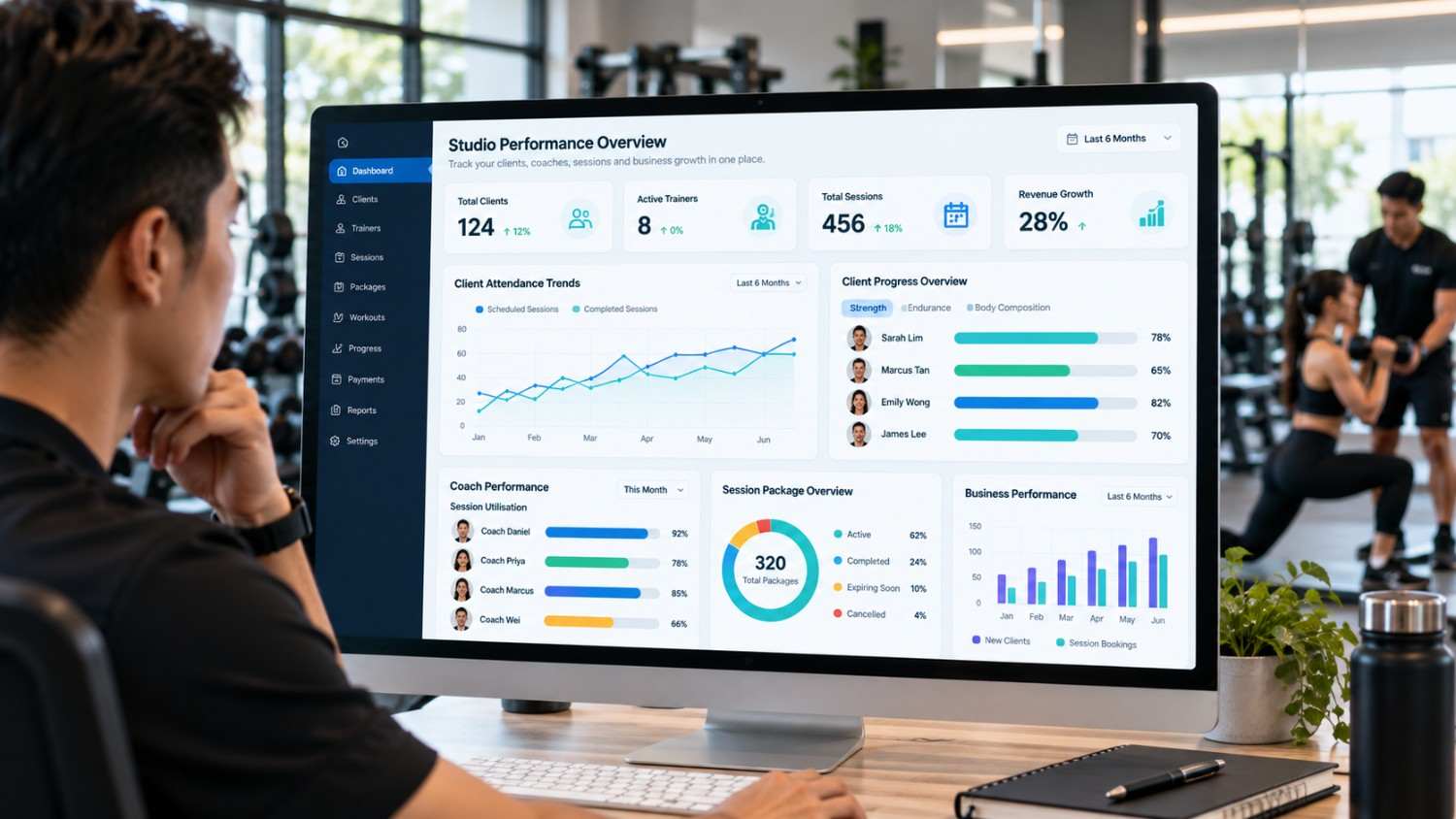
3. AI-Enabled Business Insights
Operational data can help fitness businesses understand how their services are performing.
Depending on the implementation, an analytics system could help management review:
- Client attendance patterns.
- Session utilisation.
- Coach workload.
- Package renewal activity.
- Client engagement.
- Business performance trends.
For example, if a client has missed several scheduled sessions, the system could flag the account for staff follow-up.
UAutomate AI’s product portfolio also includes Gym Unnati, described as an AI-powered gym performance system designed to provide insights into member progress, coach performance, retention risks and revenue.
This is relevant to fitness businesses interested in using operational information to support better decisions.
4. Integration With Existing Business Applications
A personal training studio may already use separate applications for payments, communication, scheduling and customer management.
Replacing every tool is not always necessary. A connected solution can be designed to integrate selected systems through APIs, depending on their technical capabilities.
UAutomate AI also offers multi-agent systems development and AI chatbot solutions that can support broader business workflow requirements.
5. A Fitness Application That Reflects Your Brand
Studios interested in offering a branded digital experience can explore UAutomate AI’s fitness application capabilities.
Depending on the project scope, a customized application could provide clients with access to appointments, package information, workout plans, progress records and studio notifications.
Rather than adopting a generic platform that may not match every requirement, studios can discuss a solution designed around their clients, coaches and business processes.
For studios that want to offer clients a digital experience under their own brand, a white-label fitness application can be another option to explore. It allows businesses to provide a branded mobile experience without necessarily developing every component from scratch. Learn more about how to launch your own branded gym app without building one from scratch and the considerations involved in bringing a branded fitness application to market.
What Does a Future-Ready Personal Training Operation Look Like?
A well-organised personal training business should provide clients with a consistent experience while making everyday operations easier for trainers and administrators.
A connected system can support different users within the same studio.
| User | Information or functionality required |
| Client | Appointments, package balance and workout information |
| Personal trainer | Assigned clients, schedules and training history |
| Studio administrator | Registrations, bookings and package records |
| Business owner | Coach utilisation, client activity and reports |
Each user should have access to information relevant to their responsibilities.
For example, trainers may need access to assigned client profiles, while owners may require a broader view of studio performance.
Software can help organise training information and highlight patterns, but qualified coaches should remain responsible for exercise selection, modifications and client-specific decisions.
The best technology should support the trainer’s expertise and fit naturally into the studio’s daily operations.
Frequently Asked Questions About Personal Training Management Software
1. What is personal training management software?
It is a digital platform designed to help personal trainers and fitness studios manage everyday operations. Depending on its features, it can include client profiles, coach scheduling, appointment bookings, session package tracking, workout planning and progress monitoring.
2. How does personal trainer software help manage multiple clients?
It provides a central location for storing client information, training history, appointments and package details. Trainers can review information before sessions, while administrators can coordinate bookings across multiple coaches.
3. Can personal training software track session packages and remaining credits?
Yes. Platforms with package management functionality can record purchased, completed and remaining sessions. They can also maintain cancellation and rescheduling records according to the studio’s configured rules.
4. Can multiple personal trainers use the same management system?
Yes. Multi-coach systems can provide individual trainer accounts, client assignments, shared scheduling and role-based access. This helps administrators coordinate multiple coaches.
5. Can personal trainers manage workout plans and client progress through software?
Yes, if the platform includes these capabilities. Trainers can record exercises, repetitions, training loads and assessments. These records support future programme reviews.
6. Is personal training management software suitable for independent trainers?
Yes. Independent trainers can use it to organise appointments, maintain client profiles, track packages and record workout history. They should choose a platform that matches their requirements and budget.
7. What is the difference between personal trainer software and gym management software?
Personal trainer software generally focuses on client relationships, coach assignments, workout programmes and training sessions. Gym management software often covers broader operations, including memberships, payments, group classes and facility administration.
8. What should a personal training studio look for when choosing software?
A studio should evaluate client management, coach scheduling, package tracking, workout planning, progress reporting, integrations, data security and scalability. The best platform is one that fits its actual workflows.
Build a More Organised Personal Training Business
Managing a personal training business requires coordination between clients, coaches, appointments, training programmes and session packages. When these activities are handled through disconnected tools, administrative work can become difficult as the business expands.
The right personal training management software can bring these activities together, creating better visibility into client information, trainer schedules, session credits and training progress.
For personal trainers and PT studios in Singapore, investing in a connected system can improve daily operations while maintaining a more organised client experience.
UAutomate AI offers custom software engineering and AI fitness application capabilities that businesses can explore when looking to build a connected digital fitness experience.
Ready to explore a customized fitness management solution?
Contact UAutomate AI to discuss your business requirements and explore how a connected fitness platform could support your clients, coaches and everyday operations.