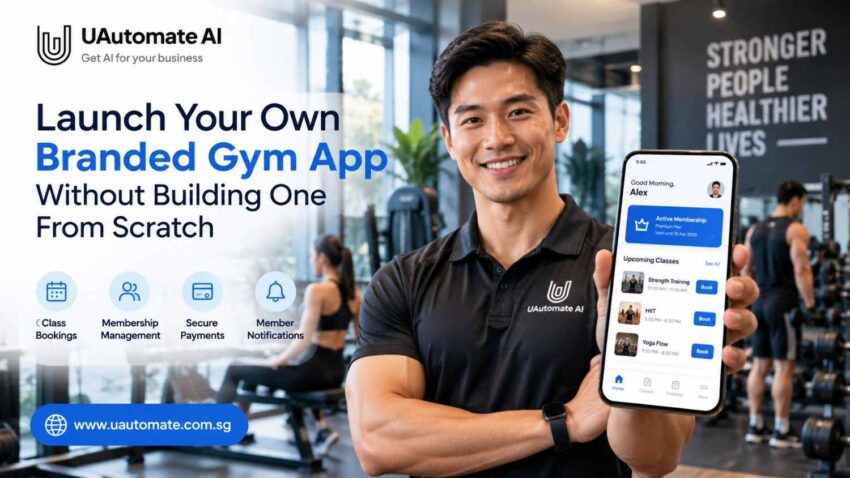
Running a gym is not just about to put out equipment and run training sessions. Also we see that owners manage memberships, class bookings, payments, we also take in enquiries and we have that which we do with members’ communication. When these are handled by separate tools the day to day admin can become very time consuming.
A white label fitness app is a solution for a company which wants to avoid building out a full scale application from the ground up. It allows fitness related businesses to use an existing platform and to put in their own brand as well as choose the features they will offer.
Imagine at the app launch members see their gym’s logo, colours, class schedules and membership info. Also they can book into classes, see what’s coming up, and get alerts for everything that’s related to the gym which they can do without going through reception for each request.
In Singapore for gyms this goes towards a more consistent digital experience which also makes basic services easier to access.
Here is what you should focus on, which is choosing a solution that works for your specific needs, integrates with present systems when required, and which also has the capacity for growth. We have put together this guide which goes into what you should think through before you invest in a branded gym app and also we at UAutomate AI present you with a development approach that may be right for you.
What Is a White Label Fitness App?
A white label fitness app is a platform which a health business can take and put their own brand on. What is included varies by the company which is providing the service but may consist of your app name, logo, colour scheme, what members see when they log in to the app and which features are made available to you.
Instead of independent development of every component we start with a base and tailor it to our needs.
For instance, a small scale studio may require class signups and membership info, at the same time a multi location gym may benefit from separate schedules for each location, staff access control and consolidated reporting.
White label options out there are many. Some present you with basic applications that have a little bit of customization, while others which support in depth changes and integration. Always check out the features included, the ownership terms, and publishing options before you choose a provider.
White-label app vs custom development vs a generic booking platform
| Factor | White-label app | Custom app | Generic booking platform |
| Starting point | Existing framework | Built around specific requirements | Existing product |
| Branding | Depends on provider | Greater flexibility | Often limited |
| Development effort | Potentially lower | Usually higher | Usually lower |
| Integrations | Depends on APIs and connectors | Can be designed around requirements | Depends on platform |
| Flexibility | Limited by supported options | Can be extensive | Product-defined |
| Maintenance | Depends on agreement | Requires a maintenance plan | Generally provider-managed |
| Best suited for | Gyms wanting their own brand | Specialised requirements | Basic booking needs |
A white-label solution can provide a middle ground between a generic platform and a fully custom application. Before committing, clarify who controls the app-store listing, which integrations are supported, and what happens if you change providers.
Why Gym Owners Are Considering Their Own Branded Apps
Members access a gym even if they are not on site. They check in on schedules, sign up for classes, review membership info, and see what is new. Including these features in one app improves the experience.
1. Create a consistent member experience
A branded app extends your gym’s identity beyond its website and physical premises. Members have a familiar place to access bookings, schedules, and membership information.
2. Reduce repetitive administrative work
Staff regularly field questions which pertain to class availability, membership expiry, and booking changes. Also we have developed an app which members may use to access some info for themselves. The time saved for staff and members depends on the features which we have integrated.
3. Make communication easier
Booking notifications, schedule updates, and renewal alerts we will send via available notification tools. We will keep messages relevant and timely, not excessive.
4. Support member engagement
Convenient check in and useful alerts for members to plan their workouts we have. Also which app does that for sure is a fallacy. As for coaching quality, facilities, price and member relationships that is still very much a factor.
5. Prepare for business growth
As a gym adds to its class, member, or location count its tech needs may change. A flexible application can include growth features.
Businesses considering wider digital improvements can explore UAutomate AI’s software and AI development services to discuss application engineering and system integration.
What Should Your Branded Gym App Actually Include?
Start with the activities members perform most often rather than trying to include every available feature.
Essential features for a first release
| Feature | Member benefit | Operational value |
| Registration and login | Access their account | Controlled access |
| Membership dashboard | View membership details | Fewer routine enquiries |
| Class scheduling | Browse sessions | Easier access to schedules |
| Class booking | Reserve sessions | Streamlined administration |
| Cancellations and waitlists | Manage reservations | Better capacity management |
| Payment integration | Pay for supported services | Convenient collection |
| Notifications | Receive reminders | Timely communication |
| Profile management | Update permitted details | Less manual administration |
These are features to evaluate, not capabilities guaranteed by every provider.
Advanced features to consider as your gym grows
- Multi-branch management: Provide location-specific schedules and services.
- Personal training bookings: Let members reserve available sessions.
- Renewal reminders: Trigger messages based on membership dates.
- Engagement workflows: Send relevant messages based on activity.
- Performance dashboards: Monitor bookings, memberships, and cancellations.
- AI-assisted experiences: Explore conversational support where useful.
A gym using WhatsApp for enquiries could also explore connecting communication workflows with other business systems. See UAutomate AI’s WhatsApp automation capabilities. Compatibility with a proposed gym app must be assessed separately.
From App Download to Daily Operations: How the System Fits Together
A branded app becomes more useful when it connects with the systems running your gym.
For example, a class reservation needs to appear in the scheduling system. Payment status must be verified where payment is required, and the system must apply capacity rules when a class is full.
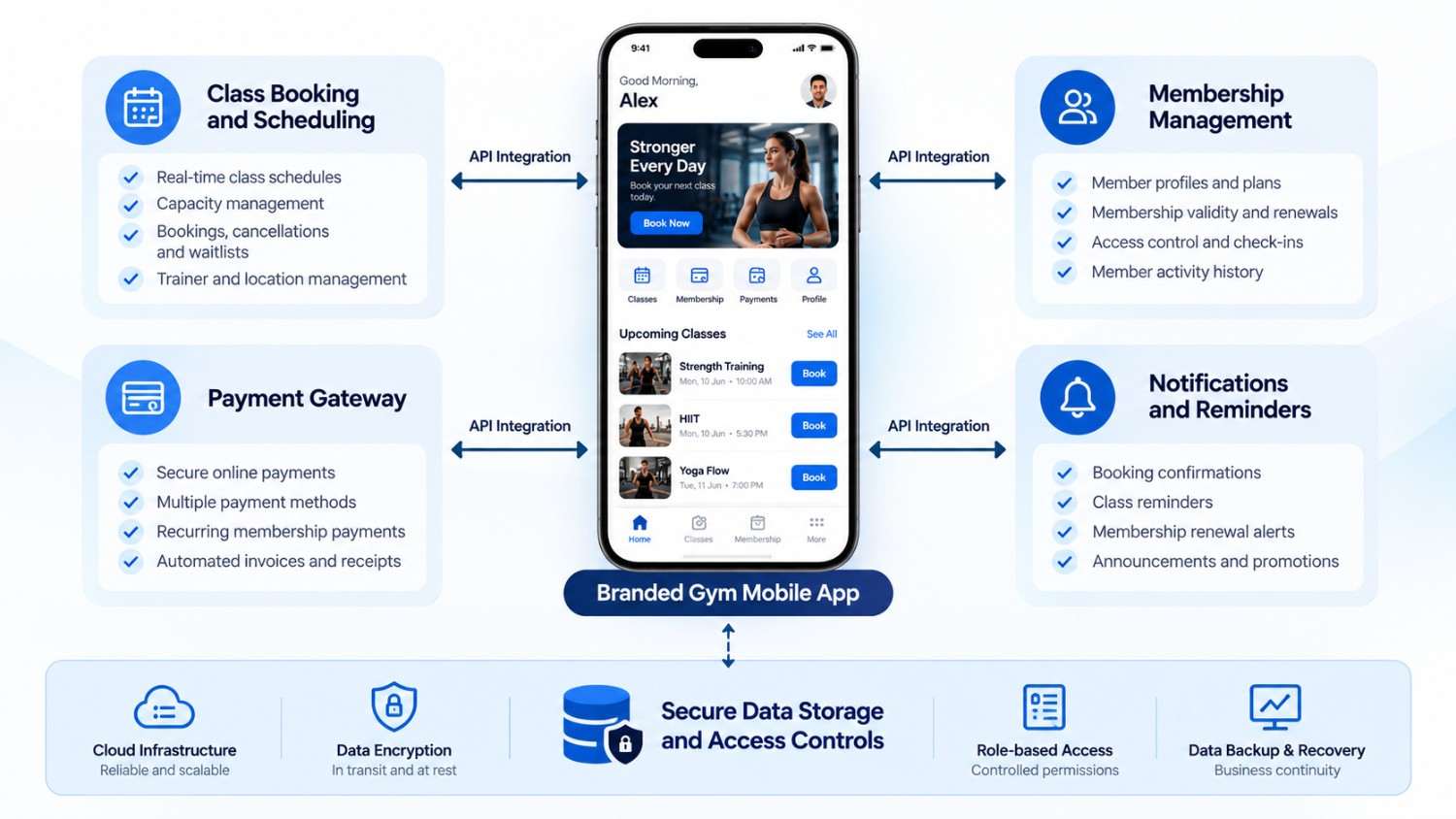
Example: What happens when a member books a class?
| Stage | What happens | Why it matters |
| 1. Select a class | Member chooses a session | Starts the booking |
| 2. Check availability | App requests current availability | Reduces outdated information |
| 3. Validate booking | System checks capacity and eligibility | Applies gym rules |
| 4. Record reservation | Booking is saved | Keeps records consistent |
| 5. Send confirmation | Member receives a notification | Confirms the reservation |
| 6. Handle changes | Cancellation updates the booking | Helps manage capacity |
This is an illustrative workflow. Actual functionality depends on the app and existing systems. If a platform lacks a suitable API or connector, additional engineering may be necessary.
Choosing the Right White Label Gym App: Questions to Ask Before You Commit
A demonstration may look impressive, but the important question is whether the application supports your real operations.
| Area | Questions to ask | Why it matters |
| Branding | Can we use our logo and app name? | Brand consistency |
| iOS and Android | Are both supported? | Platform coverage |
| Booking | Can members book and cancel? | Daily operations |
| Memberships | Can existing records be connected? | Fewer duplicate records |
| Payments | Which providers are supported? | Fees and reliability |
| Integrations | Are APIs available? | Technical feasibility |
| Security | How is access controlled? | Member privacy |
| Ownership | Who owns the data and code? | Vendor independence |
| Support | Who handles issues and updates? | Ongoing reliability |
| Pricing | What recurring fees apply? | Cost clarity |
Ask providers to demonstrate actual workflows. Confirm how a booking or membership update moves between systems, who manages app-store submissions, and what happens if you switch providers.
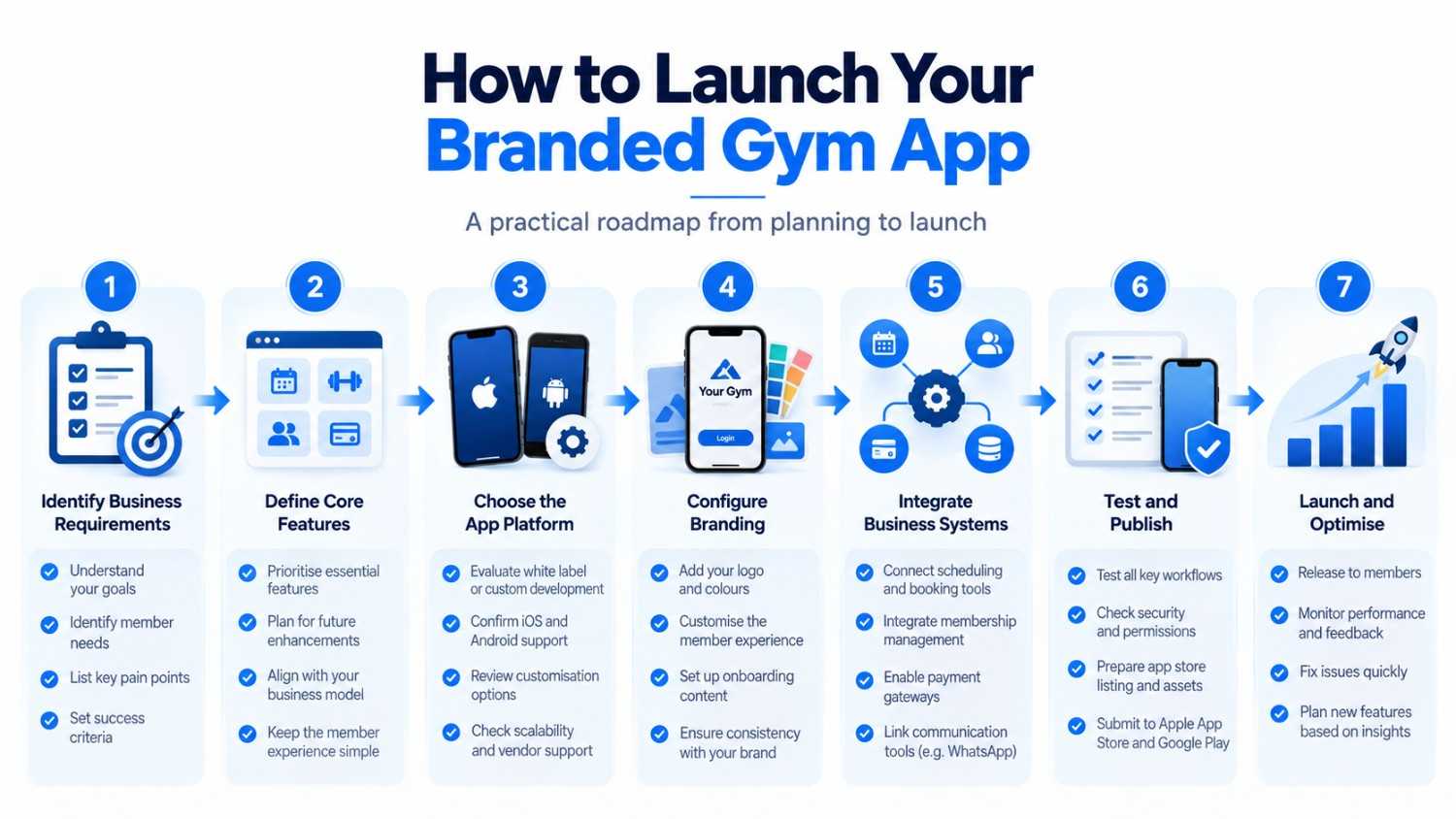
How to Launch a Branded Gym App Without Starting from Zero
A successful launch begins with a clear scope. Focus on an initial version that works reliably instead of building every possible feature.
Step 1: Identify the business problem
List the problems you want the app to solve. Are members struggling to book classes? Is reception answering repeated questions? Are reminders sent manually?
Prioritise issues according to frequency, business impact, and the effort required to resolve them.
Step 2: Define your minimum viable product
A minimum viable product (MVP) focuses on essential functionality. A gym’s first release might include:
- Branded onboarding and member login.
- Membership information.
- Class schedules and booking.
- Payment integration, if required.
- Booking confirmations and reminders.
- Basic administrative controls.
Additional features can be considered after the core workflows have been tested.
Step 3: Choose a platform and map integrations
Assess whether an existing white-label platform meets your needs. Review your scheduling, membership, payment, and communication systems, and determine how the proposed app will exchange information with them.
Step 4: Configure the brand and member experience
Prepare the app name, logo, colours, onboarding content, and support details. Test the journey from registration to booking and renewal, removing unnecessary steps.
Step 5: Test the complete workflow
| Test scenario | Expected outcome |
| Available class is booked | Booking is confirmed |
| Two members attempt the final spot | Capacity rules prevent overbooking |
| Member cancels | Booking status updates |
| Payment fails | Failure is reported accurately |
| Membership expires | Configured access rules apply |
| Staff updates a schedule | Members see updated information |
| Unauthorised access is attempted | Protected information remains inaccessible |
Also test account permissions, common devices, and recovery from failed requests.
Step 6: Prepare for publishing and launch
The app must meet relevant store requirements and provide accurate listing information and privacy disclosures.
Apple’s App Review Guidelines explain expectations for functionality and privacy. Google Play’s User Data policy covers user-data transparency and security.
Approval is not automatic, so allow time for preparation and review.
Step 7: Monitor and improve
After launch, monitor booking completion, failed transactions, support requests, cancellations, and member feedback. Use the findings to prioritise improvements.
How Much Does a White Label Fitness App Cost?
Costs depend on the provider, features, number of locations, integrations, publishing arrangements, and ongoing support. A white-label package may require less initial engineering than a bespoke application, but the subscription alone does not show the complete cost.
Cost components to include in your budget
| Component | What to clarify |
| Initial setup | Branding and configuration |
| Subscription | Monthly or annual fees |
| Integrations | Connections to existing systems |
| Data migration | Moving and validating records |
| App publishing | Developer accounts and submission assistance |
| Payment processing | Transaction fees |
| Maintenance | Bug fixes and updates |
| Support and training | Onboarding and troubleshooting |
Ask providers to separate one-time costs from recurring expenses.
An illustrative cost-calculation framework
Use quotations based on your actual requirements.
First-year cost = Setup + Integration + Migration + First-year subscription + Publishing costs + Payment and messaging fees + Maintenance and support.
Compare this with in-house development costs, including design, testing, infrastructure, maintenance, and future enhancements. The best option is the one that meets your requirements at a sustainable total cost.
How UAutomate AI Can Help You Plan a Branded Gym App
Choosing out of a white label solution is a decision which includes software and operational elements. You determine which features are stock and which require you to start from scratch, also you look at how the app will interface with your present systems.
UAutomate AI works on AI-powered applications, custom software, workflow automation, and business-system integration. Its AI development services provide a starting point for discussing your requirements.
1. Application and product planning
Identify target users, core features, member journeys, administrative needs, and the initial release scope.
2. Integration with existing systems
Assess if the present app is what your scheduling, membership, payment, and communication systems will integrate with. UAutomate AI reports we have capabilities in CRM, ERP, database and API integration. Which of these your system will be compatible with depends on technical interfaces and permissions.
3. Workflow automation
Potential examples are booking confirmations, membership notifications, follow up workflows, and enquiry routing. Also on a per project basis.
You can also explore UAutomate AI’s WhatsApp automation capabilities.
4. AI-enabled features where they make sense
AI may play a role in which we answer routine questions with what is put out by the gym’s approval or direct members to the right support. Also this may include use of reliable info and proper access controls.
5. Testing, deployment, and ongoing improvement
Agree to project scope, acceptance criteria, integration testing, and support responsibilities before implementation.
UAutomate AI reports on our work in the fields of AI and software engineering which includes requirements mapping and production focused development. For gym app projects in particular the exact terms of fit, timeline, and commercial details must be worked out with their team.
Read about its engineering capabilities or contact the team.
Privacy and Security: What Gym Owners Must Get Right
A gym app may process contact details, membership records, booking history, and payment-related information. Privacy and security should therefore be considered from the beginning.
Before choosing a provider, establish these requirements:
- Access control: Define who can view or modify information.
- Data minimisation: Collect only necessary information.
- Secure data transfer: Protect information exchanged between systems.
- Retention and deletion: Define storage periods and deletion procedures.
- Third-party access: Identify providers receiving information.
- Incident response: Establish who handles security incidents.
- Privacy documentation: Maintain appropriate notices and consent mechanisms.
For Singapore businesses, the Personal Data Protection Commission provides guidance on the Personal Data Protection Act (PDPA). Clearly establish the responsibilities of your business and software provider.
Frequently Asked Questions About White Label Fitness Apps
1. What is a white label fitness app?
It is an application based on existing software that a fitness business can adapt to its branding. Features may include bookings, memberships, notifications, and payment integrations.
2. Can I launch a branded gym app without building one from scratch?
Yes. You can configure an existing platform to match your brand and requirements. Additional development may be necessary for unsupported features.
3. Can a white label gym app be available on both iOS and Android?
Many providers support both platforms, but confirm this for the specific plan. Ask who manages submissions, developer accounts, and updates.
4. How much does a white label fitness app cost?
Costs depend on features, setup, integrations, and recurring fees. Request an itemised quotation covering subscriptions, payments, maintenance, and support.
5. Can a branded gym app connect to existing membership and booking software?
Potentially, yes. Integration depends on APIs, connectors, permissions, and technical limitations. Confirm that records can be synchronised reliably.
6. Is a white-label app better than custom gym app development?
White-label software may suit gyms with standard requirements. Custom development may be better for specialised workflows that existing platforms cannot support.
7. How long does it take to launch a branded gym app?
The timeline depends on scope, integrations, testing, and app-store review. Establish a schedule after technical discovery.
8. Can UAutomate AI help develop a custom fitness app for gyms?
UAutomate AI offers software development, application engineering, and integration capabilities that can be explored for a gym-app project. Specific features, timelines, and costs must be confirmed with its team.
Launch Your Gym’s Digital Experience with a Clear Plan
Your gym doesn’t have to start out with a complex tech project. Identify which member experiences are most important, choose the right base features, and determine how the app will integrate with present operations.
A branded member experience may be the result of a white label fitness app which is a fit for your needs in terms of features, integrations and business terms.
UAutomate AI is to support you in the fields of application engineering, workflow automation, and system integration which in turn will align with your goals.
Ready to check out your branded gym app? Get in touch with UAutomate AI to present your ideas for what you want and to set up a consultation. Come with your choice of features, current tech stack, and business goals so we can put together a right plan for you.