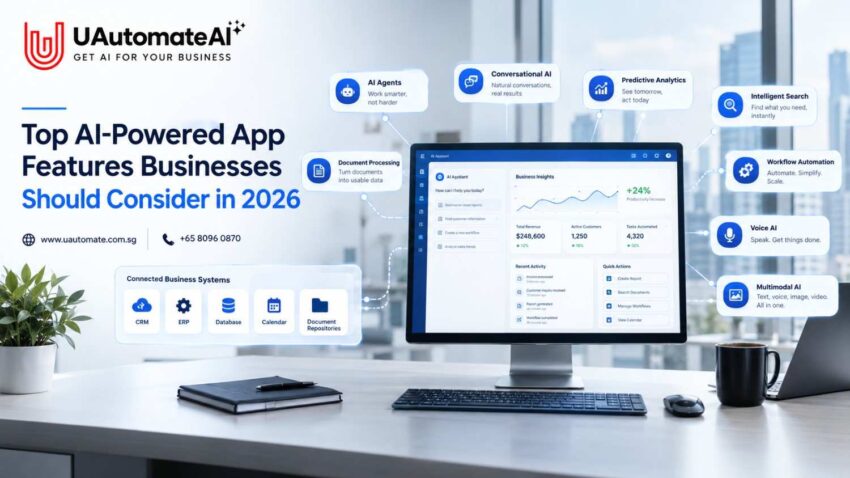
AI-powered applications are quickly becoming part of how businesses serve customers, support employees and manage everyday operations. But adding AI to an app simply because it is trending is rarely enough. Businesses need to think about where AI can actually make the product more useful, efficient and valuable.
For businesses evaluating an AI App Development Company Singapore, the real challenge is deciding which capabilities are worth investing in. Should the application have an AI chatbot? Would an AI agent be more useful? Does the business need predictive analytics, voice interaction or a private knowledge assistant?
There is no single answer.
A retail company may benefit from personalized recommendations, while a professional-services firm could get more value from an AI assistant that searches internal documents. A healthcare application may focus on appointment automation and voice interaction, while a SaaS company may need AI agents capable of handling repetitive workflows.
The right AI features depend on the business model, target users, available data and the outcomes the application is expected to deliver.
This guide explores the AI-powered app features businesses should consider in 2026, along with practical considerations around integration, security, scalability and implementation.
Why AI App Features Matter More for Businesses in 2026
AI is becoming less of a separate technology layer and more of a natural part of the application experience.
Think about how people traditionally use a business application. They may need to:
- Search for information.
- Navigate through several menus.
- Enter information manually.
- Move between different systems.
- Decide what action to take next.
An intelligent application can reduce some of that effort.
For example, a customer might simply say:
“I need to reschedule my appointment to Friday afternoon.”
Instead of making the customer work through several screens, an AI-enabled application could understand the request, check availability, offer suitable options and update the appointment once the customer confirms.
The same principle applies internally.
An employee could ask:
“Which customers have contracts expiring next month?”
Rather than opening multiple reports and spreadsheets, an AI application could search authorised business data and present the relevant information.
This is why AI application development is increasingly shifting from individual features towards outcome-focused workflows.
UAutomate AI’s current AI development approach similarly focuses on production-ready AI systems that combine LLMs, agent frameworks, orchestration and business platforms rather than treating AI as an isolated feature.
From AI features to AI-powered workflows
The difference can be easier to understand when viewed side by side:
| Traditional Application | AI-Powered Application |
| User searches for information | User asks naturally |
| User navigates menus | AI understands intent |
| User enters information manually | AI can extract relevant data |
| User switches between applications | AI can connect with business systems |
| User decides the next action | AI can recommend the next step |
| Fixed workflows | Context-aware workflows |
| Reactive experience | Potentially proactive experience |
The goal is not to remove people from every process. In many cases, the better approach is to let AI handle repetitive work while people remain responsible for decisions that require judgement, approval or accountability.
10 AI-Powered App Features Worth Considering in 2026
1. AI Agents for Automated Business Workflows
AI agents are becoming one of the most interesting developments in business applications.
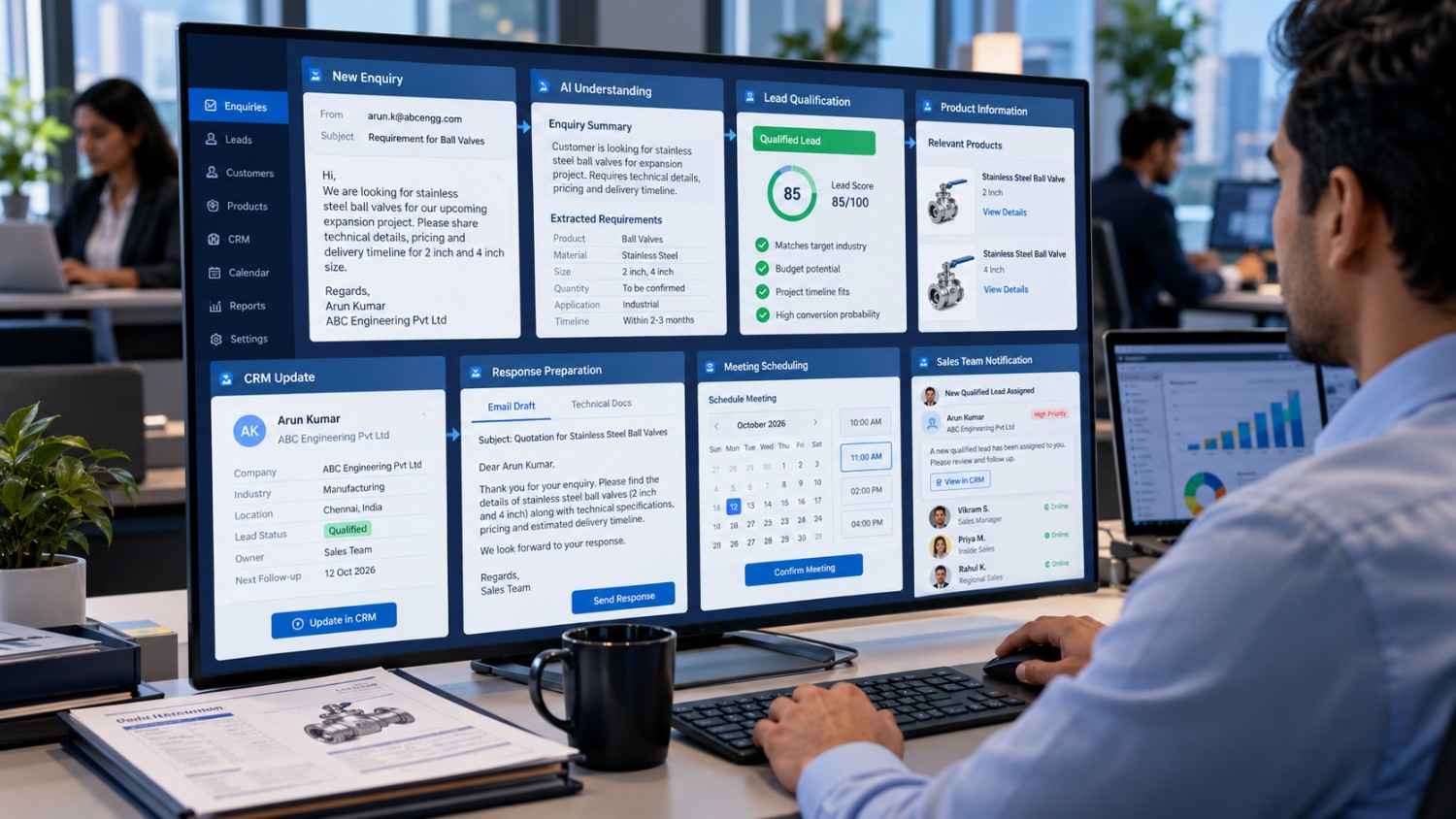
A conventional chatbot is primarily designed to respond to questions. An AI agent can be designed around a goal, use approved tools and work through multiple steps to complete a task.
Consider a typical sales enquiry.
A potential customer submits a request through a website. Instead of simply sending the enquiry to a salesperson, an AI-powered workflow could:
- Read the enquiry.
- Identify the customer’s requirements.
- Qualify the lead.
- Retrieve relevant product information.
- Check availability.
- Create or update the CRM record.
- Prepare a response.
- Schedule a meeting.
- Notify the sales representative.
The important difference is that the AI is participating in the workflow rather than simply generating a response.
This is where agentic AI can become particularly valuable for businesses.
Singapore’s Infocomm Media Development Authority (IMDA) launched its Model AI Governance Framework for Agentic AI in January 2026 and subsequently updated it with additional best practices and real-world case studies. The framework emphasises responsible deployment, technical and non-technical safeguards and human accountability.
Where AI agents can be useful
| Business Function | Potential AI Agent Use |
| Sales | Lead qualification and follow-up |
| Customer service | Issue classification and routing |
| Healthcare | Appointment coordination |
| Real estate | Lead qualification and viewing bookings |
| Finance | Document and approval workflows |
| HR | Employee information and onboarding |
| Operations | Task coordination |
| E-commerce | Product discovery and order support |
UAutomate AI’s multi-agent systems approach includes architectures where specialised agents can coordinate different parts of a workflow, with human-in-the-loop checkpoints for sensitive actions.
For businesses exploring agent-based applications, that controlled approach matters. An AI agent should not automatically be given unrestricted access to every business system simply because it can technically connect to them.
2. Retrieval-Augmented Generation for Business Knowledge
Generative AI can produce remarkably useful answers, but a general-purpose AI model does not automatically know a company’s latest internal information.
This is where Retrieval-Augmented Generation, commonly called RAG, becomes useful.
RAG connects an AI application to approved sources of business information. When someone asks a question, the system retrieves relevant information and uses that context to generate a response.
Potential sources can include:
- Company policies
- SOPs
- Product documentation
- Contracts
- PDFs
- Knowledge bases
- Internal websites
- Spreadsheets
- Databases
- Training materials
For example, an employee might ask:
“How many annual leave days can I carry forward?”
Instead of relying on general information, a RAG-powered assistant can retrieve the company’s relevant leave policy and provide an answer based on that source.
UAutomate AI’s RAG architecture focuses on connecting business documents and knowledge sources to AI assistants while using access controls to restrict retrieval based on user permissions.
Why RAG matters for business applications
| Challenge | RAG-Based Approach |
| Employees cannot find internal documents | Natural-language knowledge search |
| AI lacks company-specific context | Retrieve approved business information |
| Documents are scattered across systems | Centralised retrieval layer |
| Different users have different permissions | Role-based retrieval |
| Information changes frequently | Re-index updated sources |
| Users need evidence | Return relevant source context |
RAG is particularly useful when an application’s value depends heavily on company-specific information.
3. Personalised Recommendations and User Experiences
Personalisation has been part of digital products for years, but AI is making it possible to create more context-aware experiences.
Instead of showing every user the same content, an AI-powered application can use permitted signals to adjust recommendations based on behaviour, preferences and context.
For example:
- An e-commerce app can recommend relevant products.
- An education platform can suggest learning materials.
- A fitness application can adapt recommendations.
- A SaaS platform can prioritise relevant workflows.
- A financial application can surface appropriate information.
However, personalisation should not become an excuse for collecting as much data as possible.
Singapore’s Personal Data Protection Commission provides specific guidance on the use of personal data in AI recommendation and decision systems, including considerations for organisations and developers.
Businesses should therefore consider three questions.
What information is actually needed?
Only information that is relevant to the intended experience should be considered.
Why is it being used?
There should be a clear reason for using the data and a meaningful benefit for the user or business.
How will it be protected?
Access controls, retention policies and appropriate security measures need to be considered from the outset.
The best personalisation does not feel intrusive. It simply makes the application more useful.
4. Conversational AI That Goes Beyond FAQs
Chatbots are still valuable, but business expectations have changed considerably.
A basic chatbot might answer:
“What are your opening hours?”
A more capable conversational application could handle:
“Can I book an appointment for Friday at 3 PM?”
The second scenario requires considerably more than generating a natural-sounding answer.
The system may need to:
- Understand the user’s intent.
- Check availability.
- Retrieve customer information.
- Ask for missing details.
- Update a calendar.
- Confirm the appointment.
- Notify the customer.
- Escalate to a human when necessary.
In other words, conversational AI becomes an interface for completing tasks.
UAutomate AI’s chatbot offering covers use cases including sales, support, service routing, booking and internal knowledge, with integration into business systems and workflows.
Where conversational AI can create value
| Use Case | AI Capability |
| Customer support | Answer and route enquiries |
| Lead generation | Qualify prospects |
| Booking | Schedule appointments |
| E-commerce | Product discovery |
| Internal support | Answer employee questions |
| Service requests | Capture and classify requirements |
| Sales | Recommend next steps |
The better question is therefore not:
“How many questions can our chatbot answer?”
It is:
“What can our customers or employees actually accomplish through the conversation?”
5. Natural-Language AI Search
Search is another part of the application experience that AI can change significantly.
Traditional search usually depends on users knowing the right keywords to enter.
AI-powered search allows people to describe what they need in ordinary language.
For example:
“Find contracts expiring in the next 90 days.”
Or:
“Show customers who purchased Product A but haven’t purchased Product B.”
Or:
“Find the latest policy relating to remote work.”
The application can interpret the request and retrieve information based on meaning rather than relying solely on exact keyword matches.
This can be particularly useful for:
- Legal teams
- Finance departments
- HR
- Sales
- Procurement
- Customer support
- Operations
- Knowledge management
Semantic search vs traditional search
| Traditional Search | AI-Powered Search |
| Relies heavily on keywords | Understands natural-language intent |
| Users must know search terms | Users can describe the requirement |
| Exact matches can dominate | Semantic relevance can be considered |
| Results may require manual filtering | AI can summarise relevant results |
| Limited contextual understanding | Can incorporate conversational context |
When AI search is combined with RAG and appropriate permission controls, it can become a practical interface for accessing enterprise knowledge.
6. AI-Powered Document Processing and Computer Vision
Documents continue to be a major source of manual work for many organisations.
Invoices, contracts, receipts, forms, reports and applications often contain valuable information that employees have to extract and enter into another system.
AI can help reduce this repetitive work.
A document-processing application could:
- Receive a document or image.
- Identify its type.
- Extract relevant information.
- Validate important fields.
- Convert the information into structured data.
- Send the data into the appropriate workflow.
For example, an employee could upload an invoice.
Instead of manually entering:
- Supplier name
- Invoice number
- Date
- Amount
- Tax
- Line items
the application can extract these fields and pass them to an accounting workflow for validation.
Computer vision adds another layer
AI can also help applications interpret images.
Potential applications include:
- Property inspections
- Manufacturing quality checks
- Retail shelf analysis
- Insurance claims
- Document verification
- Equipment inspections
- Field-service reporting
The real value comes when the image analysis leads to a useful next step.
For example, identifying damage in an uploaded photograph becomes much more useful when the application can also create a service request and notify the right team.
7. Voice AI and Voice-Based App Interactions
Voice remains useful wherever typing is inconvenient or time-consuming.
A customer may prefer to call rather than complete a long online form. A field employee may need to report information while working. A patient may want to schedule an appointment without navigating through several application screens.
Voice AI can support:
- Appointment booking
- Lead qualification
- Customer support
- Reminders
- Call routing
- Follow-ups
- Information retrieval
- CRM updates
UAutomate AI’s voice AI solutions are designed around phone-based conversations, lead qualification, appointment booking, support routing and connections to CRM and calendar workflows.
Voice AI feature considerations
| Requirement | Why It Matters |
| Speech recognition | Understand customer input |
| Low latency | Keep conversations natural |
| Context management | Maintain conversation continuity |
| Business knowledge | Give relevant answers |
| Integrations | Complete actual tasks |
| Escalation | Transfer complex cases |
| Transcription | Maintain records |
| Guardrails | Control sensitive actions |
For businesses serving diverse audiences, language, accent and background-noise handling should also be tested before deployment.
8. Predictive Analytics and Next-Best-Action Recommendations
AI does not always have to interact directly with customers.
Some of the most useful applications can operate quietly in the background.
Predictive analytics can help businesses identify patterns and estimate likely outcomes based on available data.
Potential applications include:
- Customer churn prediction
- Demand forecasting
- Lead scoring
- Inventory planning
- Fraud detection
- Appointment no-show prediction
- Customer lifetime value estimation
- Operational forecasting
But a prediction by itself is not always enough.
Compare these two outputs:
Prediction:
“This customer has a high probability of churn.”
Actionable insight:
“This customer has a high churn risk. Their engagement has declined over the last 60 days. Consider the approved retention workflow.”
The second output is more useful because it connects intelligence with a potential business action.
A practical predictive-AI workflow
Data → Prediction → Explanation → Recommendation → Human/Automated Action → Measurement
This approach turns analytics into more than a reporting function. It can become a decision-support layer for employees.
9. AI Workflow Automation
Workflow automation is one of the most commercially useful applications of AI.
Many business processes involve moving information between different systems.
Consider a simple process:
Email enquiry → AI analysis → CRM → Lead qualification → Sales notification → Follow-up
Without automation, employees may have to complete several of these steps manually.
With a properly designed AI workflow, the system can interpret the incoming request, determine the appropriate route and perform approved actions.
Example: AI-powered lead workflow
Imagine a potential customer submits:
“We’re looking for an AI solution for our 50-person sales team.”
The AI workflow could:
- Identify the enquiry as a business lead.
- Extract company and requirement information.
- Classify the lead.
- Add it to the CRM.
- Identify the relevant service category.
- Prepare a personalized response.
- Notify the sales team.
- Schedule a follow-up.
- Record the interaction.
This is where AI app development becomes closely connected to automation and integration.
An AI App Development Company Singapore should therefore be evaluated not only on its ability to build application interfaces but also on its ability to connect AI with the systems that run the business.
UAutomate AI’s existing AI architecture includes workflow automation and integrations with business platforms, alongside AI agents and knowledge systems.
10. Multimodal AI for Text, Voice, Images and Documents
People do not always communicate with an application in the same way.
Depending on the situation, they might:
- Type a question.
- Upload a document.
- Take a photograph.
- Record a voice message.
- Provide structured information.
Multimodal AI allows applications to work across several of these input types.
Example: property management
A tenant could upload a photo of a damaged wall and say:
“This needs to be repaired.”
A multimodal application could potentially:
- Analyse the image.
- Understand the voice or text request.
- Identify the property.
- Categorise the issue.
- Create a maintenance request.
- Route it to the appropriate team.
- Notify the tenant.
Example: insurance
A customer could submit:
- Photographs of damage.
- A voice explanation.
- A claim form.
- Supporting documents.
The application could organise the information and initiate the appropriate workflow.
The benefit is not simply that the app accepts more types of input. The bigger opportunity is to reduce the amount of manual work required from the user.
The AI Feature Alone Isn’t Enough: Why Integration Matters
One of the clearest differences between an impressive AI demo and a useful production application is integration.
A chatbot that cannot access the information a customer needs may have limited value.
Connect that same chatbot to a knowledge base, CRM, calendar and approved business workflows, and it can become much more useful.
The same principle applies to AI agents.
An agent without tools may only provide recommendations. An agent with controlled access to approved tools can potentially carry out tasks.
Common business integrations
| System | Potential AI Integration |
| CRM | Lead creation, qualification and follow-up |
| ERP | Inventory and operational information |
| Calendar | Appointment scheduling |
| Classification and response drafting | |
| Customer conversations | |
| Databases | Data retrieval |
| Payment systems | Payment-related workflows |
| Document repositories | RAG and knowledge retrieval |
| Analytics | AI-generated insights |
UAutomate AI states that its AI development work includes integration with CRM, ERP and communication platforms such as WhatsApp and Slack.
This integration layer matters because most businesses do not operate from one system. Their customer, financial, operational and communication data is usually spread across several platforms.
AI Security and Governance Should Be Built Into the Application
AI applications can process customer information, internal documents and other sensitive business data. Security should therefore be considered during architecture and development rather than added shortly before launch.
NIST’s AI Risk Management Framework is designed to help organisations incorporate trustworthiness considerations into the design, development, use and evaluation of AI systems. Its Generative AI Profile provides additional guidance around risks associated with generative AI.
For businesses developing AI applications, several areas deserve particular attention.
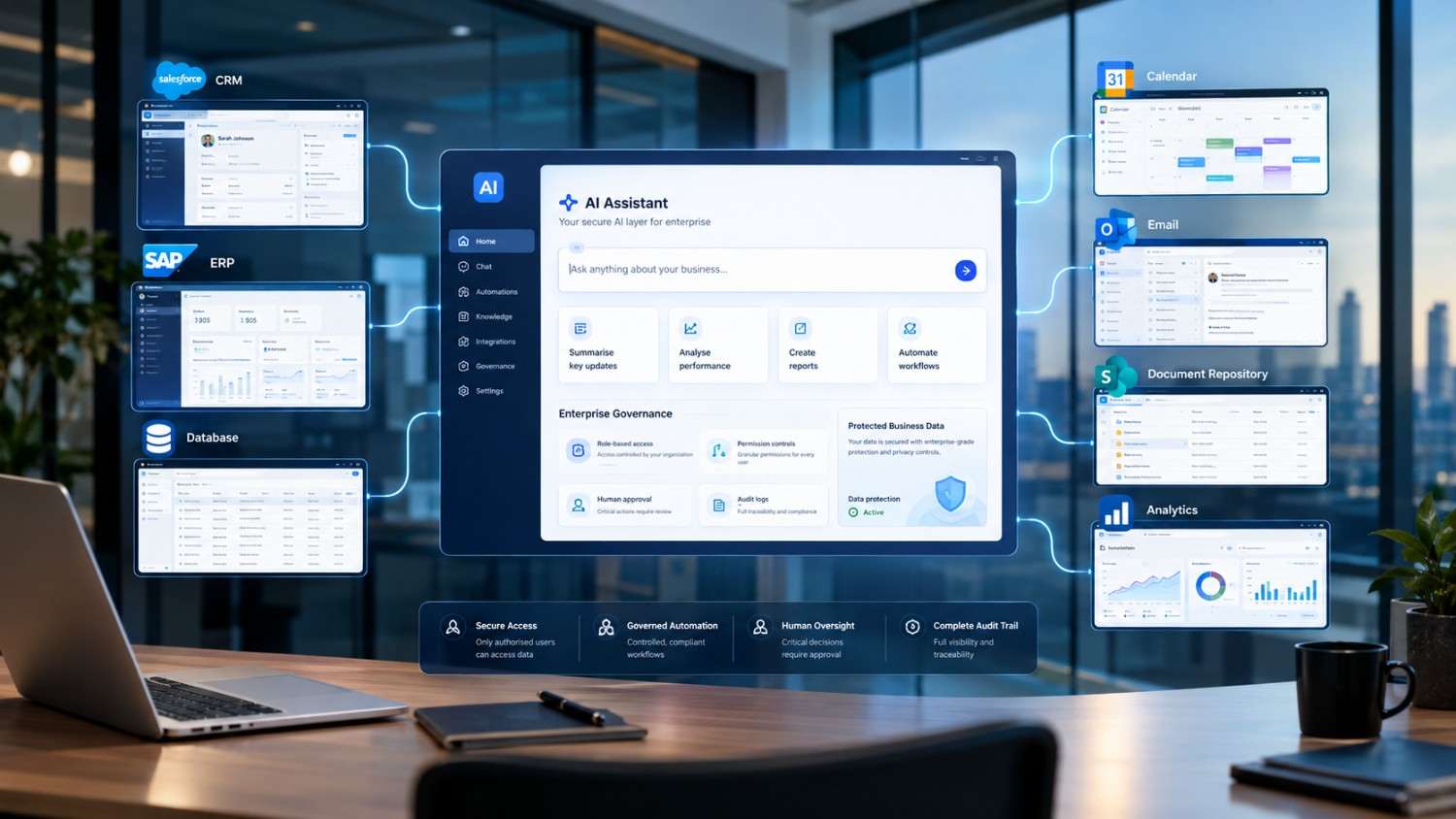
Role-Based Access
Different employees should not automatically have access to the same information.
For example, an employee using an internal knowledge assistant should only be able to retrieve documents they are authorised to access.
UAutomate AI describes role-based access controls at the retrieval layer for its RAG systems.
Human Approval for High-Risk Actions
Not every AI-generated action needs to happen automatically.
Businesses can require human approval for actions such as:
- Refunds
- Financial transfers
- Contract changes
- Account termination
- High-impact decisions
This is particularly relevant for agentic systems that can interact with external tools. Singapore’s guidance on agentic AI places emphasis on human accountability and appropriate safeguards.
Data Minimisation
AI systems should not automatically receive access to every piece of information available within an organisation.
Singapore’s PDPC guidance specifically addresses the use of personal data in AI recommendation and decision systems.
Guardrails and Permissions
AI agents should operate within clearly defined boundaries.
The application should determine:
- Which tools the agent can access.
- Which information it can retrieve.
- Which actions it can perform.
- When human approval is required.
Monitoring and Audit Logs
Once an AI application goes into production, monitoring becomes essential.
Useful information can include:
- User requests
- AI responses
- Actions taken
- Tool calls
- Errors
- Escalations
- Human approvals
- User feedback
This gives development and business teams the information they need to identify issues and improve the system over time.
How to Choose the Right AI Features for Your Business
The easiest mistake to make is trying to implement every AI capability at once.
A better approach is to start with the business problem.
Start With the Business Problem
Ask:
- What takes employees too much time?
- Where do customers experience unnecessary friction?
- Which processes involve repetitive manual work?
- Where are employees constantly searching for information?
- Where are decisions taking too long?
The answers can point towards the most appropriate AI capability.
Identify the Users
Different users require different experiences.
| User | Potential AI Feature |
| Customers | Conversational AI |
| Sales teams | AI lead qualification |
| Employees | RAG knowledge assistant |
| Management | Predictive analytics |
| Field workers | Voice and computer vision |
| Operations | AI workflow automation |
| Developers | AI coding and knowledge tools |
Determine the Data Required
Consider whether the AI needs:
- Public information
- Customer data
- Internal documents
- Transaction history
- Real-time information
- Images
- Voice
- Database records
This decision will influence the technical architecture, privacy requirements and overall project complexity.
Identify What the AI Should Do Next
One of the most useful questions during planning is:
What happens after the AI generates its answer?
If an employee still has to copy the information into another application, there may be an opportunity to automate the next step.
Define Success Metrics
AI projects should have clear measures of success.
Potential KPIs include:
- Response time
- Conversion rate
- Lead qualification rate
- Customer satisfaction
- Resolution time
- Manual hours saved
- Workflow completion
- Search success
- Booking rate
- Escalation rate
AI Feature Priority Matrix for Businesses
Not every AI capability deserves the same priority.
The following matrix can provide a useful starting point:
| Business Challenge | Recommended AI Feature | Potential Outcome | Priority |
| High volume of repetitive enquiries | Conversational AI | Faster customer response | High |
| Employees struggle to find information | RAG | Faster knowledge retrieval | High |
| Manual lead qualification | AI agents | Reduced sales workload | High |
| Document-heavy processes | Document AI | Less manual data entry | High |
| Customer retention problems | Predictive AI | Earlier intervention | Medium-High |
| Complex repetitive workflows | AI automation | Operational efficiency | High |
| Product discovery challenges | Recommendations | Better user experience | Medium-High |
| Missed calls | Voice AI | Better lead coverage | Medium-High |
| Image-based inspection | Computer vision | Faster assessment | Medium |
| Multiple input formats | Multimodal AI | Reduced user effort | Medium |
The final priority should depend on four things: potential business impact, implementation complexity, data readiness and risk.
Common Mistakes Businesses Make When Building AI Apps
Adding AI Without a Clear Business Objective
An AI feature should solve a genuine problem.
Simply adding a chatbot because competitors have one does not mean customers will use it or that it will generate a return.
Building Too Many Features at Once
A focused AI MVP can often teach a business more than a large application containing several poorly connected AI features.
Start with one meaningful workflow, measure the results and expand from there.
Ignoring Data Quality
AI cannot fix inaccurate, outdated or poorly structured business information by itself.
For RAG applications in particular, the quality and freshness of the underlying knowledge sources have a direct impact on the user experience.
Giving AI Excessive Permissions
An AI agent should not automatically receive unrestricted access to every business system.
Its permissions should match the task it has been designed to perform.
Forgetting Human Oversight
Some decisions should remain subject to human review, particularly when AI can take external actions or influence customers, employees or financial outcomes.
Measuring AI Usage Instead of Business Outcomes
The number of chatbot conversations is not necessarily a meaningful business metric.
A more useful question is:
Did the AI reduce resolution time, increase qualified leads, improve booking completion or save employee hours?
Singapore vs Indonesia: Choosing the Right AI Development Partner
Businesses operating across Southeast Asia may not restrict their search to a single market.
For example, a company expanding into the region may compare an AI App Development Company Indonesia with Singapore-based development partners.
The decision should not be based on geography alone.
Businesses should compare:
- Technical capabilities
- AI architecture expertise
- Integration experience
- Security practices
- Communication
- Industry knowledge
- Development methodology
- Post-launch support
- Scalability
- Understanding of local business requirements
Similarly, a company developing a proprietary AI SaaS platform may look for an AI Product Development Company Indonesia when it needs product engineering and AI capabilities for the Indonesian market.
For Singapore-based companies, an AI Product Development Company Singapore can be particularly relevant when the objective is to turn an AI concept into a scalable product rather than simply add one AI feature to an existing application.
UAutomate AI’s published AI product-development guidance covers areas such as RAG, secure architecture, tool calling, integrations and model-cost optimisation.
Singapore vs Indonesia: a practical comparison
| Evaluation Factor | Singapore-Focused Project | Indonesia-Focused Project |
| Primary market | Singapore | Indonesia |
| Business context | Singapore regulations and workflows | Indonesian market requirements |
| AI integration | CRM, ERP, APIs, knowledge systems | CRM, ERP, APIs, local platforms |
| Language requirements | English, Mandarin, Malay and others depending on users | Bahasa Indonesia and multilingual use cases |
| Data considerations | Singapore privacy and governance requirements | Indonesian privacy and regulatory requirements |
| Scaling opportunity | Singapore and regional markets | Indonesia and broader Southeast Asia |
| Key selection factor | Technical capability + local business understanding | Technical capability + local market understanding |
The important point is that businesses should choose a development partner based on the actual product and market requirements, rather than simply choosing a provider because a location appears in its service-page title.
Why UAutomate AI for AI App and Product Development?
Choosing an AI development partner involves more than finding a team that can write application code.
A production AI application may require:
- Product strategy
- User journey design
- AI architecture
- Model selection
- Data pipelines
- RAG
- Agent orchestration
- API integrations
- Workflow automation
- Security controls
- Testing
- Deployment
- Monitoring
- Team training
UAutomate AI positions its services around production AI systems, including AI knowledge assistants, document processing, conversational AI, WhatsApp automation and agentic workflows.
Its existing content also covers AI product development, mobile AI applications, RAG and multi-agent systems, giving businesses different options depending on what they are trying to build.
When UAutomate AI can be a good fit
UAutomate AI may be relevant for businesses looking to:
- Build a new AI-powered application.
- Add AI capabilities to an existing product.
- Create a private company knowledge assistant.
- Automate repetitive workflows.
- Build AI agents.
- Deploy conversational AI.
- Implement voice AI.
- Connect AI with CRM, ERP or other business systems.
- Turn an AI concept into a production-ready product.
The company also states that its engagement starts with a discovery process focused on understanding requirements, mapping user journeys and developing a project scope.
That discovery stage is important. The right AI architecture should come after the business problem, users and workflow have been properly understood.
Frequently Asked Questions About AI-Powered Apps
What are the most useful AI features for business apps in 2026?
The most useful features depend on the business problem, but AI agents, RAG, conversational AI, intelligent search, workflow automation, personalised recommendations, predictive analytics, document processing, voice AI and multimodal AI are among the major capabilities businesses can consider.
Can AI be added to an existing mobile or web application?
Yes. Businesses do not necessarily need to rebuild an application from scratch. AI can be introduced through APIs, AI services, RAG systems, workflow automation, conversational interfaces or integrations with existing business systems.
For mobile applications, architecture decisions can also include cloud-based AI versus selected on-device processing depending on latency, privacy and functionality requirements. UAutomate AI’s mobile AI development guidance discusses these architectural considerations.
How much does it cost to develop an AI-powered application?
The cost can vary significantly depending on the application’s complexity, number of users, AI models, integrations, data requirements, security controls and workflows.
A simple AI-enabled application and a multi-agent enterprise platform can have very different development requirements.
The most reliable way to estimate the cost is to define the scope, prioritise the MVP and determine the technical architecture before development begins.
What is RAG and why is it useful for business applications?
RAG stands for Retrieval-Augmented Generation. It enables an AI application to retrieve relevant information from approved business sources before generating a response.
This can be useful for company knowledge bases, policies, contracts, SOPs, product documentation and internal information.
Are AI agents safe for business applications?
AI agents can be deployed responsibly when businesses define appropriate permissions, guardrails, monitoring and human approval processes.
Singapore’s IMDA Model AI Governance Framework for Agentic AI provides guidance around responsible deployment and emphasises human accountability.
Should SMEs invest in AI app development?
SMEs can benefit from AI when the technology is connected to a measurable business objective.
Instead of building a large AI platform immediately, an SME could begin with a focused use case such as:
- AI customer support
- Lead qualification
- Document processing
- Internal knowledge search
- Appointment automation
- Workflow automation
The initial application can then be measured and expanded based on actual results.
How long does it take to build an AI-powered application?
The timeline depends heavily on the scope.
A focused proof of concept can be developed much faster than a production application that requires several integrations, complex data pipelines, security controls and AI agents.
UAutomate AI notes that initial MVPs or proof-of-concepts can often be deployed within weeks, while larger multi-agent systems may require months depending on architecture and integration requirements.
Build an AI-Powered Application Around Your Business Goals
The strongest AI applications in 2026 will not necessarily be the ones with the largest number of AI features.
They will be the applications that solve real problems.
For one business, that could mean an AI knowledge assistant that helps employees find information quickly. For another, it could be an AI agent that qualifies leads and updates the CRM. Another business may benefit more from personalised recommendations, predictive analytics, voice automation or intelligent document processing.
The technology should follow the business objective—not the other way around.
Before development begins, identify the workflow you want to improve, the users who will benefit, the data the AI needs, the systems it must connect to and the KPI that will determine success.
If you are looking for an AI App Development Company Singapore to turn those requirements into a production-ready application, UAutomate AI can help assess the use case, define the architecture and build AI capabilities around your existing business workflows.
Ready to explore your AI application idea? Book a consultation with UAutomate AI and discuss the right development approach for your business.