Manufacturing companies do not only require equipment and production space in which to run efficiently. Also they require reliable systems for production scheduling, monitoring of equipment, inventory tracking and issue resolution. Manufacturing software development Singapore is a consideration for companies looking to connect these activities, reduce repetitive work and make better decisions using operational data.
The issue is not always that we do not have the software. What we see is that present systems do not play well together. At the shop floor level production teams are using spreadsheets, supervisors are putting together manual reports and managers are struggling to get a picture of how the factory is performing.
Right software for manufacturing can tie in these processes via production dashboards, workflow automation, maintenance tracking and integration with present business systems. As per what is required for operation a business may buy a ready made platform, develop a custom application or do a mix of both.
This guide goes over what software options are out there, practical automation ideas, the build versus buy decision and how manufacturers may put together a solution that supports their business goals.
Why Manufacturing Businesses in Singapore Are Rethinking Their Software
Singapore is a home to a robust advanced manufacturing sector which includes semiconductor, aerospace and biomedical manufacturing. As production environments become more integrated into the digital world businesses require better methods to share info between machines, personnel, and business software.
Also it is true that digital transformation is an issue beyond large industries. Small and medium sized manufacturers also require accurate production data, efficient communication and better management for day to day operations.
In a scenario of a customer order coming in a manufacturer has the purchasing team check material availability, production planners which in to schedule the work, operators report output, and the quality team inspects finished goods. Should each department use separate spreadsheets in which to input their data employees may end up being redundant in their input.
This creates several practical problems:
- Limited visibility: Managers may find out about production delays at the point when a report is issued.
- Repeated manual work: Employees are spending time on updating spreadsheets and getting approvals.
- Maintenance issues: Equipment care may be put aside when records aren’t linked to production schedules.
- Inconsistent information: Departments may have out of date inventory numbers or order info.
- Difficult reporting: Performances info is in many different systems which makes comparison difficult.
The answer isn’t to go in and replace everything that is present. Instead we should look at which info is going missing, slowing down, or being put in duplicate and then we can determine which integration, automation or a specific custom solution will best solve the issue.
For Singapore businesses exploring industrial digitalisation, Enterprise Singapore provides information about business transformation and industry development initiatives.
What Manufacturing Software Can Actually Manage
Manufacturing software covers a range of applications used to manage production planning, shop-floor operations, inventory, quality checks, maintenance and reporting. Each system has a different role, although many modern platforms combine several capabilities.
Core types of manufacturing software
| Software type | Main purpose | Example use case |
| Enterprise Resource Planning (ERP) | Connect purchasing, finance, inventory and orders | Linking material purchases to production requirements |
| Manufacturing Execution System (MES) | Monitor and manage shop-floor activities | Tracking work orders and production output |
| Production planning software | Organise schedules and allocate resources | Assigning jobs based on capacity and deadlines |
| Inventory management software | Track stock and material movements | Identifying components that need replenishment |
| Computerised Maintenance Management System (CMMS) | Manage maintenance requests and servicing | Scheduling preventive maintenance |
| Quality management software | Record inspections, defects and corrective actions | Tracking rejected batches and rework |
| Business intelligence dashboards | Present operational information in reports | Reviewing output, downtime and order fulfilment |
These categories do in fact cross over. For instance a single ERP platform may include production planning and inventory management. It is up to the business to evaluate what features they have rather than to assume that they will require a separate application for each function.
Production dashboards: Turning data into decisions
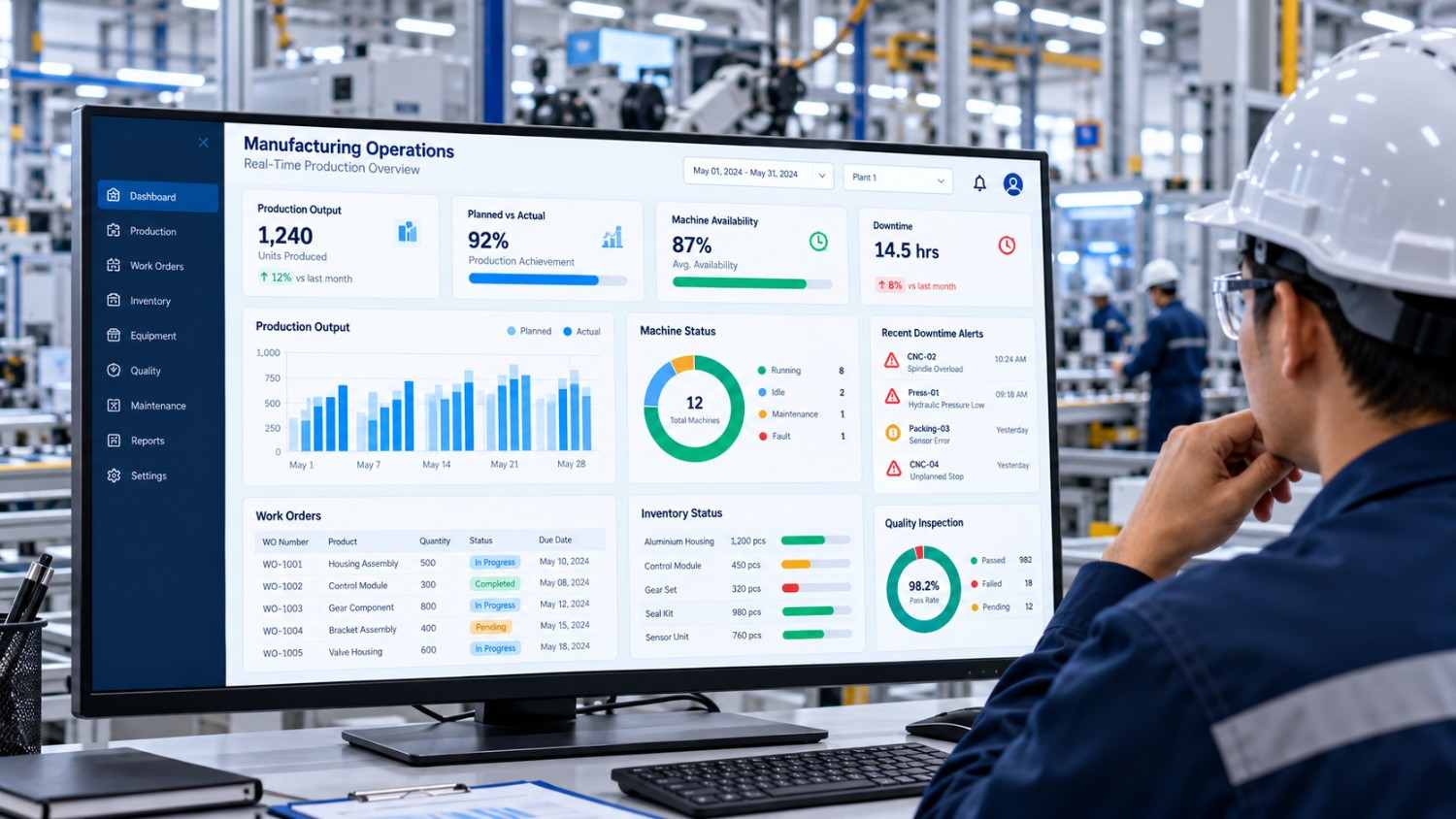
A production report suite which consolidates key operational data into one place. Instead of looking at manual reports, supervisors may review:
- Planned production against actual output.
- Work orders and their current status.
- Machine availability and reported downtime.
- Quality inspection results.
- Material shortages and replenishment requirements.
- Orders approaching their delivery deadlines.
A practical dashboard goes beyond just putting in numbers. It helps staff identify issues and determine what to do next.
For instance when a production line is delayed due to an unavailable component our dashboard which reports on those issues also notes affected work orders and reports to the right planning team. What this report does well however is when it is based on accurate data from integrated systems which is up to date.
Where Manufacturing Workflow Automation Delivers Practical Value
Manufacturing processes of automation which tie together routine steps so that tasks flow along without employees’ manual coordination.
Automation isn’t about getting rid of people in all decision processes. We still see value in human judgment for quality checks, exceptions and safety related issues. What we do is design workflows which put forward the routine tasks to the machine and pass atypical issues to the right person.
Example: Running an automating production order
Imagine a company gets an order for a set of components. A connected system may take care of the process which goes as follows.
Step 1: Place and verify the order. Check the order details, quantities that are required and delivery date.
Step 2: Check material availability. Compare the required components with available inventory.
Step 3: Resolve shortages. If materials are unavailable, notify the planner and route the issue for purchasing or rescheduling.
Step 4: Issue the work order. Upon fulfilment of the required conditions put the job at the production team’s disposal.
Step 5: Track progress of production. Note down the quantity of items produced, work status, and issue reports on issues.
Step 6: Complete quality checks. Report results of inspections and follow up on those that failed.
Step 7: Update dispatch information. Once the required checks are complete, update finished goods and dispatch records.
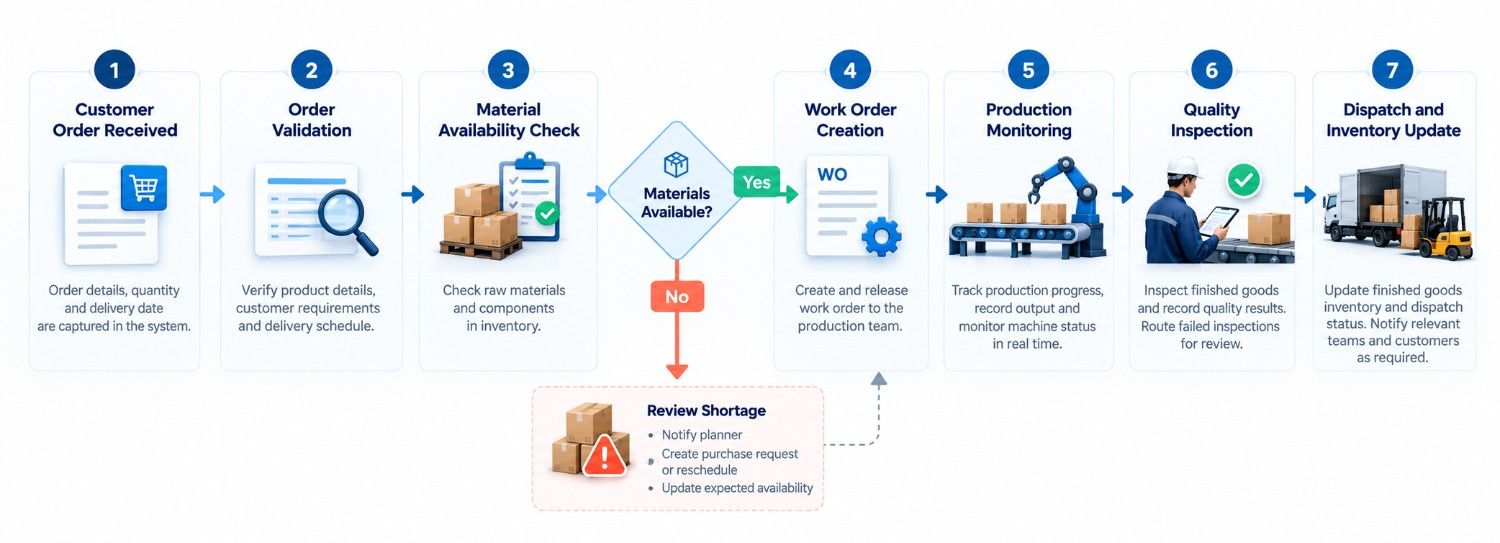
The exact workflow will vary by which processes, approval rules and connected systems are in use at each factory.
Four practical automation opportunities
- Work orders and clearances
Software can create work orders, perform task assignments and report to supervisors when an order meets certain criteria. Also we have exception routing for approval instead of automatic processing.
- Stock and restock
A connected app can trigger at low stock levels, also it is up to the system how it responds may put out a purchase req or inform a planner. Purchase actions may also go through present approval processes.
- Maintenance tracking
Maintenance software may include features that set service reminders out on schedules, base them on equipment usage, or use data from which a machine is supported. Also, what is reported by operators in terms of faults will go into a maintenance queue which is defined in terms of a clear owner, priority, and status.
- AI enabled documents and reports
AI powered document processing of supplier invoices, delivery notes, inspection documents and maintenance reports is a feature. We also have the ability to check out the extracted fields against pre determined rules which in turn will put that info into another system.
For example, UAutomate AI offers AI-related software and automation capabilities through its website. Whether a particular manufacturing workflow is suitable for automation should be assessed against its documents, accuracy requirements and technical environment.
AI can assist with analysis and reporting, but safety-critical production decisions require appropriate engineering controls and human oversight.
Custom Manufacturing Software vs Off-the-Shelf Solutions
Manufacturers must decide whether to purchase an existing platform or build software around their specific requirements. The right choice depends on how well available products fit existing workflows, the complexity of integrations and the long-term cost of ownership.
Build versus buy: A practical comparison
| Factor | Off-the-shelf software | Custom-developed software |
| Implementation | Often quicker when standard features are sufficient | Requires discovery, development and testing |
| Business processes | Designed around common requirements | Can reflect specific operational rules |
| Integration | Depends on available connectors and APIs | Can be designed around required integrations |
| Flexibility | Limited by product configuration and roadmap | Offers greater control over functionality |
| Maintenance | Vendor maintains the core product | Requires an ongoing support and maintenance plan |
| Initial cost | Licensing and implementation fees | Engineering and development investment |
| Scalability | Depends on the platform’s capabilities | Can be designed around anticipated growth |
| Vendor dependency | Reliance on the software provider | Reliance on the development team and technology stack |
Custom built software does not automatically equal better security, lower costs, or easier maintenance. Those results depend on the design, development quality and support structures.
When buying an existing platform makes sense
An established platform is a good choice if your processes are routine, the software includes your basic needs and you have access to required integrations.
It is also a good option when you are after proven features without going in to full scale development of each component.
Before you buy into a solution, do your research on the full cost of licensing, implementation, training, data migration and integrations which may not be what the vendor puts out there. Also request that vendors present to you real world scenarios from your own factory instead of the generic materials they may use.
When custom manufacturing software makes sense
Custom built solutions may be a good option when off the shelf products don’t support your specific processes well, existing systems don’t integrate well, or the business requires a certain type of report or automation.
For instance a manufacturer may have an existing ERP system which does not include what they need for easy entry of inspection results. A targeted application which interfaces with the ERP may solve the issue without the need for a full scale system replacement.
Consider a hybrid approach
Manufacturers don’t have to choose between buying in full scale and building out.
A mixed approach which maintains present systems for core business records and at the same time introduces custom dashboards, integrations or automation into areas which are weak.
Use this decision checklist:
| Question | Recommended next step |
| Does an existing product meet most requirements? | Evaluate configuration and implementation |
| Can it exchange data with current systems? | Verify integrations and technical limitations |
| Are only a few workflows missing? | Consider a focused custom application |
| Are requirements highly specialised across several processes? | Assess a broader custom solution |
| Is the operational problem still unclear? | Map workflows before selecting technology |
The objective is to solve the business problem with the least unnecessary complexity, not to build custom software simply because it is possible.
How to Plan a Manufacturing Software Development Project
A successful project begins with a clearly defined operational problem. Starting with a long feature list can result in unnecessary development and poor adoption.
Step 1: Map the current workflow
Document how work moves from order receipt through production, inspection and dispatch. Identify duplicate data entry, delayed approvals, missing information and the points where employees switch between systems.
Speak to operators and supervisors as well as management. Their experience can reveal problems that formal process documents overlook.
Step 2: Define the data and integrations
Identify which systems hold the authoritative records for orders, inventory, equipment and quality.
Determine whether information can be accessed through APIs, databases, supported exports or machine interfaces. Older equipment may require additional gateways or middleware.
Step 3: Choose a focused first release
Avoid trying to automate the entire factory in one project. Start with a specific use case, such as production reporting, maintenance requests or document processing.
Define the features, expected outcomes and actions that require human approval.
When planning a custom manufacturing application, businesses should consider how the solution will support future requirements, not just immediate operational needs. This may involve connecting existing systems, organising business data and introducing AI capabilities where they offer practical value. Understanding the fundamentals of AI product development in Singapore can help manufacturers evaluate the steps involved in moving from an initial prototype to a secure, scalable application. Starting with a clearly defined use case also makes it easier to test feasibility before expanding the project.
Step 4: Test realistic scenarios
Test ordinary operations alongside exceptions such as material shortages, duplicate documents, incorrect quantities, downtime and failed integrations. Confirm that errors are visible and users can correct inaccurate information.
Step 5: Roll out, train and improve
Start with a controlled group or production area where practical. Train users, collect feedback and measure results before expanding.
| Stage | Main deliverable | Key question |
| Discovery | Workflow map and requirements | Is the problem clearly defined? |
| Feasibility | Data and integration assessment | Can required information be accessed reliably? |
| Prototype | Demonstration of the proposed workflow | Does it address the actual problem? |
| Development | Working application and integrations | Does it meet requirements? |
| Pilot | Results from controlled use | Is it reliable and useful? |
| Improvement | Performance review and enhancements | What should change next? |
Measuring the Business Value of Manufacturing Software
Software investment should be evaluated against operational outcomes rather than the number of features delivered.
Record baseline performance before implementation, then compare results after rollout. Consider production volume, product mix, staffing and other changes that might affect the results.
| Metric | What it measures | Why it matters |
| Production cycle time | Time taken to complete a defined process | Helps identify bottlenecks |
| On-time delivery | Orders delivered by the agreed deadline | Measures fulfilment performance |
| Machine downtime | Time equipment is unavailable | Highlights maintenance issues |
| Overall equipment effectiveness (OEE) | Availability, performance and quality combined | Helps assess equipment productivity |
| Scrap and rework rate | Output rejected or requiring correction | Identifies quality problems |
| Inventory accuracy | Agreement between recorded and actual stock | Supports reliable planning |
| Manual reporting hours | Time spent compiling and reconciling information | Measures administrative workload |
For example, if automated reporting reduces the time employees spend compiling figures, the business can estimate the value of the hours released for other tasks.
If software helps improve delivery performance, compare order results before and after implementation. Avoid attributing every improvement to software alone, since staffing, equipment and demand can also affect outcomes.
Security, Integration and Scalability Considerations
Manufacturing applications may contain sensitive information about suppliers, customers, inventory, production schedules and equipment. Connecting systems without suitable controls can introduce unnecessary risks.
Before deployment, consider these requirements:
- Access controls: Give employees permissions appropriate to their roles.
- Audit trails: Record important changes, approvals and automated actions.
- Data protection: Establish appropriate encryption, backup, recovery and retention procedures.
- Integration resilience: Decide how the application will respond when a connection or external system becomes unavailable.
- Human oversight: Require review for consequential actions where automated errors could affect quality, finances or safety.
- Scalability: Account for future users, transaction volumes, facilities and integrations.
AI systems also require validation against representative documents and operational scenarios. Extracted information and generated summaries should be checked when accuracy matters.
For cybersecurity guidance, consult the NIST Cybersecurity Framework. Singapore businesses should also review relevant guidance from the Personal Data Protection Commission when personal data is involved.
How UAutomate AI Can Support Manufacturing Software Development
UAutomate AI provides AI solutions for software development and business processes which may be of use to manufacturers that have issues with present production systems.
Manufacturing is only one example of where AI can support business operations. Depending on their needs, companies can use AI to streamline document processing, automate repetitive administrative tasks, improve customer communication and organise business information. UAutomate AI explores these opportunities in its guide to AI solutions for startups in Singapore, which discusses applications such as workflow automation, AI agents and intelligent business tools. Manufacturers can use similar principles to identify suitable automation opportunities within their own operational processes.
Custom applications and operational dashboards
UAutomate AI’s software development which is of a very custom nature can develop applications, business tools and AI enabled dashboards. We may see these to include info consolidation or better access to operational reporting based on what the project needs.
AI-powered document workflows
Supplier invoices, inspection reports and maintenance records are a pain point for manual data entry. AI in document processing is a solution which extracts and organizes info with in place validation and approval steps for when accuracy is key.
Workflow automation and integrations
UAutomate AI’s AI and automation platform has what you’re looking for in terms of business application, data source, notification and approval workflows. Also we should determine during technical discovery which ERP platforms, machines or legacy systems it will integrate with.
A practical way to start
Rather than a large-scale factory wide implementation start out by identifying a repeatable issue, assess what data is at your disposal and put in a targeted solution which is put to the agreed performance metrics.
Explore UAutomate AI’s AI application development and workflow automation resource to learn more about AI-powered business workflows.
Manufacturing-specific experience, machine compatibility and expected outcomes should be verified during project discussions rather than assumed.
Frequently Asked Questions
1. What is manufacturing software, and how does it work?
Manufacturing software helps businesses manage production planning, work orders, inventory, quality, maintenance and reporting. Depending on the system, it collects information from employees, machines and business applications to coordinate tasks and support operational decisions.
2. How much does custom manufacturing software cost in Singapore?
Costs depend on the scope, integrations, data requirements, security controls and ongoing maintenance. A focused dashboard is generally less complex than a platform connecting multiple production lines and legacy systems. Request a proposal based on defined requirements.
3. What is the difference between ERP and manufacturing execution software?
ERP systems manage broader business processes, such as purchasing, finance, inventory and order management. Manufacturing execution systems focus on monitoring and coordinating shop-floor activities. Some ERP platforms also include manufacturing features.
4. Should manufacturers build custom software or buy an existing solution?
Buy an existing solution when it meets your requirements and integrates effectively with current systems. Consider custom development when specialised workflows or reporting requirements cannot be addressed efficiently by available products. A hybrid approach may work well when only certain capabilities are missing.
5. How can manufacturing software automate production workflows?
It can trigger notifications, update records, route approvals, prepare work orders and flag exceptions according to defined business rules. AI can assist with document extraction and analysis, while employees retain oversight of decisions requiring judgement.
6. Can manufacturing software integrate with existing machines and ERP systems?
Yes, when suitable interfaces or integration methods are available. Depending on the environment, connections may use APIs, databases, industrial protocols, gateways or middleware. Compatibility and security should be assessed before development begins.
Design a Manufacturing Software Solution for Your Business needs
The key to a good software strategy is identifying what in your manufacturing process is causing time loss, visibility issues or consistency problems. We offer a production dashboard, document automation, system integration or custom business application solutions which in turn will address your specific operational needs.
If you are in the manufacturing software development space in Singapore we at UAutomate AI would like to discuss your requirements, also we will evaluate your AI and automation options and determine a practical start point for your project.