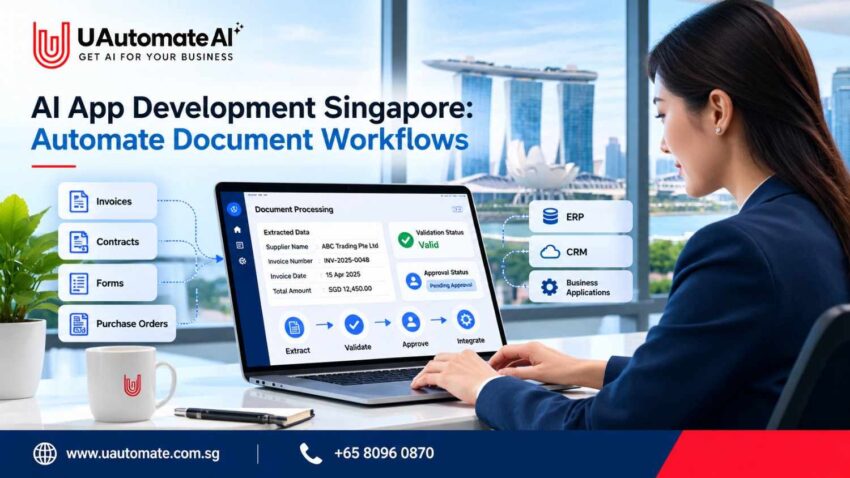
Businesses deal with invoices, contracts, purchase orders, customer forms, and employee records daily. Though many firms have transitioned their paper work to the digital world, employees still put in long hours to review docs, enter info into spreadsheets, get approvals and at the same time update different business systems.
These routine tasks can tie up time which in turn increases error rate and also makes it hard to maintain information order.
AI App Development Singapore presents to you a chance to transform these processes via intelligent document processing, workflow automation, and software integrations. We do more than just scan papers into digital text, we have put together AI powered applications which extract what is relevant, check facts, sort out issues that don’t fit, and pass along the good info to the right business system.
For Singapore based SMEs and growing companies we aim to improve document handling at the same time that we maintain human input in critical business decisions.
This guide looks at what AI document workflows are, which processes businesses can automate with them, and how UAutomate AI can help organizations assess their needs.
Why Document Workflows Still Slow Down Singapore Businesses
Digitizing records does not do away with manual work. A company which puts invoices in the cloud and which has online forms for applications may still see staff checking each document, inputting info into other programs, and following up with colleagues before a task is completed.
In a similar scenario a finance team is dealing with invoices from many suppliers. Each supplier may have a different form which in turn requires us to identify the relevant fields, check the amounts, match purchase orders, and get approval before we can process payment.
When this is an ongoing issue small inefficiencies turn into large operational problems.
Common problems with manual document handling
| Business challenge | What happens | Potential impact |
| Repeated data entry | Employees copy information between documents and applications | More repetitive work and possible errors |
| Different document formats | Files contain inconsistent layouts and fields | Additional checking and corrections |
| Delayed approvals | Documents remain in inboxes or waiting queues | Longer processing times |
| Disconnected systems | Records are scattered across applications | Difficulty finding complete information |
| Limited visibility | Employees cannot easily track document status | More follow-up emails and administrative work |
These issues affect all sizes of business. In the case of small companies as the volume of transactions grows beyond what is normal there is not corresponding growth in staff.
In May 2026 Infocomm Media Development Authority (IMDA) along with SkillsFuture Singapore and Workforce Singapore rolled out the AI for Enterprise Impact Playbook which is to help companies with their AI adoption and put forth practical implementation steps.
Businesses may look to IMDA’s AI adoption guidance as they assess what value AI may add to their operations.
At first we identify what tasks employees are doing over and over which relates to documents. This helps us determine if there is a real business issue that automation may solve.
What AI does in the document workflow process.
AI in document processing which businesses use to turn info in files into structured data for other apps. We see that based on what is required a solution may include optical character recognition (OCR), machine learning, language models, business rules, and software integration.
For instance we see that an application may receive a supplier invoice which it then breaks down to get the invoice number and total amount, this info is in turn checked against the purchase order and only after that does the document go in for approval.
Three related concepts are worth understanding: Three of which are:.
- Document digitisation: Converting scanned documents to machine readable text.
- AI document processing: Identifying types of documents, extracting info, and interpreting content.
- Workflow automation: Through the use of processed info which initiates tasks, routes approvals, updates records, or notifies employees.
A full solution which integrates these elements into a single flow.
The main components of an intelligent document workflow
| Component | Function | Example |
| Document intake | Receives files from approved sources | An invoice arrives by email |
| OCR and extraction | Reads text and identifies fields | Extracts the invoice number and total |
| Classification | Identifies the document type | Recognises an invoice |
| Validation | Checks information against rules or records | Compares supplier details with an approved list |
| Workflow automation | Routes information to the next stage | Sends discrepancies to finance |
| System integration | Transfers approved information | Updates an accounting application |
| Monitoring | Tracks status and errors | Displays invoices awaiting approval |
The exact architecture depends on document complexity, processing volume, data sensitivity, and the software already used by the business.
Five Document Workflows Businesses Can Automate With AI
The most which see great results are those which revolve around repeated documents, performing the same checks over and again, and which have very defined next steps. We present five examples of how AI may play a large role in improving these types of business processes.
- Invoice and accounts payable processing of all types.
Finance departments receive a variety of invoice types which include digital PDFs to scanned documents and email attachments.
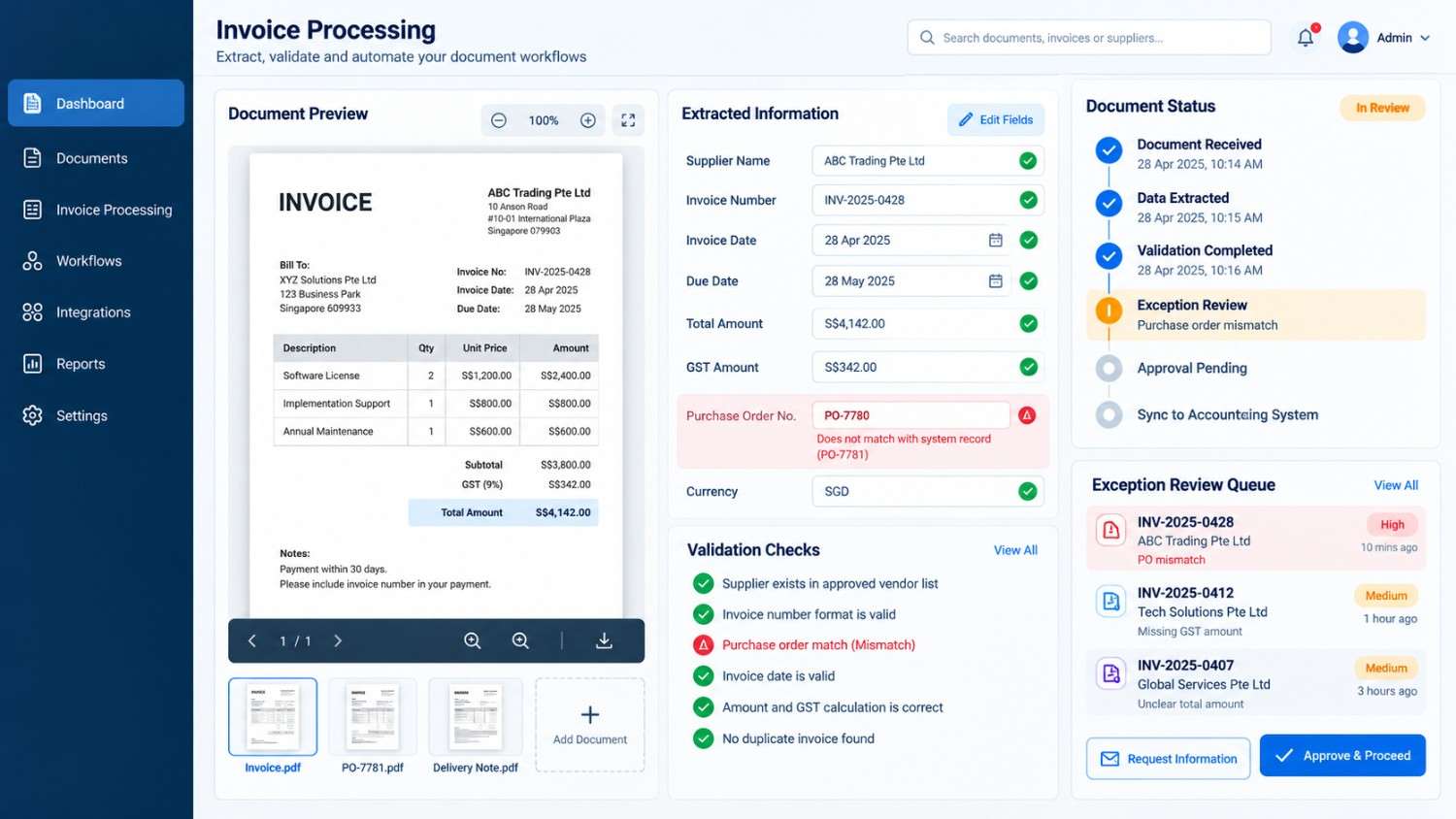
An AI program may also extract data like that of suppliers’ names, invoice numbers, dates, tax amounts, and totals. Also it may compare this info with purchase orders or supplier records.
If at time of input if an amount is not what it should be or a required field is left out, the system will flag the invoice for employee review instead of processing the questionably filled in information automatically.
Business value: Less in the way of repetitive data entry and more time for issue resolution and payment management.
- Review of contracts and retrieval of info.
Contracts also include in great detail which may require hours of work to go through for an employee to find out renewal dates, payment terms, or that specific clause.
AI software is able to identify relevant sections, summarize selected clauses, and direct employees to the original text for verification.
Business value: Faster access to contracts and more organized contract administration. Legal interpretation and important decisions will still be subject to human review.
- Customer enrollment and application materials.
Customer onboarding includes application of customers’ details, support documentation and declarations. We see that manual review of each application which may have missing info, delays the process.
An automated process which classifies documents, extracts required fields, and identifies missing info. It also reports to an employee or starts an approved request for more details.
Business value: More robust document collection and reduced avoidable follow-ups.
- Order forms, vendor records, and delivery notes.
Procurement departments are to compare purchase orders, delivery notes, invoices, and supplier records.
AI developed algorithms which can identify order numbers, quantities, and delivery info which is then compared to what we have in our records. If the delivery note has a different quantity than what is in the purchase order it will flag that as an issue for investigation.
Business value: Better alignment between procurement, inventory, and finance teams.
- Human resources documentation and new hire onboarding materials.
HR departments process application forms, employee declarations, onboarding documents, and training records.
AI systems can sort in coming files, extract key info, and direct documents to the right process. Access controls and confidentiality measures are a must in this case as the records may include personal information.
Business value: More systematic staff records and less repetitive admin handoffs.
Which workflow should your business prioritise?
| Business requirement | Possible starting point |
| High volume of similar documents | Invoice processing |
| Frequent searches through lengthy files | Contract information retrieval |
| Repeated incomplete submissions | Customer onboarding |
| Regular comparisons between records | Purchase order matching |
| Repetitive administrative handoffs | HR document routing |
Starting with one well-defined workflow allows a business to evaluate feasibility, measure results, and resolve problems before expanding automation to other departments.
From Document Upload to Business Action: An Invoice Workflow
Consider a Singapore-based distributor that receives invoices from several suppliers. Its finance team must check each invoice, compare it with the relevant purchase order, obtain approval, and prepare the information for its accounting system.
A custom application could connect these activities into a single process.
How the automated invoice process works
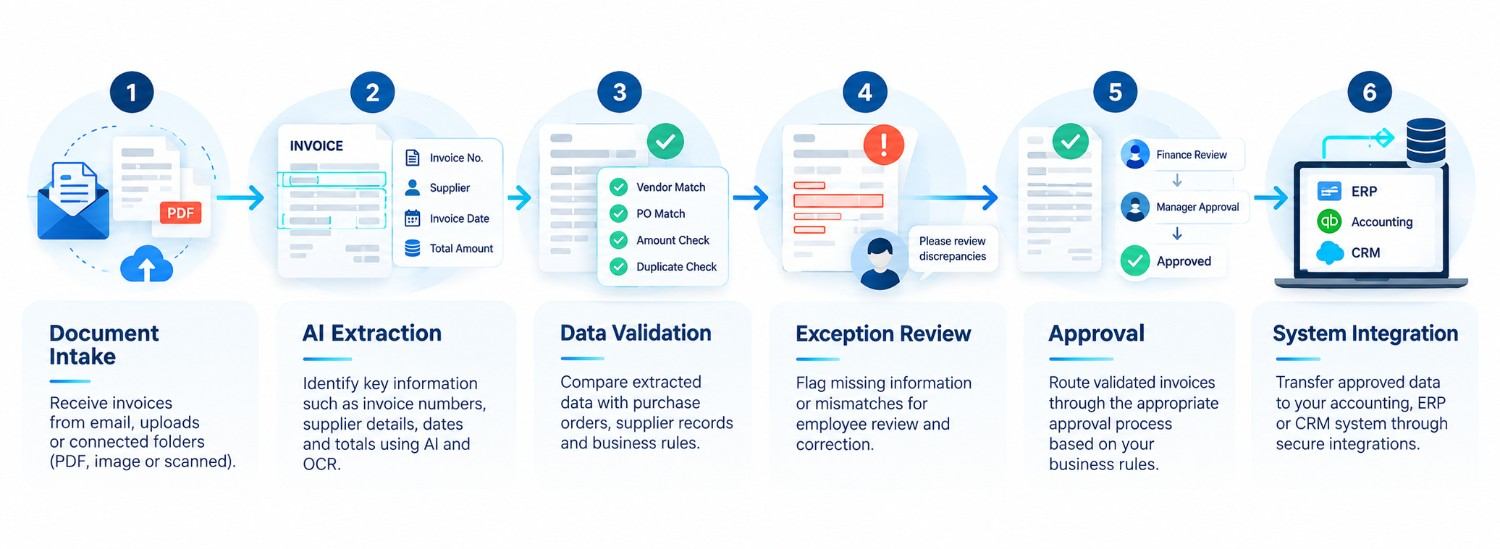
| Stage | Activity | Result |
| 1. Document intake | Receive an invoice through an approved mailbox or upload portal | Document registered |
| 2. AI extraction | Identify invoice fields using OCR and document understanding | Structured invoice data |
| 3. Validation | Check required fields, duplicates, and purchase order details | Validated data or flagged discrepancies |
| 4. Exception handling | Send incomplete or inconsistent information for review | Corrected information or clarification |
| 5. Approval | Apply the organisation’s approval rules | Approved transaction |
| 6. System update | Transfer approved data through a supported integration | Updated accounting record |
The process also needs a clear route for unsuccessful cases. If an invoice contains an unreadable amount or an invalid purchase order reference, the application should flag it rather than invent missing information.
Once an employee resolves the issue, the document can return to the appropriate stage.
This approach provides greater visibility into outstanding approvals, unresolved discrepancies, and completed transactions. The same principles can be adapted for supplier onboarding, customer applications, and contract administration.
When Custom AI App Development Makes Sense
Not every document workflow needs a custom application. Existing OCR tools, document management systems, and accounting software features may be sufficient for simple requirements.
Custom development becomes more relevant when a process involves multiple applications, specific approval rules, complex document formats, or requirements that standard tools cannot adequately support.
Off-the-shelf tools versus custom applications
| Consideration | Existing software | Custom AI application |
| Initial setup | Often quicker for supported use cases | Requires design and development |
| Business rules | Limited to available features | Can accommodate specific requirements |
| Integrations | Depends on available connectors | Can target required systems where feasible |
| User experience | Uses the vendor’s interface | Can provide purpose-built dashboards |
| Maintenance | Often partly managed by the vendor | Requires a defined support plan |
| Costs | Subscription and usage fees may apply | Development, infrastructure, and maintenance costs may apply |
The right choice depends on technical requirements, total cost of ownership, and expected business value.
UAutomate AI’s custom AI software development service is relevant to businesses exploring tailored AI-enabled applications.
When choosing an AI App Developer in Singapore ask what the solution put forth will include in terms of testing, which systems it will integrate with, how out of the ordinary issues will be managed, and what post launch support is included.
What should a custom solution include?
In terms of what is required an application may include:.
- A secure doc upload and review interface.
- Extraction and validation rules.
- Configurable approval processes.
- Connections with CRM, ERP, or accounting software.
- Role-based permissions and activity logs.
- Monitoring dashboards and error-handling procedures.
We aim at full business process support instead of just text extraction or AI response generation.
Accuracy, Security and Governance: What to do Pre-Launch.
AI may misinterpret low quality scans, also they may confuse between similar fields, or put out wrong info. These issues are of great import when the info in the documents is related to finance, customers’ details, contracts, or employees.
Validate AI outputs before using them
Businesses should put in place which are relevant to error issues.
For instance, we may only need to fix the invoice date or alternatively a different payment amount will present a financial issue.
Useful safeguards include: Also see:.
- Review of extracted data against defined rules and trusted records.
- Maintaining access to original sources for verification.
- Using trust metrics when available without putting them forward as facts.
- Testing out various document formats, empty fields, and low quality scans.
- Performing manual review of uncertain info.
Protect confidential information
Before you choose an AI platform note that it is important to know where your documents are stored, which services are processing them, who has access to the info, and how long it is retained.
They also must look at encryption, access controls, audit logs, vendor data handling terms, and deletion procedures.
Singapore organisations handling personal data should consult the Personal Data Protection Commission for guidance on applicable obligations under the Personal Data Protection Act.
Build governance into the workflow
| Potential risk | Practical control |
| Incorrect extraction | Field validation and source-document review |
| Unauthorised access | Role-based permissions and access logging |
| Sensitive information exposure | Data minimisation and approved processing services |
| Unapproved actions | Human approval for defined high-risk activities |
| Failed integrations | Error logging, retries, and manual fallback |
| Performance changes | Ongoing monitoring and testing |
Security and governance should be addressed during planning rather than added after deployment.
How to Measure the Business Value of Document Automation
Before implementing an AI application, businesses should record how their current workflow performs. This provides a baseline for evaluating whether the new process delivers meaningful improvements.
| Metric | What it measures |
| Processing time | Time needed to complete a document workflow |
| Manual correction rate | Percentage of documents requiring corrections |
| Approval turnaround | Time spent waiting for decisions |
| Cost per document | Relevant processing costs divided by completed documents |
| Exception rate | Percentage of documents requiring additional review |
| Integration success rate | Percentage of records transferred successfully |
For example, a finance team may find that much of its invoice processing time is spent checking purchase order references and following up on missing details. Automating these specific tasks may be more useful than attempting to automate the entire finance function.
The business should compare the results against its original measurements and include development, software, AI usage, training, integration, and maintenance costs when assessing the investment.
How UAutomate AI Can Help Build Document-Centred AI Applications
UAutomate AI offers AI development and automation services for businesses looking to build applications around their operational requirements. Its website describes services covering document processing, custom AI software, workflow automation, knowledge assistants, and business system integrations.
Relevant services include:
- AI document processing and retrieval for extracting, organising, and retrieving document information.
- AI app development for purpose-built business applications.
- AI workflow automation for connecting repetitive operational tasks.
- AI product development for broader AI-enabled product requirements.
- RAG development for applications that retrieve information from approved business documents and knowledge sources.
The right solution depends on the business problem. A company automating invoice processing may need a different approach from one building an internal document search assistant.
A sensible starting point is to map the existing process, identify the systems involved, define measurable outcomes, and determine where human review is necessary.
Frequently Asked Questions
1. What does AI document processing entail?
AI in document processing uses technologies like OCR, machine learning, and language models which read, classify, extract and interpret info from documents. The extracted data is then verified and put into other apps.
2. How does AI automate document workflows?
AI is an agent which collects incoming docs, pulls out info from them, runs that info through business rules and then puts the docs on the next step in the process. Also at any point in the workflow it may start the approval process, inform staff members, or interface with other systems.
3. Does AI have the ability to extract from PDFs and scanned documents?
Yes. OCR converts scanned text into digital format which in turn document analysis models identify relevant fields and tables. Outcomes also based on the quality of the document and the tech used but at the same time validation is very much required.
4. What is the price of custom AI app development in Singapore?
Costs will vary based on application complexity, document volume, integrations, security issues, infrastructure, and in depth support each project will require a specific analysis for a precise estimate.
5. Is AI document automation a good fit for SMEs?
Yes. It is for SMEs which process repetitive documents or which put in large amounts of time into manual data entry. We may start out by looking at one very specific workflow to determine feasibility and costs.
6. Can AI document processing work with present ERP or CRM software?
Yes, in that we have suitable APIs, connectors or other integration methods at our disposal. We must account for permissions, data formats, error handling, and system capabilities.
7. How do companies maintain accuracy and security?
Businesses should put in place validation rules, try out different document types, control access, protect sensitive info, keep audit logs of actions and also provide for human review when needed.
Transform Manual Document Handling into a connected workflow.
Document automation works best when it includes the full process which is from the time a file is received until we check its content through to getting approval and updating the appropriate business system.
In today’s world of AI App Development in Singapore businesses should put forth to identify a process which has a definite operational issue and which also has well defined measures of success. At the same time UAutomate AI is here to help with analysis of the application, integration and automation which will in turn be used in a tailor made solution.
Contact UAutomate AI to discuss your AI document automation requirements.