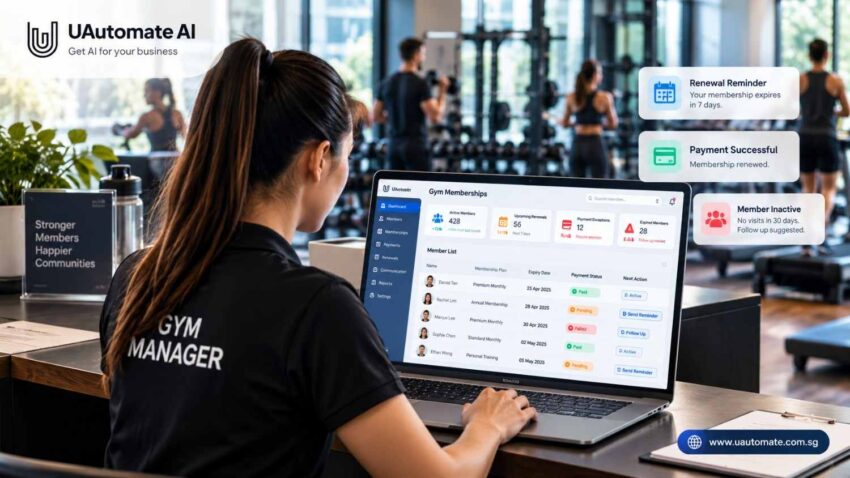
Running a gym is more than just running workouts and classes. We also ask that we keep track of member info, payment records, watch for expiring memberships and get in touch with members which don’t renew. When these tasks are handled by hand it is very easy to miss some important things.
Gym membership Management software that brings it all into one organized system. Instead of going to spreadsheets or using staff memory, gym owners may now use centralized records, scheduled reminders and payment tracking to improve membership management.
The goal isn’t just to push out info at random. We want to improve member renewals and staff efficiency. This guide goes over how membership automation plays out, what to look for in those systems and how UAutomate AI’s software development and automation tools can help health clubs integrate with their present platforms.
Why membership administration becomes difficult as a gym grows
A spreadsheet works for a gym with a small membership. As the business grows, managing monthly and annual plans, personal training programs, payment terms, freezes and cancellations becomes more complex.
When data is put into many different systems, staff spend time verifying reports and correcting errors.
| Administrative challenge | Possible impact | How a structured workflow helps |
| Manual expiry tracking | Missed or late reminders | Upcoming expiries appear in a review list |
| Separate payment records | Time spent checking transactions | Payment status is linked to membership records |
| Follow-ups based on memory | Unresolved cases are forgotten | Alerts or tasks flag outstanding cases |
| Inconsistent staff processes | Members receive conflicting information | Shared records support consistent communication |
| Manual reporting | Limited visibility into renewals | Dashboards summarise membership status |
These issues may not be a result of carelessness from staff. What we see is that what they do is out of routine performance of the same tasks while at the same time they have other responsibilities.
For instance some members may have paid yet still show as outstanding due to record issues. Also some may get a reminder after they have renewed. A connected workflow which is what we are putting in place will help to reduce these types of errors.
For a broader look at how businesses can reduce repetitive work, explore UAutomate AI’s guide to AI automation in Singapore.
What is gym membership management software?
Gym software for membership management which is used by fitness businesses to track member info, membership plans, expiry dates and billing. Also based on the platform’s features it may include attendance tracking, class bookings, communication and reporting.
Its worth is in delivering info at the right time. We see which membership will expire next week as useful; what we do with info that the member has renewed, received a reminder or needs help is what truly makes it actionable.
Essential capabilities to look for
| Capability | Purpose | Example |
| Member database | Stores profiles and membership details | Check a member’s plan and expiry date |
| Membership expiry tracking | Identifies approaching and expired memberships | Review plans expiring within seven days |
| Renewal notifications | Sends messages according to defined rules | Remind members before expiry |
| Gym billing software functionality | Organises invoices and payment records | Flag an unpaid invoice |
| Follow-up management | Tracks unresolved cases | Assign a task when assistance is needed |
| Reporting dashboard | Summarises membership and payment activity | Review pending renewals and overdue balances |
A small studio may only need expiry alerts and payment tracking. A larger gym may also need multi-location reporting, complex membership rules and integrations with existing systems. Start by identifying the tasks that consume the most time before deciding which features are essential.
How automated membership renewals work from start to finish
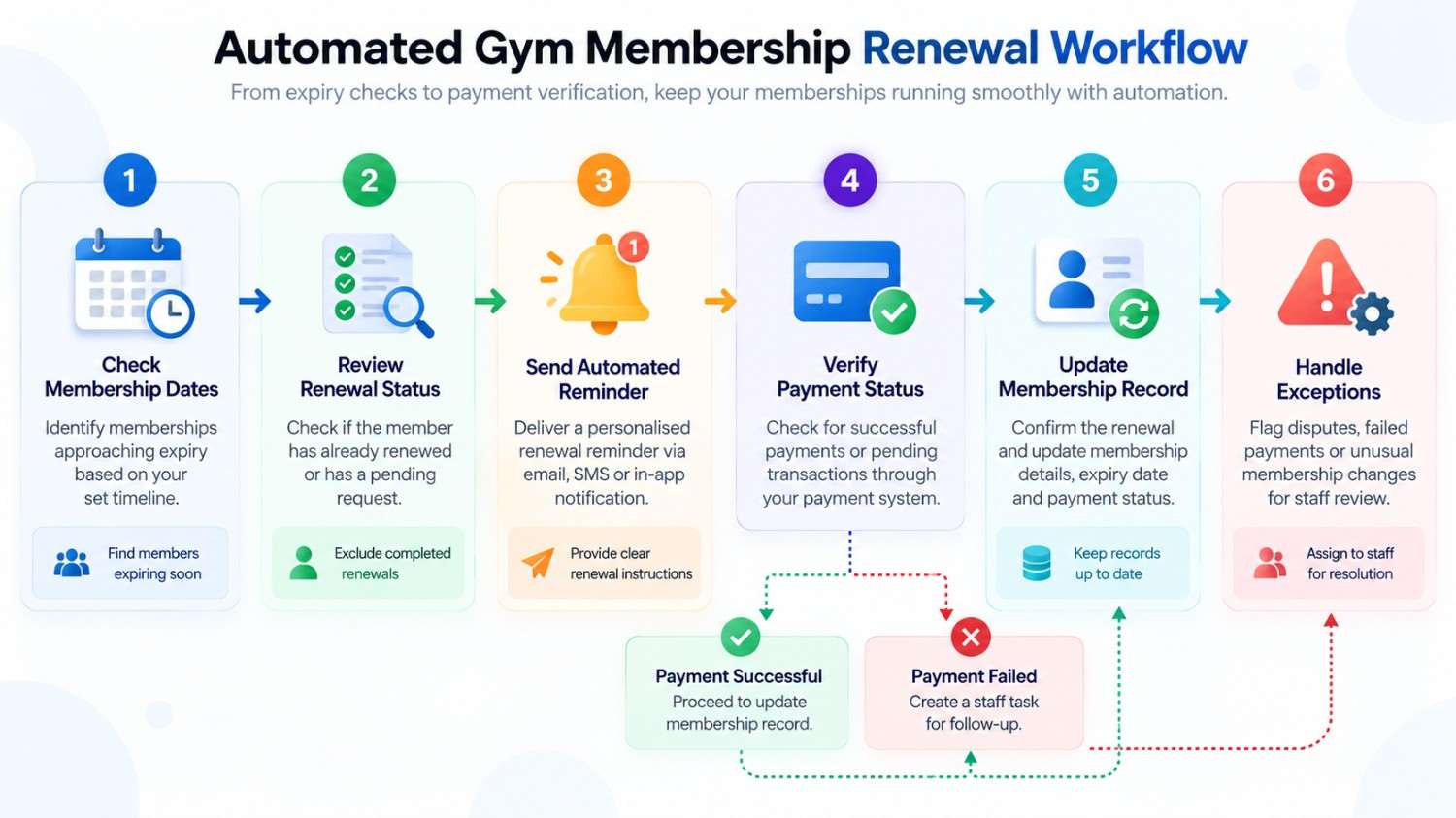
Membership renewal software should manage what happens after a reminder is sent, not just deliver the message.
Suppose a member’s plan is approaching expiry. The system needs to check the membership record, determine whether a reminder is appropriate and identify the next action based on the renewal and payment status.
A practical membership renewal workflow
| Step | What happens | Next action |
| 1. Check membership dates | Identify memberships approaching expiry | Add eligible records to the renewal queue |
| 2. Review renewal status | Check whether the member has already renewed | Exclude completed renewals from further reminders |
| 3. Send a reminder | Deliver an approved message | Provide clear renewal instructions |
| 4. Check payment status | Review available payment records | Distinguish confirmed payments from unresolved transactions |
| 5. Update the next action | Determine whether to confirm, remind or escalate | Record the appropriate next step |
| 6. Review exceptions | Flag disputes or unusual membership changes | Assign cases requiring human attention |
This numbered table can be published directly in WordPress without a complex flowchart.
Example: A membership expiring in seven days
Imagine that a member’s monthly membership expires on 30 November. A gym could use the following schedule:
| Timing | Action | Purpose |
| Seven days before expiry | Send the first reminder | Give the member time to plan |
| Three days before expiry | Follow up if renewal is pending | Bring the expiry date to their attention |
| On the expiry date | Check membership and payment status | Identify records needing attention |
| After expiry | Follow up where appropriate | Offer a clear way to renew |
| After confirmation | Update the record and send confirmation | Keep information accurate |
These timings are examples and should be adjusted to the gym’s policies and communication preferences. If a member renews after the first reminder, subsequent messages should be cancelled or checked against the updated record.
Automate the three tasks that keep memberships running
Renewals, payments and expiry reminders are connected, but each requires different rules. A reminder before expiry should not be treated like a failed-payment notification or a personal retention follow-up.
1. Renewal alerts and expiry tracking
Membership expiry tracking helps staff identify upcoming renewals before they become overdue. Instead of opening individual records, employees can review memberships grouped by status, such as active, expiring soon, expired or awaiting confirmation.
A practical setup should account for:
- Different membership durations and renewal dates.
- Membership freezes, extensions and cancellations.
- Payments not yet reflected in the membership system.
- Members requesting help with renewal options.
- Changes to contact details or communication preferences.
These details help prevent incorrect reminders, particularly when a membership has been extended or payment has already been received.
2. Billing and payment follow-ups
Payment management involves more than recording whether money has been received. Staff need to know whether a transaction is pending, an invoice remains unpaid or a failed payment requires attention.
| Payment situation | Appropriate response |
| Payment completed | Record the payment and update membership status |
| Payment pending | Wait for confirmation or check again |
| Payment unsuccessful | Explain the next step to the member |
| Payment overdue | Schedule a follow-up according to gym policy |
| Refund or adjustment requested | Refer the case to an authorised employee |
A failed transaction does not necessarily mean that a member wants to cancel. The issue could involve an expired payment method, a declined transaction or an authentication requirement.
Stripe provides payment recovery tools for eligible recurring transactions. Availability depends on the payment method and configuration. See Stripe’s payment recovery guidance.
Follow-ups should be based on verified payment status. Sending a reminder is not proof that payment has been received.
3. Retention workflows for inactive members
A member who has stopped visiting may be considering leaving, but inactivity does not explain why. They could be travelling, managing a busy schedule or temporarily unable to attend.
A thoughtful follow-up process could:
- Identify members whose attendance has declined.
- Check membership status and any recorded restrictions.
- Send a friendly check-in or ask a coach to contact them.
- Record the response and any assistance requested.
- Review whether the member returns or renews.
The aim is to make communication more relevant, not simply to send more messages. Attendance history and renewal records can help identify patterns, but automated risk classifications should prompt review rather than be treated as definitive judgments.
What should a membership automation dashboard show?
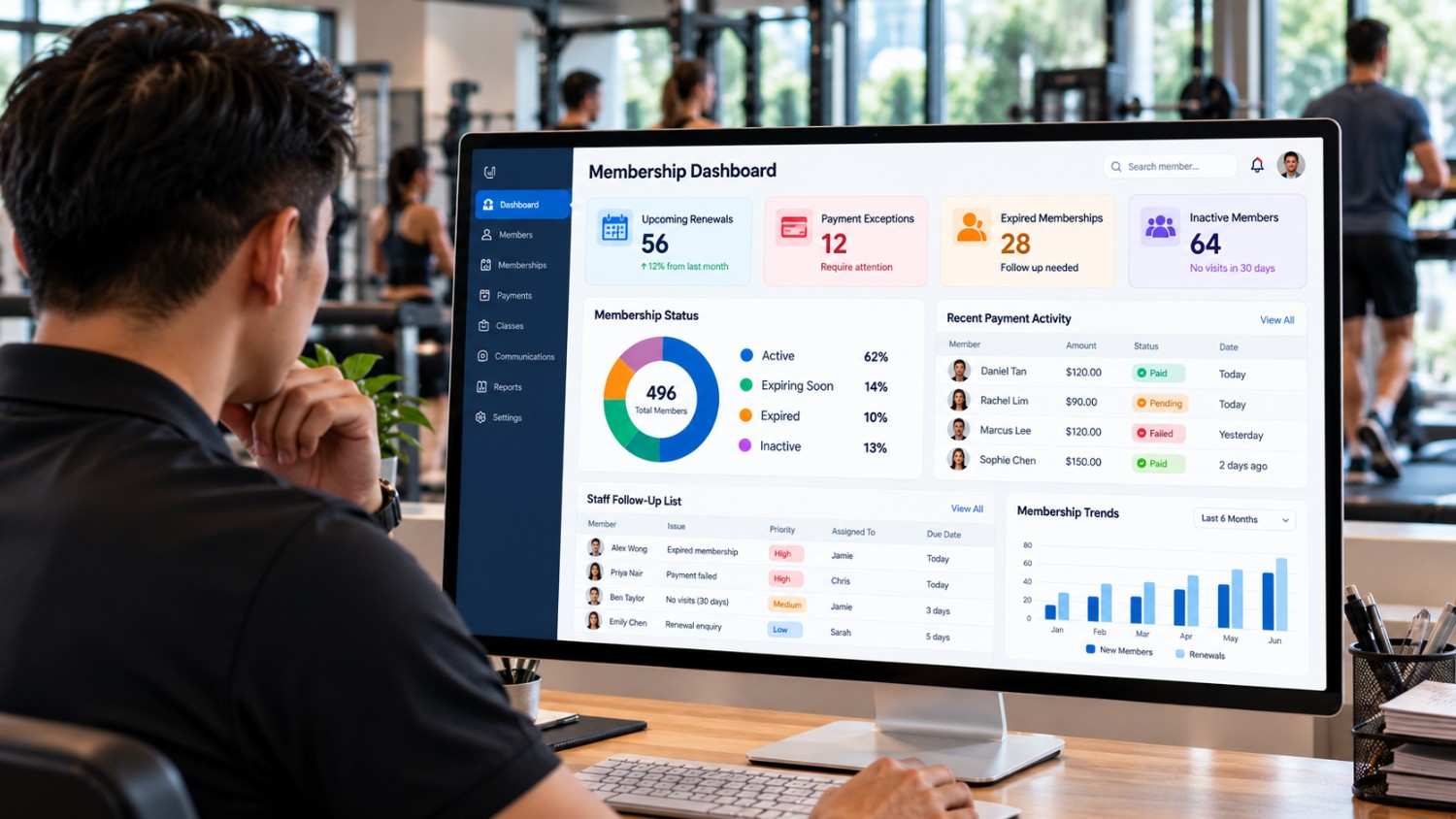
A dashboard should help owners decide what needs attention rather than simply display large amounts of data.
| Dashboard area | Information to display | Question it answers |
| Upcoming renewals | Member, plan, expiry date and status | Which memberships need reminders? |
| Payment exceptions | Outstanding balance and transaction status | Which payments need investigation? |
| Expired memberships | Expiry date and last contact | Who needs a renewal conversation? |
| Inactive members | Recent attendance and engagement status | Who may benefit from a check-in? |
| Staff follow-up queue | Assigned employee and task deadline | Which cases remain unresolved? |
| Renewal performance | Completed, pending and expired renewals | Where are follow-ups breaking down? |
Gyms can also monitor renewals completed before expiry, unresolved payment cases and the time staff spend handling membership enquiries. Define each metric consistently so that reports remain useful over time.
Gyms that need faster access to membership policies, payment procedures and internal documentation can also explore AI knowledge assistants to help staff find relevant information more efficiently.
How to choose software that fits your gym
The longest feature list does not necessarily mean the best fit. What matters is whether the system handles the gym’s actual membership process, including exceptions that require staff intervention.
Use this software evaluation checklist
| Evaluation area | Questions to ask |
| Automation rules | Can reminders be triggered by expiry dates and payment status? |
| Payment integrations | How are successful and failed transactions confirmed? |
| Member communications | Can messages stop when a member renews? |
| Membership changes | How are freezes, extensions and cancellations handled? |
| Reporting | Can staff filter upcoming renewals and overdue payments? |
| Integration options | Can the system connect to existing business software? |
| Data security | Are appropriate permissions and secure integrations available? |
| Staff usability | Can employees quickly identify cases needing attention? |
| Scalability | Can the system support more locations and membership types? |
Off-the-shelf software or a tailored automation system?
A large number of members may already be present in an established platform which a gym may take advantage of. As for when many systems don’t play well together or basic features don’t support key processes a made to measure solution may be what you are looking for.
| Consideration | Off-the-shelf platform | Tailored automation |
| Initial setup | Often faster for standard requirements | Requires discovery and implementation |
| Routine tasks | Standard features may be available | Can follow agreed business rules |
| Integration | Depends on supported connectors and APIs | Depends on available interfaces and feasibility |
| Unusual membership rules | Limited to supported options | Can accommodate specific rules where feasible |
| Cost structure | Usually subscription-based | Depends on development and ongoing support |
| Ongoing changes | Governed by provider features | Managed through an agreed support arrangement |
If you are unsure whether to extend your current software or build a more tailored solution, our guide to AI integration vs. custom AI development explains the key differences.
A small gym that has basic membership plans may not need custom software. For a multi location company with separate systems we see better value in integration.
Before you go live test out renewals which go through successfully, failed payments, membership freezes and cancellations. Also check that in each of these scenarios the correct records are updated and that we get the proper notifications.
Data protection and responsible automation
Membership programs which have personal info, and payment processes which deal with sensitive transaction details. We must have in place proper access controls and clear rules for information handling.
For gyms operating in Singapore, the Personal Data Protection Commission’s guidance on data protection obligations explains responsibilities involving personal data.
In practice, gyms should:
- Use member information for appropriate, clearly communicated purposes.
- Restrict access according to staff responsibilities.
- Protect integrations and connections.
- Avoid storing full payment-card details in systems that do not need them.
- Correct inaccurate records and define retention periods.
- Respect communication preferences before enabling automated outreach.
Refunds, disputed transactions and sensitive complaints may require an authorised employee to review the case. Good automation makes administration easier without compromising member trust.
How UAutomate AI can support connected membership workflows
UAutomate AI develops AI-powered business applications, workflow automation and integrations around business requirements. Its published services include custom AI software development, workflow automation, system integration and AI-powered dashboards. Visit the UAutomate AI website to explore its capabilities.
For a gym looking to connect membership operations, these services could provide a starting point for a tailored project, subject to technical discovery and agreed scope.
1. Connect membership records with operational workflows
A custom integration of a present member database with an approved communication tool, payment system or internal task queue.
As a membership nears its end we have the system check the current status, it will then decide if a reminder should go out and at that time it will set in motion the proper communication or follow up task. Also the design of the final solution will be based on which software we are using at the moment and the access that we have into those systems’ interfaces.
2. Automate routine reminders and exception handling
A seamless process which will identify between a confirmed renewal, a pending payment and a case that requires personal attention.
- Renewal confirmed: Update the status and prepare confirmation.
- Expiry approaching: Schedule an appropriate reminder.
- Payment unresolved: Flag the record for follow-up.
- Complex query or dispute: Assign the case to an employee.
Human approval can remain in place for financial, contractual or customer-service decisions.
3. Build a clearer operational view
A custom dashboard may include upcoming renewals, payment exceptions and staff follow up work loads. We are to present important info in a more accessible way without which existing tools we may not change.
Explore UAutomate AI’s custom AI software development services, AI workflow automation offering and AI knowledge assistant solutions.
These are relevant service areas, not a claim that UAutomate AI already offers a ready-made gym membership management product. Suitability should be confirmed during project discovery.
Frequently asked questions
1. What is the main purpose of gym membership management software?
It helps fitness businesses organise member information and manage membership plans, expiry tracking, renewal follow-ups and payment records. Depending on the platform, it may also support attendance, bookings and reporting.
2. Can gym membership renewal software send reminders automatically?
Yes, when the software supports scheduled or rule-based notifications. Gyms can configure reminders around expiry dates and stop further messages when renewal is confirmed.
3. How does membership expiry tracking help gym owners?
It identifies memberships approaching expiry or already expired, helping staff prioritise follow-ups without relying entirely on manual spreadsheets.
4. Can gym billing software track failed and overdue payments?
Many systems record payment status and outstanding balances. More advanced workflows may connect to payment providers to receive transaction updates and trigger appropriate follow-ups.
5. Does automated membership management improve member retention?
It can support retention by reducing missed follow-ups and helping staff respond when members become less engaged. However, retention also depends on coaching, pricing, convenience and overall member experience.
6. Should a small gym invest in a custom membership automation system?
Not necessarily. An existing platform may be sufficient for straightforward requirements. Custom automation is worth exploring when current tools cannot handle important workflows or integration needs.
7. Is it possible to integrate membership automation with existing gym software?
Potentially, yes. It depends on available APIs, connectors and other supported interfaces. Data access, synchronisation, permissions and error handling should be checked before implementation.
8. How can a gym get started with membership automation?
Document the current renewal process, identify recurring problems, evaluate suitable software and define reminder rules. Test common scenarios before expanding the workflow across the business.
Make membership administration more manageable with UAutomate AI
Gyms report that they put in a lot of extra work dealing with missed notifications, disjointed payment reports and redundant follow ups. With a fully integrated system staff will be able to better handle member info, see which cases still need attention and process renewals in a more uniform way.
The best approach will depend on your present systems, membership model and operational priorities. As you research gym membership management software solutions which in turn may prompt you to look at a custom workflow that better fits your needs, get in touch with UAutomate AI to discuss your project. We will have a discovery discussion in which we will clarify your requirements, what integration options are available to you and what the best next step is for you.