Running a gym or fitness studio is not just about setting up class schedules and collecting membership fees. We also have to take care of reservations, attendance, payments and keep members’ info updated. If this is done in separate spreadsheets, messaging apps and different payment platforms it can cause daily headaches. But with the help of gym booking and payment software which brings all of these aspects together into one managed system, running a smooth day to day operation is much easier.
For health clubs, boutique fitness studios and personal training gyms in Singapore the goal is to improve member experience at the same time we put staff in better control of day to day operations.
This guide goes over how connected booking, attendance, and payment processes function, also what business should look at and how UAutomate AI can better provide a fully integrated digital experience.
The Operational Problem: Three Activities That Should Never Be Disconnected
Imagine a fitness studio offering Pilates, yoga and strength training.
A member books a class through WhatsApp. The receptionist adds the reservation to a spreadsheet, while the trainer maintains a separate attendance register. The member purchases a package through an online payment link, with the transaction recorded elsewhere.
Although each activity is completed, the information remains scattered.
| Operational area | Common problem | Business impact |
| Bookings | Separate reservation records | Duplicate bookings |
| Attendance | Manual registers | Incomplete records |
| Payments | Independent transaction tracking | Difficult reconciliation |
| Memberships | Manual package updates | Incorrect session balances |
For example, the receptionist may see eight bookings while the trainer’s register shows six attendances. The finance team may have received payment for a ten-session package but cannot immediately confirm the remaining balance.
What changes when these activities are connected?
An integrated system connects activities to the relevant member profile.
- Confirmed bookings update class availability.
- Check-ins update attendance history.
- Successful payments update transaction records.
- Package purchases update available credits.
- Cancellations and refunds update relevant records.
The benefit is not simply digitising paperwork. It is keeping information consistent across the business.
Follow One Member Through the Complete Fitness Journey
A practical way to evaluate fitness software is to follow an actual member journey.
Imagine a customer joining a fitness studio in Singapore and wanting to book a class, attend the session and purchase a membership package.
Stage 1: Discovering and booking a class
The member logs into the studio’s application and goes through the list of available sessions.
The booking form will display class name, trainer, date, time, location, available spaces and cancellation policies.
After you choose a session the system checks availability which in turn confirms the reservation.
For instance, at the point of full enrollment in a Pilates class which has space for 15 participants the system should stop new bookings. A wait list may be used as an option.
Stage 2: Confirming the reservation
After you book the member will be sent out details of the session.
The booking also is reported in the admin dashboard which in turn allows reception and training staff to see what classes are coming up.
Automatic alerts will do the job of reminding members of their reservations.
Stage 3: Checking in
Upon the member’s arrival staff check in and record attendance.
For which the business requires it check in may take place via a staff dashboard, QR code or member application.
The system should tell which bookings turned into attendances.
Stage 4: Updating payment and package records
Assume the customer went in for a ten session package.
After completing a class the system will report your balance for ten sessions to that for nine.
If an invoice is left unpaid then that status should be seen by authorized staff.
The complete member journey
| Step | Activity | Expected system update |
| 1 | Member opens application | Classes displayed |
| 2 | Selects a session | Availability checked |
| 3 | Confirms reservation | Booking created |
| 4 | Payment or credit verified | Entitlement updated |
| 5 | Arrives at studio | Check-in recorded |
| 6 | Completes session | Attendance confirmed |
| 7 | Uses package credit | Balance updated |
| 8 | Views account | Activity history available |
Payment may happen before or after booking, depending on studio policies. Prepaid bookings may use existing credits.
Businesses planning a dedicated mobile experience can explore the AI app development process for iOS and Android
What Should a Connected Booking System Actually Manage?
A booking interface may look simple, but its scheduling rules determine how reliably it works.
Class scheduling and capacity management
A Pilates studio may offer six reformer spaces, while a group fitness class accommodates 20 participants.
Useful scheduling capabilities include:
- Recurring weekly schedules.
- One-time and special classes.
- Trainer availability.
- Class capacity restrictions.
- Booking cut-off times.
- Cancellation windows.
- Waitlists.
- Membership-based booking privileges.
For example, a studio offering weekday yoga classes and weekend workshops should be able to manage both through one scheduling environment.
Booking rules based on membership type
Different members may have different booking privileges.
| Membership | Entitlement | Payment model |
| Basic | Four classes monthly | Subscription |
| Premium | Eight classes monthly | Subscription |
| Unlimited | Subject to availability | Subscription |
| Class package | Fixed sessions | Prepaid |
| Drop-in | Individual session | Per booking |
A configurable system can apply different rules according to membership type. Premium members, for instance, may receive an earlier booking window.
Managing cancellations and waitlists
When someone cancels, the system should release the space and update class capacity.
It can then identify the next eligible member on the waitlist and send a notification according to studio rules.
Cancellation policies should clearly explain whether session credits are returned, deducted or retained.
Studios with specialised scheduling requirements can explore custom software development in Singapore to understand how applications can be designed around specific business workflows.
Attendance Is More Than Recording Who Entered the Gym
Attendance becomes more useful when connected to bookings, membership entitlements and trainer schedules.
Understanding attendance statuses
| Status | Meaning |
| Booked | Member reserved a place |
| Checked in | Member arrived |
| Cancelled | Reservation withdrawn |
| No-show | Member did not attend |
| Waitlisted | Member is waiting for a place |
| Pending verification | Staff confirmation required |
Booking and attendance are not interchangeable. A member may reserve a class but never arrive, while another may attend after being moved from a waitlist.
How attendance tracking improves visibility
Accurate records help gym owners understand:
- Which classes regularly reach capacity.
- Which sessions have frequent cancellations.
- Which members have not visited recently.
- Which trainers have the highest session utilisation.
- How many prepaid sessions members have used.
For example, a studio may notice that its weekday 7 PM strength class regularly fills up, while the 3 PM session has several available spaces.
This information can help management review class timings and adjust schedules.
Personal training requires a different approach
Personal training businesses may need trainer-specific calendars, one-to-one bookings, session package balances, rescheduling history and individual client records.
Attendance should connect directly to the trainer’s schedule and the client’s purchased package.
Connecting Gym Payments With Memberships and Bookings
Payment administration becomes complicated when transactions are disconnected from member records.
A customer may purchase a monthly membership, pay for an individual class, renew a package or request a refund. Each transaction should be associated with the correct member and service.
Different payment models gyms should support
| Payment model | How it works | Suitable use |
| Recurring membership | Charges at configured intervals | Monthly memberships |
| Prepaid package | Payment before sessions | Personal training |
| Pay per class | Individual payment | Drop-in classes |
| Trial booking | Free or paid session | Customer acquisition |
| Registration fee | One-time payment | Membership onboarding |
| Add-on purchase | Separate service payment | Workshops |
What should happen after payment?
Consider a member purchasing a five-class package.
- The member selects the package.
- The system creates a payment request.
- The payment gateway processes the transaction.
- The system receives the transaction result.
- Successful payment activates the package.
- Credits become available for eligible bookings.
- The member receives confirmation.
Pending and failed transactions should not automatically be treated as successful.
Payment statuses that should be visible
| Status | Meaning |
| Pending | No final transaction result |
| Successful | Payment confirmed |
| Failed | Transaction unsuccessful |
| Refunded | Money returned |
| Partially refunded | Part of the amount returned |
| Overdue | Payment still due |
Managing recurring payments
A connected system should help identify upcoming renewals, successful charges, failed payments, expired memberships and outstanding invoices.
Businesses can configure reminders and follow-up processes for failed transactions. Payment retries and membership suspensions should follow agreed terms.
The Real Value: How Three Systems Work Together
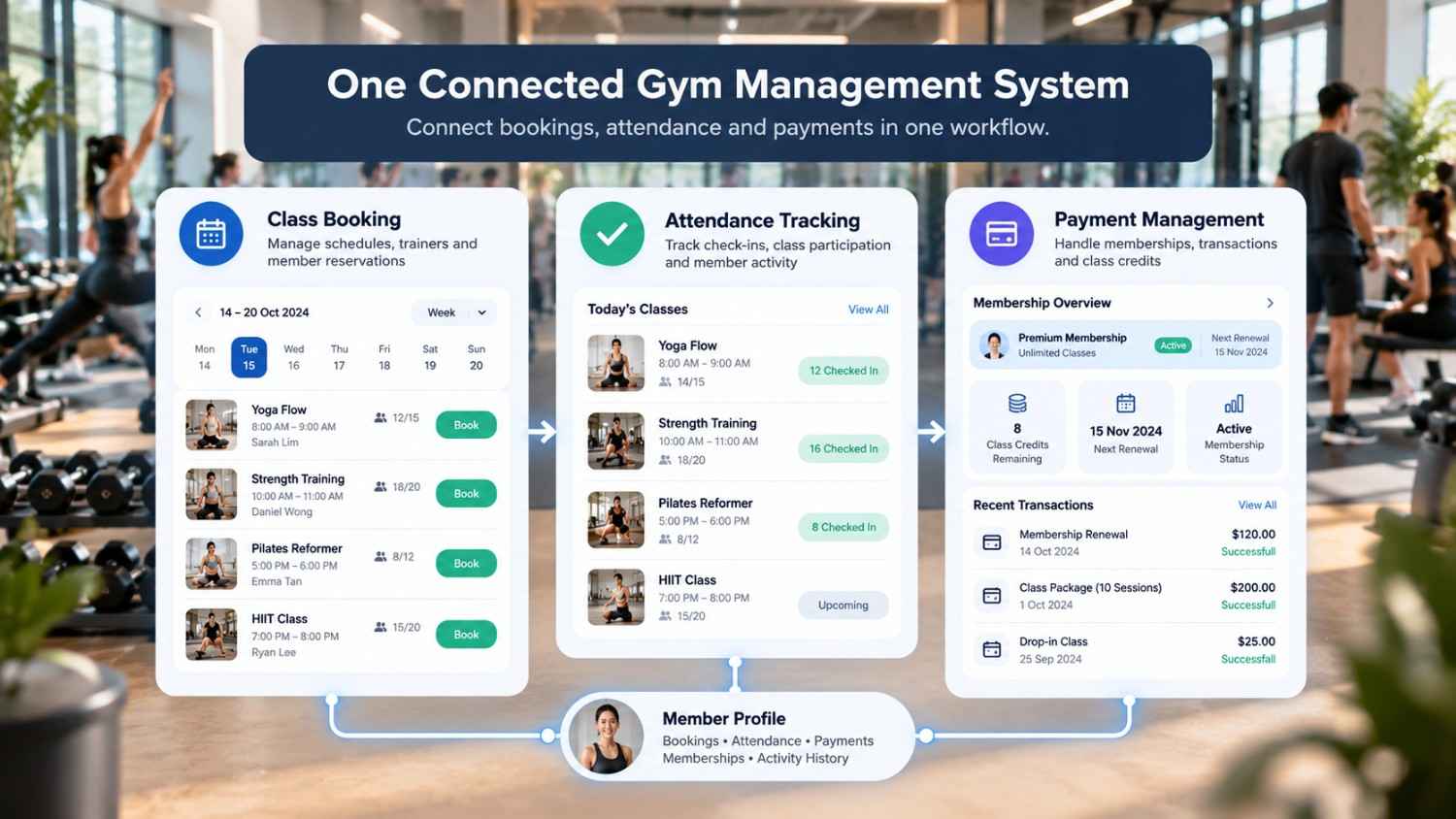
The biggest advantage comes from connecting booking, attendance and payment information.
Consider a member with a monthly plan covering eight classes. During the month, they book eight sessions, attend six, cancel one within the permitted window and miss another.
The system should show the original entitlement, booking history, actual attendance and remaining balance. Deductions depend on the studio’s policies.
An integrated operational record
| Member activity | Booking | Attendance | Payment/package |
| Plan purchased | No booking | None | 8 credits activated |
| First class booked | Confirmed | Pending | 8 credits |
| First class attended | Completed | Present | 7 credits |
| Second class cancelled | Cancelled | Not attended | Apply policy |
| Third class missed | No-show | Absent | Apply policy |
| Monthly renewal | New period | History retained | Renewal recorded |
What should the manager see?
A central dashboard can bring together:
Booking overview
- Today’s reservations.
- Upcoming classes.
- Available spaces.
- Waitlisted members.
Attendance overview
- Check-ins.
- No-shows.
- Attendance history.
- Trainer utilisation.
Payment overview
- Successful collections.
- Pending transactions.
- Outstanding invoices.
- Upcoming renewals.
Member overview
- Active membership.
- Purchased packages.
- Remaining credits.
- Booking and payment history.
Staff should be able to access individual records when investigating discrepancies.
Businesses can also explore business process automation in Singapore to understand how connected workflows reduce repetitive administrative activities.
Features to Evaluate Before Choosing Fitness Class Booking Software
A product demonstration can make almost any platform look impressive. However, gym owners should understand how it handles everyday situations.
| Evaluation area | Questions to ask | Why it matters |
| Scheduling | Can we manage recurring classes? | Flexible timetables |
| Capacity | Can we restrict class sizes? | Prevents overbooking |
| Memberships | Can plans have different entitlements? | Flexible pricing |
| Attendance | Can trainers record check-ins? | Accurate records |
| Payments | Are transactions linked to members? | Easier reconciliation |
| Renewals | Can failed payments be tracked? | Collection visibility |
| Notifications | Can members receive updates? | Less manual work |
| Reporting | Can bookings and revenue be analysed together? | Better decisions |
| Integrations | Can existing applications connect? | Fewer information silos |
| Security | Can staff access be restricted? | Data protection |
Questions to ask during a demonstration
Ask the provider to demonstrate:
- Booking a full class.
- Cancelling a reservation.
- A pending payment.
- A failed membership renewal.
- An unplanned member check-in.
- A trainer changing a session time.
- Recording a refund.
- Correcting a package balance.
These scenarios reveal whether the platform can handle real operational requirements.

Build or Buy? Choosing the Right System for Your Fitness Business
A small yoga studio may only need basic scheduling and payment collection. A multi-location gym may require more complex membership rules, staff permissions and integrations.
| Requirement | Ready-made software | Custom-built solution |
| Standard scheduling | Often available | Can be developed |
| Member records | Usually available | Can be customised |
| Payment integration | Provider-dependent | Can be scoped |
| Unique membership rules | May have limitations | Can be tailored |
| Branded application | Provider-dependent | Can be developed |
| Specialised integrations | API-dependent | Can be engineered |
| Custom dashboards | Reporting-dependent | Can be customised |
When ready-made software makes sense
A standard platform may be suitable when the business follows common membership models, has straightforward schedules and can use existing integrations.
It can also be practical for smaller studios that want to start without managing a development project.
When custom development is worth evaluating
Consider custom development when:
- Multiple branches follow different operating rules.
- Booking and payment workflows are specialised.
- A branded iOS and Android application is required.
- Existing systems cannot exchange information.
- Management needs specialised dashboards.
Compare the total ownership cost, including development, integrations, maintenance, hosting and support.
Custom software should solve a genuine business problem rather than simply add more features.
How UAutomate AI Can Help Build a Connected Fitness Application
UAutomate AI approaches fitness technology through branded mobile applications and connected software engineering.
Its website reports that we present to you our AI fitness apps which are native to the iOS and Android platforms and are also supported by our connected fitness operating system.
For fitness companies looking at a total digital solution this is a chance to develop an app which meets real world needs.
A fitness application built around business requirements
Depending on project scope, a connected application may include:
- Member-facing application
A branded environment which customers use to check in on schedules, make reservations and view member information.
- Administrative dashboard
A staff workspace which includes schedule, membership, booking, attendance and payment record management.
- Trainer management
A tool for instructors to view classes, manage availability and record attendance.
- Payment and membership integration
Integration of appropriate payment gateways and membership processes.
- Business reporting
Dashboards for booking, attendance, trainer use and collections.
Where UAutomate AI’s capabilities fit
| Capability | Potential fitness application |
| AI application development | Branded member applications |
| Custom software development | Management dashboards |
| AI workflow automation | Booking reminders |
| System integrations | Connecting business platforms |
| Business intelligence | Operational reporting |
| Conversational AI | Customer enquiries |
For example, an AI-enabled assistant could help members find classes or answer questions about studio policies. Confirming reservations and collecting payments requires appropriate system integration and validation.
Explore UAutomate AI’s engineering approach, AI knowledge assistants, WhatsApp automation and conversational AI applications.
Why integration matters
A fitness application becomes more useful when its components share accurate information.
UAutomate AI’s connected systems and software integration capabilities can help businesses evaluate how existing tools and new application components should work together.
Projects should define data ownership, payment-provider responsibilities, access permissions and error handling before development begins.
Security, Payment Reliability and Member Data Protection
A booking and payment platform handles information that deserves careful protection, including member details, booking history, membership records and transaction information.
Personal data protection
Singapore’s Personal Data Protection Act (PDPA) establishes obligations relating to the collection, use, disclosure and protection of personal data.
Businesses should:
- Collect only necessary information.
- Explain how member data is used.
- Restrict employee access.
- Maintain suitable retention procedures.
- Protect information against unauthorised access.
- Review third-party service-provider arrangements.
Payment security
The Payment Card Industry Data Security Standard (PCI DSS) provides security requirements for organisations that store, process or transmit payment card data, or can affect the security of the cardholder data environment.
Businesses should use appropriately secured payment gateways and avoid storing raw card details in application databases.
Singapore’s Cyber Security Agency also provides guidance for businesses with an online presence.
Payment reconciliation and auditability
Payment records should retain enough information to investigate discrepancies, including transaction references, member accounts, amounts, timestamps, statuses and refund information.
Corrections should follow a controlled process with an audit trail rather than silently overwriting existing records.
Measuring Whether the System Is Improving Gym Operations
Installing software does not automatically improve business performance. Gym owners should establish baseline measurements and monitor them after implementation.
| KPI | What it measures | Why it matters |
| Booking conversion rate | Completed booking journeys | Identifies booking friction |
| Class fill rate | Booked spaces against capacity | Optimises schedules |
| Attendance rate | Attended reservations | Measures participation |
| No-show rate | Reservations not attended | Identifies attendance issues |
| Payment success rate | Successful transactions | Highlights collection issues |
| Outstanding balance | Payments still due | Improves visibility |
| Package utilisation | Sessions used against purchased | Supports membership management |
| Trainer utilisation | Delivered sessions against capacity | Helps manage resources |
Example: Understanding business impact
Suppose a studio handles 400 monthly reservations.
Previously, its manager checked several spreadsheets and payment records to prepare weekly reports.
After implementing a connected system, the manager can review bookings, attendance and payment statuses through one dashboard.
The improvement can be measured through reporting time, manual corrections, duplicate bookings, failed-payment follow-ups and package balance accuracy.
These indicators provide a more realistic picture than assuming software automatically increases revenue by a fixed percentage.
Frequently Asked Questions
1. What is gym booking and payment software?
It helps fitness businesses manage class reservations, payment collection and member records. Depending on the platform, it may also include attendance tracking, membership management and reporting.
2. How does a gym booking system in Singapore help fitness businesses?
It helps manage class schedules, reservation limits, cancellations and member availability, reducing manual coordination.
3. Can fitness class booking software track attendance?
Yes. Depending on its functionality, it can record check-ins through staff dashboards, QR codes or integrated access systems.
4. Can gym booking software integrate with payment gateways?
Many platforms support payment gateway integrations. Businesses should verify whether transaction statuses, failed payments and refunds are properly recorded.
5. What is the difference between booking and attendance tracking?
Booking management records reservations and class capacity. Attendance tracking records whether members actually attended.
6. Can gym software manage recurring memberships and class packages?
Many platforms support recurring memberships and prepaid packages. Businesses should check how renewals, failed charges and package deductions work.
7. Is custom gym booking software better than ready-made software?
It depends on requirements. Ready-made software suits standard operations, while custom development may help businesses with specialised workflows or branded applications.
8. How much does gym booking and payment software cost in Singapore?
Pricing depends on members, locations, features, integrations and customisation. Compare subscription fees alongside development and maintenance costs.
Connect Every Part of the Member Journey
A health and fitness business requires more than a calendar for bookings and a separate system for payment. It requires an integrated database which tracks what members book into, which classes they attend and what they have paid for.
Gym booking and payment software that ties in scheduling, attendance, membership benefits and payment processes. When put in according to what your business needs it can reduce admin issues and also gives gym owners better control of day to day operations.
UAutomate AI provides custom fitness application development and connected software engineering services for companies looking to present a unique digital experience.
Ready to dive into our business fitness application?
Reach out to UAutomate AI with your booking, attendance, payment and integration questions.